
If you work with medium-voltage switchgear, you know how quickly condensation can become a real headache. When moisture sneaks into your panels, it doesn’t just sit quietly—it starts a chain reaction of problems. Check out some of the most common risks:
| Risk/Consequence | Description |
|---|---|
| Corrosion | Moisture reacts with metallic contacts, leading to higher resistance and eventual failure. |
| Flashovers | Moisture lowers insulation resistance, letting arcs jump across unintended paths. |
| Equipment Damage | Flashovers can destroy equipment in seconds, causing costly downtime and repairs. |
That’s why you need to stay ahead of condensation in medium-voltage switchgear panels. The right combination of heaters and ventilation can protect your investment and keep your operations running smoothly.
Key Takeaways
- Condensation in switchgear panels can lead to corrosion, flashovers, and costly equipment damage. Act quickly to prevent moisture buildup.
- Use anti-condensation heaters to maintain a warm environment inside panels. This helps stop condensation before it starts.
- Combine heaters with proper ventilation to effectively manage humidity and temperature. This dual approach protects your equipment year-round.
- Regularly inspect your panels for signs of moisture and ensure heaters and ventilation systems are functioning properly.
- Reach out to experts like Linkwell for customized solutions that fit your specific needs and ensure compliance with safety standards.
Condensation in Medium-Voltage Switchgear Panels
How Condensation Forms
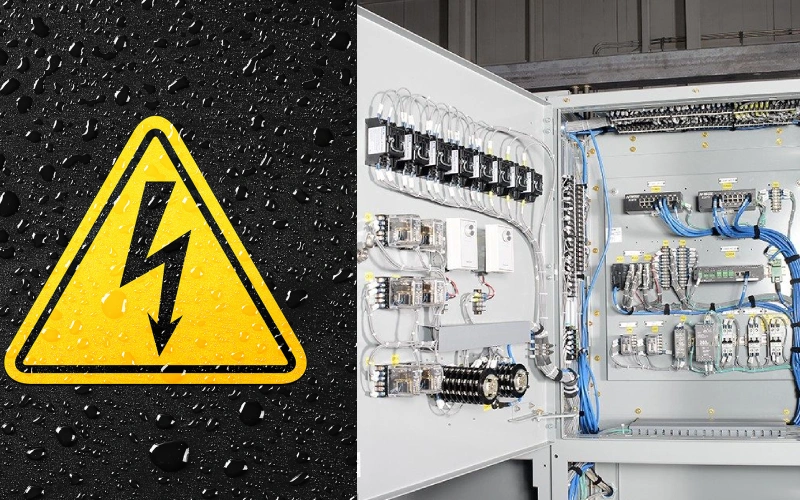
You might wonder why condensation in medium-voltage switchgear panels happens so often. The main reason is the mix of temperature and humidity inside your enclosure. When the surface temperature of your panel drops to or below the dew point of the air around it, moisture starts to collect. This gets worse if you work in a place with high humidity or big swings in temperature. For example, if your switchgear sits outside or in a drafty room, cold nights and warm days can trigger condensation problems. You can fight back by raising the temperature inside the panel and making sure air flows well. These steps help keep condensation in medium-voltage switchgear panels under control.
Tip: If you notice water droplets or foggy surfaces inside your panel, you’re probably dealing with condensation in medium-voltage switchgear panels. Don’t ignore it—moisture can cause trouble fast.
Damage Pathways and Failure Rates
Condensation in medium-voltage switchgear panels doesn’t just look bad—it leads to real damage. Here’s how moisture can attack your equipment:
- Moisture intrusion from leaky enclosures or poor seals causes metal parts to rust.
- Corrosion of electrical contacts increases resistance and can make connections fail.
- Dielectric breakdown and flashovers happen when moisture lowers insulation resistance, letting dangerous arcs form.
- Reduction in insulation resistance is an early warning sign that your equipment might malfunction or become unsafe.
- Dust and moisture can mix to form sludge, which blocks electrical paths and eats away at components.
| Damage Pathway | What Happens? | Result |
|---|---|---|
| Moisture Intrusion | Rusts metal parts | Shorter equipment lifespan |
| Corrosion of Contacts | Raises resistance, causes failures | Costly repairs |
| Dielectric Breakdown/Flashover | Arcs form, equipment destroyed | Downtime, safety risks |
| Insulation Resistance Drop | Early malfunction, safety hazard | Unplanned outages |
| Dust + Moisture = Sludge | Blocks paths, corrodes components | System failure |
If you spot any of these issues, act quickly. Condensation in medium-voltage switchgear panels can shorten the life of your equipment and lead to expensive repairs. Keeping moisture out is key to reliable operation.
Dew Point and Humidity Risks
Dew Point Examples in MV Panels
You might hear the term “dew point” and wonder why it matters for your switchgear panels. Dew point is the temperature where air becomes so full of water vapor that it starts to turn into liquid. If the metal inside your panel gets colder than this temperature, water forms on the surface. That’s when trouble starts.
Let’s look at some real numbers. In coastal Australia, if the air is 20°C with 80% humidity, the dew point sits around 16.4°C. If the temperature rises to 25°C but humidity drops to 60%, the dew point is still close—about 16.7°C. These examples show that even small changes in humidity can keep the dew point high. When your panel cools down at night or during a cold snap, it can easily drop below the dew point. That’s when you see water droplets or fog inside your enclosure.
- Humidity and dew point compared to surface temperature decide if condensation will form.
- If the dew point is higher than your panel’s surface, you get water buildup.
- Monitoring these numbers helps you keep your switchgear reliable.
Real-World Impact and Water Accumulation
You can’t ignore what happens when dew point and humidity team up against your equipment. If you don’t control these factors, moisture will collect inside your panel. This leads to rust, electrical shorts, and even dangerous arcs. You might see water pooling at the bottom of the enclosure or find fog on the insulation. Over time, this weakens your system and can cause sudden failures.
- Condensation forms when the panel’s surface drops below the dew point.
- Water inside the panel can cause corrosion, insulation breakdown, and flashovers.
- Using heaters and ventilation helps keep the inside temperature above the dew point and pushes out humid air.
Tip: Check your panels after big temperature swings or rainy days. If you spot water, act fast to protect your equipment.
Heater Solutions for Medium-Voltage Switchgear
Linkwell Enclosure Heater Types
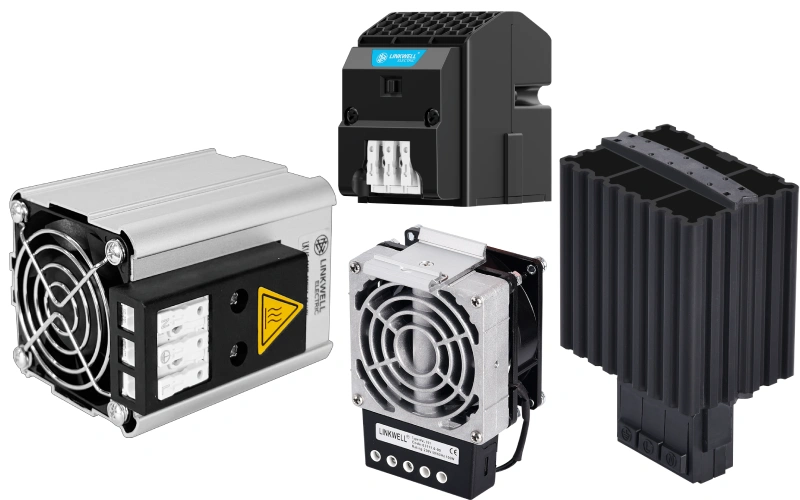
You want your medium-voltage switchgear to last. You want to avoid downtime and expensive repairs. That’s where anti-condensation heaters step in. These devices keep your panels dry and safe, even when the weather outside changes fast.
Linkwell offers a range of anti-condensation heaters designed for switchgear panels. You can find models that fit small control boxes or large outdoor cabinets. Each one comes with features that make your life easier. For example, you get CE and UL certifications, so you know they meet strict safety standards. You can choose from different power ratings, mounting styles, and control options. Some models have built-in thermostats, while others let you add external controls for more flexibility.
Here’s a quick look at one of the most popular Linkwell anti-condensation heaters for switchgear panels:
| Product Name | Company Name | Review Score | Minimum MOQ | Country | Price Range (USD) | Key Attribute |
|---|---|---|---|---|---|---|
| Factory Sell CE UL Cabinet Heater Heater for Switch Cabinet Enclosure Heater | Linkwell Electric (Shanghai) Co., Ltd. | 5.0 | 2 pieces | CN | $20–38 | CE/UL Certified, Ideal for Control Panels |
You can see that Linkwell’s anti-condensation heaters are built for reliability. They work well in tough environments. You can use them in places with high humidity, dust, or even outdoor exposure. The IP65 full-seal design keeps out water and dirt. The aluminum housing resists corrosion. You can mount these anti-condensation heaters on a DIN rail or with screws, so installation is simple.
Tip: If you need to protect a large panel, you can use multiple anti-condensation heaters in different sections. This gives you even coverage and better anti-condensation results.
Performance and Energy Efficiency
You want your anti-condensation system to work without wasting energy. Linkwell’s anti-condensation heaters use smart heating technology to keep your panels dry and efficient. The built-in thermostat only turns on the heating element when needed. This means you don’t waste power when the temperature is already safe. You get stable anti-condensation performance and lower energy bills.
Let’s talk about how these anti-condensation heaters help with ventilation. Good ventilation works with anti-condensation heating to keep air moving and prevent hot spots. When you combine anti-condensation heaters with proper ventilation, you get the best protection against moisture and temperature swings. Linkwell’s anti-condensation heaters are designed to work with their ventilation systems. You can set up a complete anti-condensation solution that covers both heating and airflow.
You can pick from a wide range of heating power, from 10W for small boxes to 500W for big cabinets. The anti-condensation heaters can handle temperatures from -40°C to +85°C. You can use them in cold storage, outdoor substations, or humid factories. The self-regulating heating element adjusts its output, so you never overheat your panel. This keeps your anti-condensation system safe and reliable.
Here’s why you’ll love Linkwell’s anti-condensation heaters:
- You get fast installation and easy wiring.
- You can trust the anti-condensation heaters to last for years, even in harsh conditions.
- You save money with energy-efficient heating and smart controls.
- You can combine anti-condensation heaters with ventilation for the best results.
If you want to stop condensation and keep your switchgear running, anti-condensation heaters are your best friend. Pair them with good ventilation, and you’ll have a complete anti-condensation strategy that works year-round.
Sizing and Placement of Heaters
Sizing by Volume and Climate
You want your switchgear panel to stay dry and safe. Picking the right heater size is the first step. Start by measuring the volume of your enclosure. Use the formula:
Volume (m³) = Height (m) × Width (m) × Depth (m)
Once you know the volume, think about your local climate. If you work in a cold or humid area, you need more heating power. For a small indoor panel, a 20W heater might do the job. If your cabinet sits outside in a damp climate, you may need 150W or more. Check the manufacturer’s chart for recommended wattage based on enclosure size and environment.
Here’s a quick table to help you estimate heater size:
| Enclosure Volume | Typical Climate | Recommended Heater Power |
|---|---|---|
| < 0.2 m³ | Mild/Indoor | 10–30 W |
| 0.2–0.5 m³ | Moderate | 40–80 W |
| > 0.5 m³ | Cold/Humid | 100–150 W+ |
Tip: Always round up if you’re unsure. It’s better to have a little extra heat than to risk moisture problems.
Placement and Compartmentalization
Heater placement matters just as much as sizing. You want to put heaters near areas where cold air enters or where condensation forms. Mount the heater low in the enclosure, close to the door or vent. Warm air rises, so this setup helps heat spread evenly.
If your panel has separate compartments, use smaller heaters in each section. This keeps every part protected. Avoid blocking airflow with wires or equipment. Make sure nothing touches the heater surface.
- Place heaters near entry points for cold air.
- Use multiple heaters for large or divided enclosures.
- Keep heaters clear of obstructions.
Note: Good placement and compartmentalization help your heaters work better and last longer.
Control Methods for Moisture Prevention
Thermostats and Hygrostats
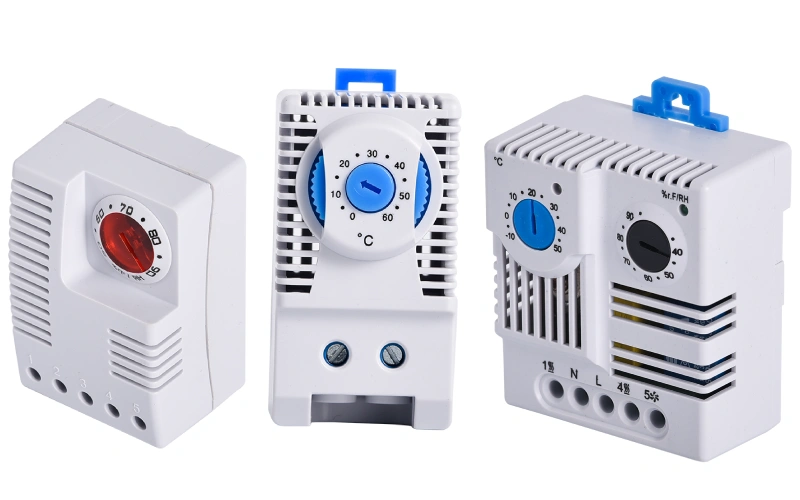
You want your switchgear panels to stay dry and reliable. Thermostats and hygrostats help you do just that. A thermostat senses the temperature inside your enclosure. When it drops too low, the thermostat turns on the heater. This keeps the panel warm enough to stop condensation from forming. The system works in a closed loop, always checking if the temperature matches your set point.
A hygrostat takes things a step further. It monitors the relative humidity inside your panel. If humidity climbs too high, the hygrostat activates the heater or ventilation system. This action prevents moisture from building up on your equipment. For example, a hygrostat like the TOSUNlux MFR-012 will kick in when humidity passes a certain level. It helps you avoid corrosion and keeps your electronics safe. With both devices working together, you get strong humidity management and better protection for your switchgear.
Tip: Pairing thermostats and hygrostats gives you more control. You only use energy when you need it, and your equipment stays dry.
PLC and Smart Controls
You can take your control system to the next level with PLCs and smart controls. These systems combine sensors, heaters, and ventilation fans for complete moisture prevention. Here’s why you might want to use them:
- You keep the internal temperature above the dew point, so condensation never forms.
- Humidity is managed only when needed, which saves energy.
- Sensitive parts like relays and terminals stay protected from corrosion and short circuits.
- You can fit these controls into new or existing panels without a big redesign.
- Your panels run more reliably, with fewer unexpected shutdowns.
- You spend less time on maintenance and troubleshooting.
- Component life gets longer, so you replace parts less often.
- Heaters and hygrostats work only when required, making your energy costs predictable.
Smart controls help you monitor and adjust your system in real time. You can even set alerts for sudden changes in temperature or humidity. When you combine PLCs with thermostats and hygrostats, you create a powerful defense against moisture. Your switchgear panels stay dry, and your operations stay on track.
Ventilation Strategies for MV Panels
Natural vs. Forced Ventilation Fan
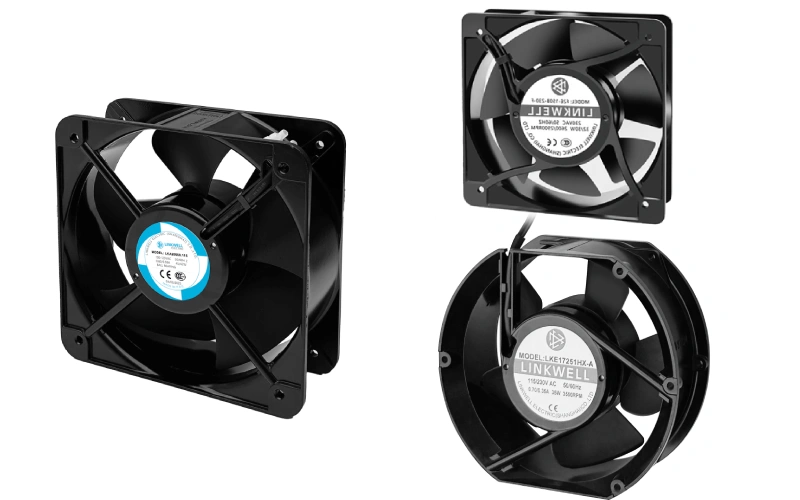
You have two main choices when it comes to ventilation strategies for your medium-voltage switchgear panels: natural or forced ventilation. Natural ventilation uses the difference in temperature and pressure between the inside and outside of your enclosure. You add ventilation openings at the top and bottom of your panel. Warm air rises and escapes through the top, while cooler air enters from below. This method works well for transformer compartments. It keeps temperature swings small and helps reduce pollution inside the panel. You get longer equipment life and fewer service calls.
Forced ventilation steps things up. You use fans or blowers to move air through the enclosure. This approach is essential for areas where your switchgear generates a lot of heat, like the circuit breaker trolley room or busbar compartment. You install axial flow fans at the top to push hot air out. This setup keeps the temperature rise under control, even in tough conditions. Studies show that smart air duct designs can cut pressure drop by more than half and lower temperature rise by up to 25% in the busbar area. That means your equipment stays cooler and works better.
You should think about your panel’s layout and where heat builds up. If you have a simple setup with low heat, natural ventilation might be enough. If you see hot spots or run heavy loads, forced ventilation gives you better control. Always check that your ventilation openings are clear and filters are clean. Dust or debris can block airflow and make your system less effective.
Integration with Heaters
You get the best protection against moisture when you combine heaters with proper ventilation. Heaters keep the inside of your panel above the dew point, while ventilation removes humid air and prevents heat buildup. Linkwell’s electrical enclosure ventilation products make this easy. You can choose from fan filter units, cabinet air conditioners, and thermostats that work together for complete control.
Here’s how you can set up your system for both cooling and heating:
| Thermostat Type | Function in Cooling | Function in Heating |
|---|---|---|
| Normally Open (NO) | Activates fan when temperature exceeds set point | N/A |
| Normally Closed (NC) | N/A | Turns off heater when temperature exceeds threshold |
You install ventilation openings near the top and bottom of your enclosure. Place fans where heat collects, and mount heaters near areas prone to condensation. Use thermostats to control both. When the temperature rises, the fan kicks in. When it drops, the heater turns on. This setup keeps your panel dry and at a safe temperature all year.
When you pick your ventilation strategy, look at your enclosure type and IP rating. NEMA and IEC standards help you decide what level of protection you need. Higher IP ratings mean better defense against dust and water, but you still need to plan your ventilation openings carefully. Make sure your fans and filters match the enclosure’s rating. For outdoor or harsh environments, choose products with IP54 or IP65 ratings.
Here’s a quick checklist for selecting and implementing ventilation strategies:
- Check your enclosure’s IP or NEMA rating.
- Decide if you need natural or forced ventilation based on heat load.
- Plan ventilation openings for good airflow—top and bottom work best.
- Use Linkwell’s fan filter units for forced ventilation and add heaters for moisture control.
- Match all components to your enclosure’s protection level.
- Inspect and clean ventilation openings and filters regularly.
Tip: If you’re not sure which ventilation strategy fits your panel, reach out to Linkwell’s support team. They can help you design a system that keeps your equipment safe and reliable.
By using the right ventilation strategies and integrating heaters, you protect your switchgear from both heat and moisture. You get longer equipment life, fewer breakdowns, and peace of mind.
Installation and Maintenance Best Practices
Heater and Ventilation Placement
Getting the placement right makes all the difference. You want to mount heaters at the lowest practical point inside your switchgear panel. This lets natural convection do its job, warming the air from the bottom up. Always keep at least 50 mm of clearance from PVC-insulated cables. That way, you avoid heat damage and keep airflow smooth. For ventilation, design natural airflow with louvers that allow 5–10 air changes per hour. Make the exhaust louvers 10–15% larger than the intake. This helps maintain a slight negative pressure, which pushes humid air out and keeps your panel dry. If you work in a place where humidity stays below 70% most of the year, forced or conditioned ventilation works well.
- Mount heaters low for best convection.
- Keep heaters clear of cables and obstructions.
- Size exhaust louvers larger than intake for better airflow.
- Use forced ventilation in moderate climates.
Commissioning and Monitoring
When you commission your system, you want to make sure everything works as planned. Close the panel doors and use an IR thermometer to check if the heater is energized. Set your thermostat or hygrostat to match your local climate zone. Test the heater operation during auxiliary supply failure scenarios. Record baseline humidity readings so you can compare them later. Install humidity indicator cards (cobalt-free type) for easy visual checks during maintenance.
Always verify heater operation with doors closed.
Confirm control set points match your climate.
Document humidity readings for future reference.
Preventing Common Failures
You can avoid most problems with regular checks and smart setup. Make sure heaters and fans are free from dust and debris. Replace filters every few months. Check wiring for signs of wear. Use humidity indicator cards to spot moisture before it causes trouble. If you see condensation or corrosion, act fast. Regular monitoring and maintenance keep your switchgear running smoothly and extend its life.
- Inspect heaters and fans monthly.
- Change filters every 3–6 months.
- Watch for wiring issues.
- Use indicator cards for early warning.
Linkwell Expertise and Support
Customized Solutions and Product Range
You want a partner who understands your unique needs. Linkwell steps up with a wide range of products and the ability to customize every solution. Maybe you need a compact heater for a small control box. Maybe you want a high-powered ventilation system for a large outdoor panel. Linkwell has you covered. You can choose from enclosure heaters, fan filter units, cabinet air conditioners, thermostats, and more. Each product comes in different sizes, power ratings, and mounting styles. You get to pick what fits your project best.
Need something special? Linkwell’s team works with you to design custom solutions. You can ask for specific temperature setpoints, unique mounting brackets, or even special control features. The support team listens to your requirements and helps you find the right answer. You never have to settle for a one-size-fits-all approach.
Here’s a quick look at what you can expect:
| Product Type | Options Available | Typical Use Case |
|---|---|---|
| Enclosure Heaters | 10W–500W, IP54/IP65, DIN | Preventing condensation |
| Fan Filter Units | Multiple airflow ratings | Forced ventilation |
| Cabinet Air Conditioners | Digital control, compact | High-heat environments |
| Thermostats/Hygrostats | Analog/digital, adjustable | Smart control |
Ensuring Compliance and Reliability
You want your equipment to last and meet all safety standards. Linkwell delivers products with CE, UL, and RoHS certifications. These certifications mean you can trust the quality and safety of every component. The team tests each product to make sure it stands up to tough industrial environments. You get heaters and ventilation systems that resist dust, water, and corrosion.
Linkwell also helps you stay ahead of problems. The support team offers 24/7 assistance. If you have questions about installation or maintenance, you get answers fast. You can rely on Linkwell to help you prevent moisture issues and keep your switchgear running smoothly. When you choose Linkwell, you choose peace of mind.
Conclusion
You’ve seen how moisture can sneak into your medium-voltage switchgear panels and cause real trouble. Condensation leads to corrosion, flashovers, and expensive downtime. You don’t want that. The good news? You can fight back with the right combination of heaters and ventilation.
When you use Linkwell’s enclosure heaters, you keep the inside of your panels warm and dry. These heaters stop condensation before it starts. Pair them with smart ventilation—like fan filter units or cabinet air conditioners—and you push out humid air while keeping temperatures steady. This one-two punch gives your equipment the best shot at a long, reliable life.
Remember: Moisture control isn’t just about stopping water. It’s about protecting your investment, keeping your team safe, and making sure your operations never miss a beat.
Here’s what you can do next:
- Check your panels: Open them up after a rainy day or a cold night. Look for signs of moisture or corrosion.
- Review your setup: Do you have the right size heater? Is your ventilation working? Are your thermostats and hygrostats set correctly?
- Reach out for help: Not sure what you need? Linkwell’s team is ready to help you pick the perfect solution. You get expert advice, custom options, and support every step of the way.
| Why Choose Linkwell? | What You Get |
|---|---|
| Certified, reliable products | Peace of mind and safety |
| Custom solutions | Fit for your unique environment |
| 24/7 support | Answers when you need them |
Don’t wait for condensation to cause a problem. Take action now. Protect your switchgear panels with Linkwell’s heater and ventilation solutions. You’ll save money, avoid headaches, and keep your operations running strong.
You know moisture can wreck your switchgear panels fast. Coordinated heater and ventilation solutions keep your equipment safe and reliable. Linkwell gives you certified products and expert support for every environment. Want to check your current setup? Try these steps:
- Inspect for moisture, rust, or leaks.
- Seal any gaps or seams.
- Test heaters and controllers with infrared tools.
| Environmental Condition | Required Solution |
|---|---|
| Hot environments | Supplemental ventilation or cooling fans |
| Cold climates | Internal heating elements |
| High humidity | Preventative measures to avoid condensation |
| Excessive dust | Filtration systems to capture fine particulates |
Reach out to Linkwell for custom, standards-compliant solutions that fit your needs.
FAQ
How do I know if my switchgear panel needs a heater?
If you see condensation, rust, or fog inside your panel, you need a heater. Cold climates or high humidity also mean you should install one. Heaters help prevent moisture and keep your equipment safe.
Can I use Linkwell heaters in outdoor or wet environments?
Yes! Linkwell heaters have IP65 ratings. You can use them in outdoor or wet areas. The full-seal design keeps out dust and water. Your sensitive electronics stay protected.
What’s the difference between natural and forced ventilation?
Natural ventilation uses air openings. Warm air rises and escapes, cool air enters. Forced ventilation uses fans or blowers. You get better airflow and cooling for panels with high heat loads.
How often should I check or replace ventilation filters?
Check filters every month. Replace them every 3–6 months. Clean filters keep airflow strong and block dust. Your panel stays cool and dry.


