
You need to keep your server room temperature between 68 and 77°F to protect your equipment. Servers run nonstop and create a lot of heat, so cooling becomes a big deal. If you ignore temperature and humidity control, you risk downtime, hardware damage, and even data loss. ASHRAE suggests aiming for these ranges:
- Server room temperature: 64.4 to 80.6°F
- Humidity: 40% to 60% relative humidity
Getting server room HVAC requirements right helps you keep your data safe and your hardware running smoothly.
Key Takeaways
- Keep server room temperature between 68°F and 77°F to protect your equipment.
- Maintain humidity levels between 40% and 60% to prevent static electricity and condensation.
- Use dedicated HVAC systems designed for server rooms to handle high heat loads effectively.
- Regularly monitor temperature and humidity with sensors to catch issues early.
- Implement airflow management strategies, like hot aisle/cold aisle setups, to improve cooling efficiency.
server room hvac requirements overview
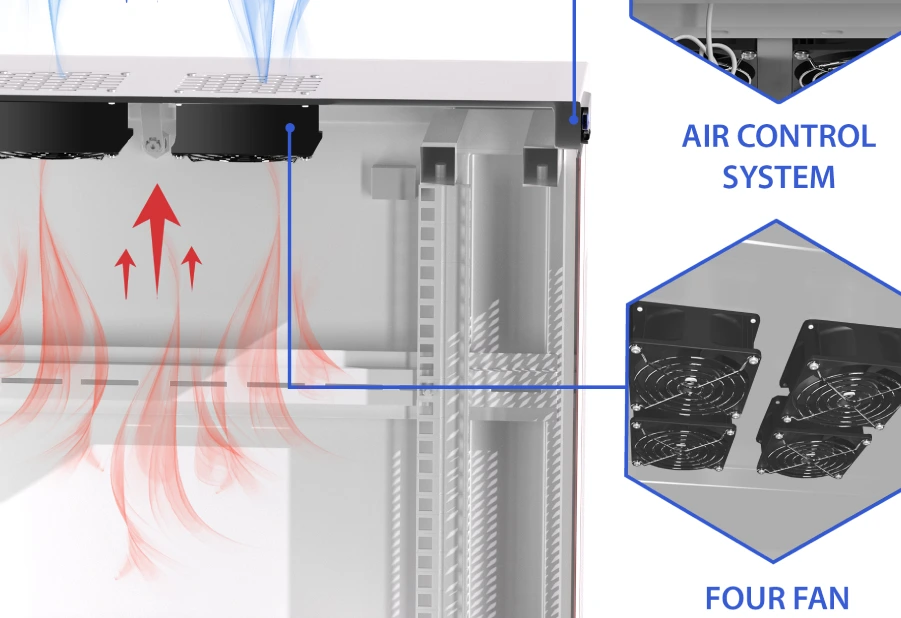
why dedicated hvac is essential
You might wonder why you need a dedicated system for server room hvac requirements instead of relying on your building’s regular cooling systems. Servers and IT equipment generate intense heat all day, every day. Standard cooling systems just can’t keep up with these demands. Dedicated cooling systems are designed to handle high heat loads, maintain precise temperature and humidity, and keep airflow steady. This means your equipment stays safe and your data remains protected.
Let’s look at some industry standards and recommendations that back up the need for dedicated cooling systems:
| Standard | Description |
|---|---|
| ASHRAE | Governs temperature and humidity control for servers. |
| NEC | Ensures proper electrical wiring and fire safety. |
| NFPA 75/76 | Codes for IT equipment protection. |
| OSHA | Workplace safety regulations for server rooms. |
Manufacturers also stress the importance of dedicated cooling systems. They recommend keeping server room hvac requirements between 64.4°F and 80.6°F, with humidity levels from 40% to 60%. Staying in these ranges helps prevent overheating and condensation. Proper airflow is another key part of server room hvac requirements. Without it, hotspots can form and threaten your equipment.
risks of poor environmental control
Ignoring server room hvac requirements can lead to serious problems. If you let temperature and humidity drift outside the recommended ranges, you put your hardware and data at risk. Here’s what can happen:
- Overheating
- Equipment malfunctions
- Catastrophic data loss
Fires in server rooms and data centers can have devastating consequences, but they are largely preventable with the right measures in place.
Check out this table showing common issues linked to poor environmental control:
| Type of Issue | Description |
|---|---|
| High Heat Buildup | Can lead to hardware failure, reduced performance, and permanent damage. |
| Humidity Issues | High humidity causes condensation and corrosion; low humidity increases static electricity risk. |
You need to take server room hvac requirements seriously. Dedicated cooling systems, proper airflow, and regular monitoring help you avoid costly downtime and keep your business running smoothly.
optimal temperature and server room temperature
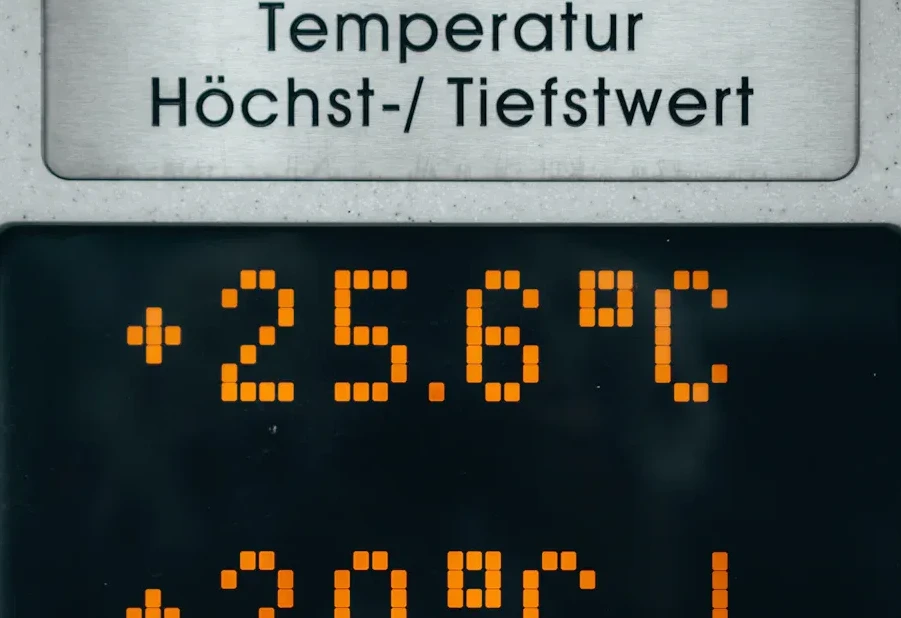
recommended temperature ranges
You want your server room temperature to stay in the sweet spot. If you keep things too hot or too cold, your equipment pays the price. Most experts agree that the optimal temperature for a server room sits between 68°F and 77°F. This range helps your servers run smoothly and keeps your data safe.
Take a look at what the top organizations and manufacturers recommend for server room temperature:
| Source | Recommended Temperature Range |
|---|---|
| ASHRAE | 64.4°F to 80.6°F (18°C to 27°C) |
| Dell | Up to 80°F (about 26.7°C) |
| Other | 50°F to 82°F (preferred 68°F-71°F) |
You might see some variation, but most professionals stick with the recommended temperature ranges of 68°F to 77°F. This is often called the ideal server room temperature. If you keep your room in this range, you lower the risk of overheating and avoid problems like condensation from being too cold.
Tip: Use a reliable thermometer or sensor to check your server room temperature every day. Small changes can make a big difference.
temperature stability and equipment longevity
You might think colder is always better for your servers, but that’s not true. Stability matters more than just blasting cold air. When the server room temperature jumps up and down, your hardware faces stress. Overheating speeds up wear and tear, while overcooling can cause moisture to build up and lead to corrosion.
Stable temperatures help your equipment last longer. If you keep the optimal temperature steady, you protect your servers from sudden changes that can cause failures. Experts say that temperature swings outside the recommended range can lead to overheating, which breaks down components faster and increases the chance of downtime. On the flip side, low temperatures can cause condensation, which leads to rust and other moisture problems.
Here’s how temperature stability affects your server hardware:
- Excessive heat can cause parts to overheat, slow down, or even break for good.
- Too much cold can make your system use more energy and risk moisture damage.
- Keeping the server room temperature stable helps you avoid these issues and keeps your equipment running longer.
| Temperature Change | Impact on Reliability |
|---|---|
| 18°C to 28°C | No measurable impact on overall server reliability |
If you keep the ideal server room temperature steady, you boost the mean time between failures (MTBF) for your hardware. That means fewer breakdowns and less money spent on repairs.
Note: Don’t chase the cold. Focus on keeping your server room temperature stable within the optimal temperature range. Your servers will thank you with better performance and longer life.
server room humidity and humidity management
ideal humidity levels
You might think temperature and humidity are the only things you need to watch in your server room, but humidity management deserves just as much attention. The ideal humidity level for server rooms sits between 40% and 60% relative humidity. ASHRAE and IT industry experts agree on these recommended humidity ranges because they help you avoid two major problems: static electricity and condensation.
If you let humidity drop below 40%, you risk electrostatic discharge. This can zap your servers and damage sensitive components. On the other hand, humidity above 60% can cause condensation. Moisture builds up, leading to corrosion and hardware failure. Here’s a quick look at what happens when humidity goes outside the safe zone:
- Low humidity (below 40% RH) can lead to electrostatic discharge (ESD), which may damage critical server components.
- High humidity (above 60% RH) can cause condensation, resulting in hardware corrosion and potential equipment failure.
Tip: Always keep an eye on your server room humidity. Staying in the 40-60% range protects your equipment and keeps your data safe.
controlling humidity with hvac and dehumidifiers
You need reliable humidity management tools to keep your server room in top shape. HVAC systems play a huge role in controlling both temperature and humidity. Most dedicated server room HVAC setups include humidifiers and dehumidifiers to maintain the right balance. These systems work together to keep humidity between 40% and 60%, which helps prevent electrostatic discharge and stops condensation from forming.
Let’s break down some of the most effective tools for humidity management:
| Type | Description |
|---|---|
| HVAC System | Dedicated air conditioning system for maintaining server room temperature. |
| Desiccant Dehumidifier | Uses adsorbents like silica gel to absorb moisture from the air. |
| Condensation Dehumidifier | Uses a compressor to remove moisture from the air, effective for high temperatures and humidity. |
You’ll find that condensation dehumidifiers work well in server rooms with higher temperatures and humidity levels. These units quickly pull hot, humid air through the system and can cool below the optimum dew point level. They’re cost-effective, easy to operate, and can drain large volumes of moisture.
Humidity management doesn’t stop with equipment. You need strong humidity monitoring capabilities to keep everything running smoothly. Humidity sensors give you real-time data, so you can spot changes before they become problems. Automated controls, powered by smart technologies, can predict humidity swings and adjust your HVAC settings automatically. This proactive approach helps you avoid condensation and static electricity, keeping your servers safe.
Note: Don’t wait for problems to show up. Use sensors and automated controls to stay ahead of humidity issues and protect your investment.
If you focus on temperature and humidity together, you’ll create a stable environment for your servers. Good humidity management means fewer breakdowns, less downtime, and longer hardware life.
monitoring and control systems
temperature and humidity sensors
You can’t protect your server room if you don’t know what’s happening inside. That’s why high-quality temperature and humidity sensors are a must for any serious environmental monitoring setup. These sensors give you real-time data, so you can monitor server room temperature and humidity every minute of the day. Reliable sensors help you spot problems before they turn into disasters.
Here’s a quick look at some of the most trusted temperature and humidity sensors for server rooms:
| Vendor | Sensor Name | Description |
|---|---|---|
| AKCP | Single Port Temperature Humidity Sensor | Combines temperature and humidity in one sensor, saves space. |
| APC | NetShelter Rack PDU Advanced Temperature Sensor | Smart rack power distribution with advanced features. |
| Aten | Temperature Sensor – TAA Compliant EA1140 | Works with Power Distribution Units for environmental monitoring. |
| AVTECH | RoomAlert Digital Temperature Sensor | Real-time readings from -67 to 257°F. |
| CPI | 60111-007 Temp & Humidity Sensor with Display | Wall-mount, 3% RH accuracy, easy-to-read display. |
| Monnit | Wireless Temperature Sensors | Automated remote monitoring for safe temperatures. |
| Panduit | SmartZone™ G5 Temperature Environmental Sensor | Flexible placement with a 6.6-foot cable. |
You should set a regular schedule for sensor calibration. Most experts recommend checking your temperature and humidity sensors every 6 to 12 months. If your server room supports mission-critical systems, you may want to check even more often.
Tip: Don’t skip calibration. Accurate sensors are your first line of defense against overheating or moisture problems.
automated alerts and remote monitoring
You can’t be in the server room 24/7, but automated alerts and remote monitoring systems have your back. These tools send instant notifications if temperature or humidity goes out of range. This fast response helps you prevent data loss, keep your business compliant with standards like ASHRAE, and create a safer workplace for everyone.
Here’s why automated alerts and remote monitoring matter:
- Prevent data loss from temperature spikes, humidity swings, or water leaks.
- Meet industry standards and stay audit-ready.
- Keep employees safe by tracking air quality and heat index.
Modern remote monitoring solutions do more than just monitor server room temperature. They offer cloud-based access, so you can check conditions from anywhere. You get continuous environmental monitoring, automated alerts, and reliable data storage. Many systems also integrate with backup cooling and power protection for extra redundancy.
| Feature | Description |
|---|---|
| Continuous Monitoring | 24/7 tracking of temperature and humidity |
| Automated Alerts | Instant notifications for out-of-range conditions |
| Data Storage | Secure, compliant record-keeping |
| Integration | Works with cloud platforms for remote access |
| Compliance | Supports industry regulations |
If you want peace of mind, invest in a solid monitoring and control system. You’ll catch problems early, avoid costly downtime, and keep your server room running smoothly.
airflow and maintenance best practices
airflow management strategies
You want your server room to stay cool and efficient, right? Good airflow management is the secret. Start with a hot aisle/cold aisle setup. This means you line up your server racks so that cold air blows into the front of the servers (cold aisle) and hot air exits out the back (hot aisle). This simple trick keeps hot and cold air from mixing, which helps your cooling system work better.
Here are some easy ways to boost airflow in your server room:
- Use hot aisle/cold aisle containment to separate hot and cold air paths.
- Place perforated floor tiles in front of racks to direct cold air where it’s needed most.
- Add blanking panels to empty rack spaces. These panels stop hot air from sneaking into the cold aisle.
- Seal gaps around cables with air restrictors or floor grommets. This keeps cold air from leaking out.
- Remove clutter and manage cables so nothing blocks the airflow.
- Cover empty rack units to prevent air from bypassing your equipment.
Proper air circulation and sealing make a big difference. Check out this table to see how these steps help your cooling system:
| Practice | Impact on Cooling Efficiency |
|---|---|
| Sealing cable openings with grommets | Directs more cold air to equipment, reduces air leaks |
| Correct placement of vented tiles | Improves subfloor air pressure, lowers energy costs |
Tip: When you keep hot and cold air separate, your cooling system doesn’t have to work as hard. That means lower energy bills and happier servers!
regular inspections and troubleshooting
You can’t just set up your HVAC system and forget about it. Regular inspections keep everything running smoothly. Change air filters often—sometimes even daily in busy server rooms. Clean filters mean better airflow and less dust on your equipment.
Here’s a quick checklist for server room maintenance:
- Inspect HVAC units and filters regularly.
- Check for air leaks and seal them right away.
- Assess airflow to make sure cold air reaches the front of racks and hot air escapes from the back.
- Spread out equipment in racks to avoid overcrowding.
- Use portable AC units if your main system fails.
- Install temperature sensors with real-time alerts.
- Keep humidity between 40% and 60% with dehumidifiers or humidifiers.
If you spot a problem, act fast. Look for blocked vents, check for hot spots, and make sure your sensors are working. Planning for future needs—like more servers or higher rack density—will help you avoid surprises down the road.
Note: Staying on top of inspections and troubleshooting saves you money and keeps your data safe.
Conclusion
You’ve learned why server room HVAC requirements matter so much. Keeping your equipment safe starts with controlling temperature and humidity. If you ignore these basics, you risk downtime, hardware failure, and even data loss. You want your server room to run smoothly for years, so planning ahead is key.
Let’s recap the essentials:
- Dedicated HVAC systems keep your servers cool and stable.
- Optimal temperature and humidity ranges protect your hardware and data.
- Monitoring tools like sensors and automated alerts help you catch problems early.
- Airflow management keeps hot and cold air separate, boosting efficiency.
- Regular maintenance stops small issues from turning into big headaches.
Remember: You can’t just set up your server room and forget about it. Regular checks and updates keep everything running at peak performance.
Here’s a quick checklist to guide your planning:
| Step | Why It Matters |
|---|---|
| Set up dedicated HVAC | Handles high heat loads |
| Monitor temperature and humidity | Prevents hardware damage |
| Manage airflow | Improves cooling efficiency |
| Schedule inspections | Extends equipment lifespan |
If you start with a solid plan, you’ll avoid costly mistakes. You’ll also make sure your server room supports your business as it grows. Don’t wait for problems to show up. Take action now, and you’ll enjoy reliable performance and peace of mind.
You have the tools and knowledge to create a safe, efficient server room. Focus on temperature and humidity, invest in good monitoring, and keep up with maintenance. Your servers will thank you, and your data will stay protected.
You want your server room to run smoothly and last for years. Keep these key points in mind:
- Maintain temperature between 64°F and 80°F.
- Keep humidity in the 40%–60% range, aiming for about 50%.
- Use dedicated HVAC, monitor conditions, and schedule regular maintenance.
Following industry standards boosts energy efficiency, keeps your system performing well, and helps you stay compliant. Stick with these best practices, and your servers will thank you!
FAQ
What temperature should you keep your server room?
You should aim for 68°F to 77°F. This range keeps your servers safe and helps prevent overheating. Most experts and manufacturers recommend staying within these limits for best performance.
How often should you check HVAC systems in your server room?
You should inspect your HVAC system at least once a month. Change filters regularly and look for any airflow problems. Frequent checks help you catch issues early and keep your equipment running smoothly.
Why does humidity matter in a server room?
Humidity affects your hardware. Low humidity can cause static electricity, which may damage components. High humidity leads to condensation and corrosion. Keep humidity between 40% and 60% to protect your servers.
Can you use regular air conditioning for a server room?
Regular AC units often can’t handle the heat load from servers. You need a dedicated HVAC system designed for server rooms. These systems keep temperature and humidity stable and protect your equipment.
What is hot aisle/cold aisle containment?
Hot aisle/cold aisle containment separates hot and cold air in your server room. You line up racks so cold air enters the front and hot air exits the back. This setup improves cooling efficiency and helps your HVAC system work better.


