What Are Reverse Blade Fans for Pc? These unique fans are designed to change the typical airflow pattern inside your computer. Unlike standard fans that move air from the front to the back, reverse blade fans for PC pull air in from the back and push it out through the front. Here’s a quick comparison:
| Fan Type | Airflow Direction |
|---|---|
| Normal-Blade | Air enters from the front and exits through the back. |
| Reverse Blade Fans for Pc | Air enters from the back and exits through the front. |
Reverse blade fans for PC are most often used as intake fans. They not only help boost your system’s thermal performance but also add a stylish touch by making the spinning fan blades visible from the front of your case.
Key Takeaways
- Reverse blade fans change airflow direction by pulling air from the back and pushing it out the front, enhancing cooling and aesthetics.
- These fans are ideal for showcasing RGB lighting, making your PC visually appealing while improving airflow.
- Placement matters: use reverse blade fans as front intake fans for optimal cooling and visibility of the spinning blades.
- Check compatibility before purchasing; some reverse blade fans are thicker and may not fit in all cases.
- Plan your fan layout carefully to balance cooling performance and visual impact for your PC build.
What Are Reverse Blade Fans for PC
Definition and Main Features
So, what are reverse blade fans for pc? You might have seen these fans in some custom PC builds and wondered what makes them different. Reverse blade fans use a special blade orientation that flips the direction of airflow compared to normal-blade fans. When you install one, it pulls air from the back and pushes it out the front, which is the opposite of what you get with most fans.
You often see reverse blade fans in setups where you want to show off the spinning blades from the front of your case. This design not only changes how air moves but also gives your PC a unique look. If you want both style and function, these fans can help you achieve that.
Normal-blade fans usually hide the spinning part behind the frame, so you only see the back of the blades. With reverse blade fans, you get a clear view of the front, making your lighting effects pop. That’s why many PC builders choose them for intake positions, especially when they want to highlight RGB lighting.
Let’s break it down:
- Normal-blade fans: Air enters from the front, exits through the back. You see the frame, not the blades.
- Reverse blade fans: Air enters from the back, exits through the front. You see the spinning blades and lighting effects.
If you’re asking yourself, what are reverse blade fans for pc, just remember—they flip the airflow and the look.
Blade Design Differences
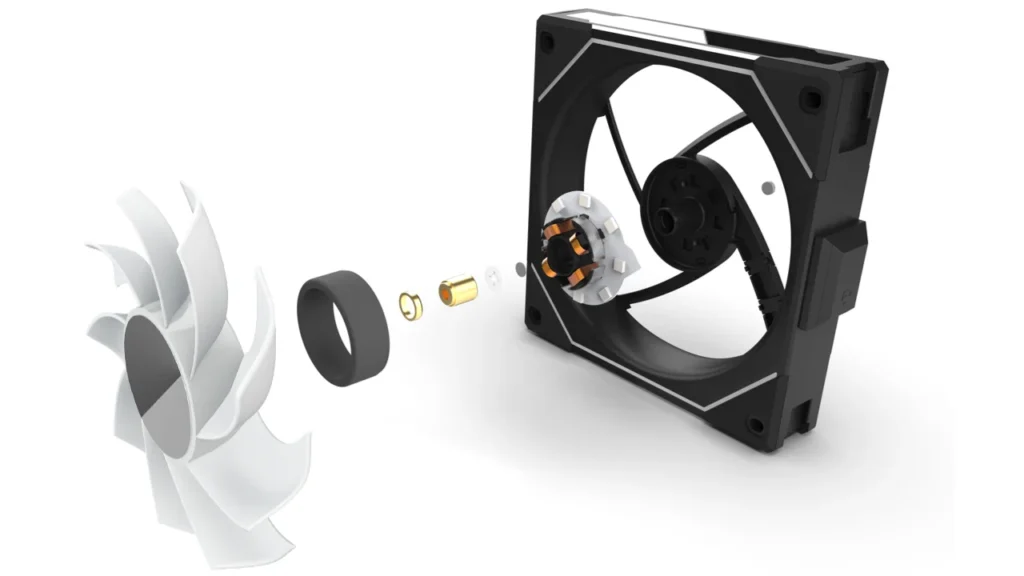
Now, let’s talk about how the blades themselves differ. The main thing that sets reverse blade fans apart from normal-blade fans is the angle and curve of the blades. In normal-blade fans, the blades are shaped to scoop air from the front and push it out the back. Reverse blade fans flip this design. The blades curve in the opposite direction, so they pull air from the back and send it out the front.
You’ll also notice differences in the materials used for the blades. Here’s a quick table to help you compare:
| Material Type | Pros | Cons |
|---|---|---|
| Metal | Durable and rigid, withstands high pressure and impacts. Excellent heat dissipation. | Higher cost than plastic. Heavier, which can affect efficiency. |
| Plastic | Cost-effective and lightweight. Corrosion-resistant. | Less durable, prone to cracking. Lower heat resistance than metals. |
Most reverse blade fans use plastic blades because they are light and easy to shape. Some high-end models use metal for extra strength and better heat handling, but these cost more and weigh more.
Normal-blade fans and reverse blade fans can both use these materials, but the shape and orientation of the blades make the biggest difference. When you look at what are reverse blade fans for pc, you’ll see that the unique blade curve is what changes the airflow direction.
If you compare the two types side by side, you’ll spot the difference right away. Normal-blade fans have blades that lean one way, while reverse blade fans lean the other. This simple change lets you control where the air goes and how your PC looks.
So, what are reverse blade fans for pc? They are fans with a special blade design that flips the airflow and gives you a front-row seat to the action inside your case. If you want to stand out and improve your cooling, these fans might be just what you need.
Airflow and Function of Reverse-Blade Fans
Airflow Direction Explained
When you look at reverse-blade fans, the first thing you’ll notice is how they change the airflow direction inside your PC. Standard fans usually pull air from the front and push it out the back. Reverse-blade fans flip this pattern. They draw air in from the back and send it out through the front. This unique airflow direction lets you control how cool air moves through your case.
You might wonder why this matters. The answer is simple: the way air moves can make a big difference in how well your PC stays cool. If you want to show off your RGB lighting or the spinning blades, reverse-blade fans let you do that while still keeping your system cool. You get both style and function.
Tip: Always check the arrows on the fan frame. These arrows show the airflow direction, so you can install the fan the right way.
Here’s a quick look at how airflow direction changes with different fan types:
| Fan Type | Airflow Direction |
|---|---|
| Standard Fan | Front (intake) → Back (exhaust) |
| Reverse-Blade Fan | Back (intake) → Front (exhaust) |
With reverse-blade fans, you get more control over where the cool air enters and where the warm air leaves. This can help you target hot spots in your PC and keep your components running smoothly.
Intake vs. Exhaust Use
Now, let’s talk about where you should use reverse-blade fans. Most people use them as intake fans at the front of the case. This setup pulls cool air from outside and pushes it into your PC. When you use reverse-blade fans in this way, you get a clear view of the spinning blades and any lighting effects. Your PC not only runs cooler but also looks amazing.
You can also use reverse-blade fans as exhaust fans, but that’s less common. The main reason is that the design works best when you want to see the front of the fan. If you put them at the back or top as exhaust, you lose the visual effect. Still, if you want to experiment with intake or exhaust airflow, reverse-blade fans give you that option.
Here are some things to keep in mind when choosing where to place your fans:
- Front Intake: Best for showing off lighting and blades. Brings cool air into the case.
- Top/Rear Exhaust: Not as common for reverse-blade fans. You won’t see the blades as much.
- Side Panel: Can work for extra cooling, but check if your case supports it.
Note: The orientation of your reverse-blade fans affects your cooling performance. Always plan your fan layout before you start installing.
If you want the best mix of cooling and style, use reverse-blade fans as front intake fans. You’ll get great airflow, lower temperatures, and a PC that stands out from the crowd.
Pros and Cons of Reverse Blade Fans
Cooling Performance
When you look at cooling, reverse blade fans offer some unique features. You might notice that these fans have a larger gap between the blades and the intake filters. This design can help reduce noise when you use them as intake fans. However, reverse blade fans do not shape airflow as much as standard fans. The air moves in a less focused way, which can affect how well your PC cools down certain parts.
- Reverse blade fans usually have lower CFM and static pressure ratings than standard fans.
- They work best when you need extra static pressure, like when stacking fans together with one spinning in reverse.
- If you want optimal cooling performance, you should plan your fan setup carefully and think about where you need the most airflow.
You may not get the same directed airflow as with regular fans, but you can still keep your system cool if you use them in the right spots.
Aesthetic Benefits
Reverse blade fans really shine when it comes to looks. If you love RGB lighting, these fans let you show off every color and effect. The reversed blades make the lighting fully visible from the front of your case, even as the airflow moves in the opposite direction. You can sync the lights with your motherboard and create custom effects.
| Feature | Description |
|---|---|
| RGB Visibility | The reversed fan blades allow RGB lighting to be fully visible from the front. |
| Airflow Direction | Lets you move air from rear to front while showing off lighting effects. |
| Customization | Many models offer 9 addressable LEDs for stunning, personalized lighting. |
If you want your PC to stand out, reverse blade fans give you both style and function.
Potential Drawbacks
You should also know about some downsides. Reverse blade fans do not push air as strongly as standard fans. This means you might see slightly higher temperatures if you rely on them for all your cooling needs. The less focused airflow can make it harder to cool specific hot spots inside your case. Some models may also cost more because of their unique design and lighting features.
Note: Always check your case and component compatibility before buying reverse blade fans. Not every setup will benefit from them, so think about your cooling goals and style preferences.
If you want a balance between cooling and aesthetics, reverse blade fans can be a great choice. Just remember to plan your setup for the best results.
Installing Reverse Blade Fans

Placement Tips
When you start planning the installation of reverse blade fans, think about where you want the best cooling and visual impact. The most popular placement is at the front of your case. This spot is one of the recommended installation positions because it lets you show off the spinning blades and lighting. You also get strong airflow that brings cool air into your PC. If you want to keep your system clean, face the fans outward. This placement can help airflow move dust away from your components, which means less dust builds up inside your case. Try to match the fan type and placement to your cooling needs and style.
Compatibility Considerations
Before you buy reverse blade fans, check if they fit your case and work with your setup. Some fans, like the P14 Pro Reverse, have a 30mm thickness. This can cause problems if you want to use them with radiators or in tight spaces. Here’s a quick table to help you spot possible issues:
| Issue Type | Description |
|---|---|
| Thickness | The 30mm thickness of some reverse blade fans can lead to compatibility issues with radiators in popular PC cases. |
You should also look at your motherboard and power supply. Keep these points in mind:
- Most fans do not work if you reverse the polarity.
- If you reverse the polarity, airflow drops and cooling suffers.
- LEDs in the fans will not light up if the voltage direction is wrong.
Best Practices
For the best results, plan your installation before you start. Place reverse blade fans at the front for intake and cooling. Make sure you have enough space for the fans, especially if your case is small or you use a radiator. Always connect the fans with the correct polarity so you get full airflow and lighting. Clean your filters and fans often to keep dust from building up. Good placement and careful installation help you get the most out of your reverse blade fans.
Conclusion
You’ve learned a lot about reverse blade fans for PCs. Now, let’s wrap things up and help you decide if these fans fit your next build.
Reverse blade fans stand out because they flip the airflow and show off the spinning blades from the front. You get a cool look and a chance to highlight your RGB lighting. These fans work best as intake fans at the front of your case. You can boost your cooling and make your PC look unique at the same time.
Here’s a quick checklist to help you decide:
- Want to show off your RGB lighting? Reverse blade fans let you see the lights and blades from the front.
- Need better airflow at the front of your case? These fans pull cool air in and help keep your parts cool.
- Worried about compatibility? Always check the size and thickness before you buy. Some cases have tight spaces.
- Looking for easy cleaning? Placing reverse blade fans at the front can help keep dust away from your components.
Tip: Plan your fan layout before you start building. Think about where you want airflow and how you want your PC to look.
Reverse blade fans do have a few drawbacks. They may not push air as strongly as standard fans. You might see slightly higher temperatures if you use only reverse blade fans. Some models cost more because of their special design and lighting.
If you want a balance of style and cooling, reverse blade fans are a great choice. Just remember to match your cooling needs with your visual goals. Take your time, check your case, and pick the fans that fit your build best. Your PC will thank you for it! 😎
Reverse blade fans give your PC a fresh look and help you manage airflow with ease. You get less dust and longer service intervals compared to standard fans:
| Feature | Reverse Blade Fans | Standard Fans |
|---|---|---|
| Reliability | Superior | Lower |
| Maintenance Frequency | Lower | Higher |
| Service Intervals | 6–12 months | More frequent |
You might like these fans if you want quiet, energy-efficient cooling and bold RGB effects. Many users choose matching brands and sizes for a clean build.
- Reverse blade fans need less cleaning and last longer.
- They work well for gaming and workstations.
- You can find them in many sizes and styles.
A common myth says you can reverse airflow electronically. You actually need to reposition the fan to change direction.
Think about your cooling needs and style. If you want easy maintenance and a standout look, reverse blade fans could be perfect for your next build!
FAQ
What makes reverse blade fans different from regular fans?
You’ll notice reverse blade fans have blades angled the opposite way. This flips the airflow direction. You get to see the spinning blades and lighting from the front of your case, which isn’t possible with standard fans.
Can I use reverse blade fans as exhaust fans?
You can, but most people use them as intake fans. If you use them for exhaust, you won’t see the blades or lighting effects from the front. Intake placement gives you the best look and airflow benefits.
Do reverse blade fans affect PC cooling performance?
Reverse blade fans can cool your PC well, especially as intake fans. They may not push air as forcefully as standard fans. You should plan your fan layout to get the best cooling results.
Are reverse blade fans louder than standard fans?
Most reverse blade fans run quietly, especially at lower speeds. Some models may produce more noise if airflow is less focused. Always check reviews and specs before buying.
Will reverse blade fans fit in any PC case?
You need to check the size and thickness before you buy. Some reverse blade fans are thicker than standard ones. Make sure your case has enough space for them, especially if you use radiators or have a compact build.