
You want to keep your equipment safe and working smoothly, right? To figure out cooling requirements, you just need to measure heat inside your enclosure and match it with adequate cooling solutions. If you skip adequate cooling, you risk serious problems. Take a look at what can happen:
| Consequence Type | Description |
|---|---|
| Reduced Lifespan | Heat shortens the life of your components. |
| Performance Degradation | Your system slows down and loses accuracy. |
| Electrical Risks | High temperatures can cause insulation failure and short circuits. |
| Fire Hazards | Overheating may lead to fires and arc flashes. |
| Personnel Safety | You could face burns or unexpected equipment behavior. |
You don’t need advanced skills to use an Enclosure Cooling Calculator. I’ll show you how to use Linkwell’s solutions for adequate cooling step by step.
Key Takeaways
- Accurate cooling is essential to protect your equipment from overheating, which can lead to reduced lifespan and performance issues.
- Gather key data about your enclosure, including heat output and dimensions, to ensure effective cooling calculations.
- Set clear temperature goals based on your equipment’s specifications to maintain optimal performance and safety.
- Use the enclosure cooling calculator to determine the necessary cooling capacity for your setup, ensuring you choose the right Linkwell product.
- Regular maintenance, such as cleaning filters and checking airflow, is crucial for keeping your cooling system efficient and your equipment safe.
Preparation for Enclosure Cooling
Gather Key Data
Before you start any calculation, you need to collect some basic information about your enclosure. This step helps you avoid mistakes later. Here’s a quick table to guide you:
| Key Data Points | Description |
|---|---|
| Total heat output of equipment | The total amount of heat generated by all equipment in the enclosure. |
| Floor area in square feet (ft2) | The total area of the enclosure that needs to be cooled. |
| Facility design and electrical system | The layout and specifications of the facility and its electrical power rating. |
| Heat measurement units | Heat can be measured in British thermal units, tons, or watts, requiring conversion to a common format. |
| Power consumption and thermal output | The thermal output in watts is generally equal to the power consumed by IT devices. |
You should also note the enclosure size, material, and the type of equipment inside. Larger enclosures often need stronger cooling systems, especially if you pack them with high-powered devices. The type of equipment sets the maximum allowable temperature and affects your temperature control needs. Linkwell offers a wide range of cooling solutions that fit different enclosure sizes and layouts, so you can always find a match for your project.
Define Temperature Goals
Now, set your temperature control needs. Every piece of equipment has a recommended operating temperature. If you keep the temperature within this range, your system runs smoothly and lasts longer. Take a look at these common ratings:
| Component Type | Common Temperature Rating |
|---|---|
| General Electrical Components | Up to 60 °C (140 °F) |
| Variable Frequency Drives (VFDs) | 40 °C (104 °F) |
| Acceptable Working Environment | Exceeds 40 °C (104 °F) |
You want to keep your enclosure below the highest recommended temperature for your most sensitive device. This helps you avoid overheating and keeps your equipment safe.
Assess Environmental Factors
Don’t forget about the world outside your enclosure. Ambient temperature and humidity play a big role in cooling calculations. High ambient temperature means your cooling system works harder. Humidity can cause condensation, which leads to corrosion and electrical failures. Here’s a quick look at how these factors affect your enclosure:
| Key Findings | Description |
|---|---|
| Impact of RH | High relative humidity (RH) can lead to condensation, causing electrical failures and corrosion. |
| Temperature Influence | Both ambient temperature and RH affect the thermophysical properties of air, crucial for cooling calculations. |
| CFD Analysis | Computational fluid dynamics (CFD) is used to predict local climate conditions inside enclosures, considering various ambient conditions. |
Dust and moisture also matter. Dust blocks airflow and makes ventilation less effective. Moisture can cause short circuits and insulation breakdown. Linkwell’s enclosure cooling products are designed to handle tough environments, including high humidity and dusty conditions. You can trust their solutions to protect your equipment and keep everything running smoothly.
Tip: Always match your cooling products to the same NEMA rating as your enclosure. This ensures proper protection against dust, water, and corrosion.
Calculating Heat Load
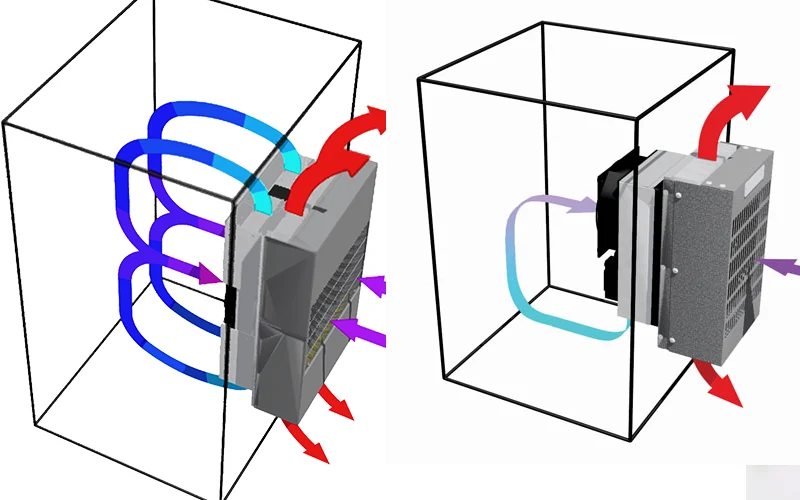
Getting your enclosure cooling system right starts with understanding how much heat you need to remove. You want to keep your equipment safe and running smoothly, so let’s break down the process into three main parts: internal heat sources, external heat transfer, and the total heat load formula.
Internal Heat Sources
First, look inside your enclosure. Every device, power supply, and electronic board gives off heat. This is called the internal heat load. If you ignore this, your enclosure cooling system might not work as expected.
Here’s how you can figure out the internal heat load:
- Check the power rating (in watts) for each device inside the enclosure.
- Add up all the wattages. This total shows the heat generated by the components.
- Remember, almost all the power used by electrical devices turns into heat.
For example, if you have three devices rated at 50W, 30W, and 20W, your internal heat load is 100W. To use a heat load calculator, you’ll need this number. Most calculators ask for the total internal heat load in watts or Btu/hr.
Tip: Always double-check your equipment list. Missing a device can lead to underestimating the internal heat load, which means your enclosure cooling system might not keep up.
External Heat Transfer
Now, think about what’s happening outside the enclosure. The environment can add extra heat, especially if your enclosure sits in a hot room or under direct sunlight. This is called the external heat load.
External heat transfer happens in three main ways:
| Mechanism | Description |
|---|---|
| Conduction | Heat moves through the enclosure walls. Materials like steel transfer heat quickly, so you get more heat coming in. |
| Convection | Air moving around the enclosure can carry heat inside, especially if the enclosure isn’t well sealed. |
| Radiation | Sunlight or other heat sources can warm up the enclosure, even if the air feels cool. |
Some materials, like steel, create thermal bridges. These bridges let heat move in faster, making your enclosure cooling system work harder. Modern enclosures use special designs to reduce this effect.
External conditions matter a lot. On a hot summer day, the temperature difference between inside and outside increases. This makes the external heat load higher. Humidity also plays a role. High humidity can raise the total heat load, especially if your enclosure is outdoors or in a factory.
- Sensible heat load goes up when it’s hot outside.
- Latent heat load increases with humidity.
- Both add to the work your enclosure cooling system must do.
Note: If your enclosure sits in direct sunlight, the external heat load can jump by 20-30%. Always consider the worst-case scenario when planning your cooling.
Total Heat Load Formula
Now, let’s put it all together. You need to know the total heat load before you pick an enclosure cooling system. Here’s a simple way to calculate it:
- Calculate the internal heat load in watts. Multiply by 3.41 to convert to Btu/hr.
- Figure out the external heat load. Measure the surface area exposed to air. Find the temperature difference between inside and outside. Use a conversion table to get Btu/hr/ft².
- Multiply the surface area by the conversion factor to get the external heat load in Btu/hr.
- Add the internal and external heat loads. This gives you the total heat load in Btu/hr.
The total heat load tells you how powerful your enclosure cooling system needs to be. Most heat load calculator tools use this method. They help you avoid common mistakes, like forgetting about the ambient temperature or ignoring sunlight.
Common errors include:
- Treating enclosure cooling as an afterthought.
- Ignoring the full range of outside temperatures.
- Overlooking the effect of solar radiation.
- Grouping hot devices together inside the enclosure.
- Blocking airflow with poor layout.
- Underestimating the internal heat load.
If you follow these steps, you’ll get a reliable number for your enclosure cooling system. This makes it easy to choose the right Linkwell solution and keep your equipment safe.
Using the Enclosure Cooling Calculator
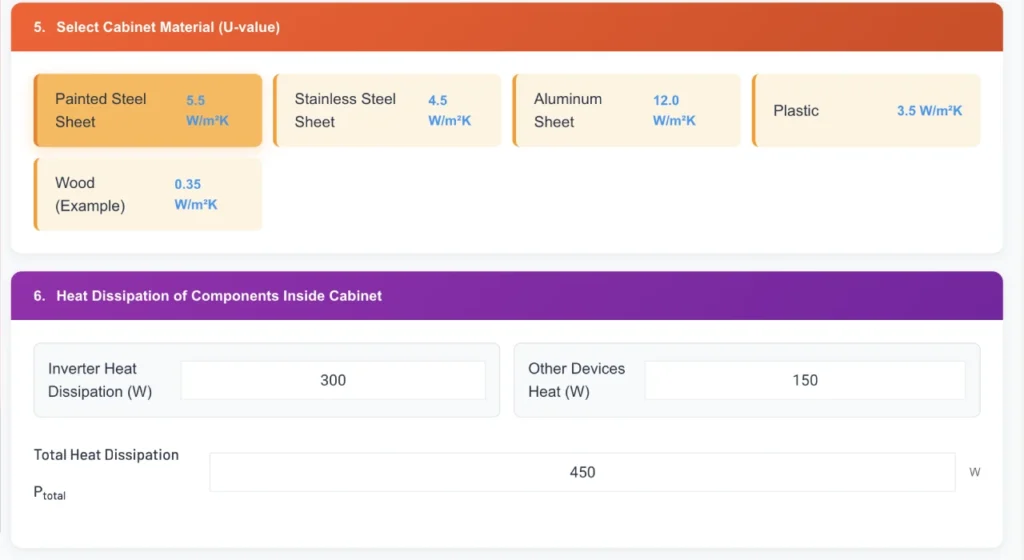
You’re ready to make your enclosure safer and more reliable. The enclosure cooling calculator helps you figure out exactly what you need. Let’s walk through the process together.
Inputting Data
Start by gathering all the details about your enclosure. The enclosure cooling calculator asks for specific information. You’ll want to have these numbers handy:
| Input Data | Unit of Measure | Example Value |
|---|---|---|
| Cabinet material | Steel | |
| Cabinet height | mm | 1800 |
| Cabinet length | mm | 800 |
| Cabinet depth | mm | 600 |
| Minimum external temperature | °C | 10 |
| Maximum external temperature | °C | 40 |
| Minimum internal temperature | °C | 20 |
| Maximum internal temperature | °C | 50 |
You also need to know the total heat load from your equipment. Write down the wattage for each device inside the cabinet. Add them up. This number is key for the enclosure cooling calculator.
When you use an online cooling calculator, you’ll enter these values step by step. The calculator uses your cabinet dimensions, material, and temperature ranges to estimate how much heat needs to be removed. It also considers the heat generated by transformers, circuit breakers, and other components. If your enclosure sits in a hot room or outdoors, make sure you include the highest possible external temperature.
Tip: Double-check your measurements before you start. Accurate data means better results.
Interpreting Results
Once you’ve entered all your data, the enclosure cooling calculator gives you a recommended cooling capacity. You’ll see the result in watts or Btu/hr. This number tells you how much cooling power you need to keep your equipment safe.
Here’s what you should look for:
- The calculator shows the total heat load. This includes both internal and external sources.
- It suggests the cooling capacity needed to maintain your target temperature.
- You’ll see if forced air cooling is enough, or if you need a more advanced solution.
If the calculator recommends forced air cooling, you can choose from Linkwell’s Electrical Enclosure Fans or ventilation systems. These products move air efficiently and help remove excess heat. For higher heat loads, the calculator may suggest a cabinet air conditioner. Linkwell’s Cabinet Air Conditioners offer precise temperature control and work well in tough environments.
Use the results to match your needs with the right Linkwell product:
| Cooling Solution | Best For | Linkwell Product Example |
|---|---|---|
| Forced air cooling | Moderate heat loads, indoor use | LK3238 Series Fan and Filter |
| Cabinet air conditioner | High heat loads, outdoor or dusty settings | EIA Series 05 Cabinet Air Conditioner |
| Ventilation system | General airflow, moisture control | Electrical Enclosure Ventilation Kits |
Note: Always aim to keep your internal temperature at least 20°F below the maximum rating of your most sensitive component.
Avoiding Common Mistakes
It’s easy to make errors when using an enclosure cooling calculator. Here are some common pitfalls and how you can avoid them:
- Incorrect initial data: Make sure you use accurate cabinet dimensions and temperature readings. Old or estimated numbers can lead to problems.
- Oversizing or undersizing: If you pick a cooling system that’s too big or too small, you risk poor performance or wasted energy.
- Mechanical incompatibility: Always check that your chosen forced air cooling solution fits your cabinet. Mismatched sizes can block airflow.
- Wrong thermal architecture: Don’t select a cooling method that doesn’t match your enclosure’s needs. Forced air cooling works for many cases, but high heat loads may need air conditioning.
- Exceeding internal temperature limits: If you let your enclosure get too hot, you risk condensation and damage.
- Poor enclosure layout: Place your equipment so air can move freely. Avoid blocking fans or vents.
- Cooling as an afterthought: Plan your cooling system early. Don’t wait until installation or testing.
Tip: Keep spare parts like filters and fans on hand. Regular maintenance helps prevent downtime.
If you follow these steps, you’ll get the most out of your enclosure cooling calculator. You’ll know when forced air cooling is enough and when you need a cabinet air conditioner or a full ventilation system. Linkwell’s products cover all these options, so you can find the perfect match for your project.
Choosing Linkwell Cooling Solutions
You’ve got your cooling requirements calculated. Now, let’s match them to the best Linkwell products for your enclosure. Linkwell offers several types of enclosure cooling solutions, each designed for different needs and environments. You’ll find options for indoor cabinets, outdoor enclosures, and even high-density industrial setups.
Cabinet Air Conditioners
Cabinet air conditioners work well for enclosures with high heat loads or those exposed to tough conditions. If your enclosure sits outdoors or in a hot factory, you need a powerful cooling system. Linkwell’s cabinet air conditioners come in different sizes and cooling capacities. You can use the heat load formula to figure out the right model: Heat = SystemMaxPower * (1 – efficiency). This helps you pick a unit that handles the heat your equipment produces.
Here’s a quick table to help you choose:
| Location | Cooling Power Needed |
|---|---|
| Location1 | 250W |
| Location2 | 325W |
| Summary | Air conditioners with the same power work differently in hot areas. |
When you select a cabinet air conditioner, look at the BTU rating, cabinet size, and heat output. Regular maintenance and filter changes keep your system running efficiently. Linkwell’s air conditioners offer energy savings and long-term reliability, which means lower utility bills and fewer repairs.
Enclosure Fans
Enclosure fans are perfect for moderate heat loads and indoor environments. These fans move air through your cabinet, preventing hot spots and keeping temperatures stable. You can target hot areas by positioning fans where heat builds up. Integrate thermostats to control fan operation based on temperature. This saves energy and extends equipment life.
Try these strategies for better airflow:
- Attach blanking panels to fill gaps and prevent air mixing.
- Use real-time temperature monitors to spot spikes early.
- Separate hot and cold air with chimney structures or aisle containment.
Linkwell’s enclosure fans fit standard cabinets and work with other enclosure cooling systems. They’re easy to install and maintain, making them a smart choice for many projects.
Ventilation Systems
Ventilation systems help you manage airflow and moisture inside your enclosure. These solutions include fan kits, louvers, and ducts. You can use ventilation accessories to stabilize temperatures and prevent condensation. Linkwell’s ventilation systems work well in dusty or humid environments, protecting sensitive electronics.
Here’s a table of strategies to optimize your enclosure:
| Strategy | Description |
|---|---|
| Install Physical Barriers | Use curtains or panels to direct airflow. |
| Use Ventilation Accessories | Add louvers and ducts for better air movement. |
| Monitor Temperatures | Detect spikes early with sensors. |
When you choose among types of enclosure cooling solutions, consider ambient temperature, solar load, and NEMA rating. Linkwell’s products meet these standards, so you get reliable protection.
Using Linkwell cooling solutions gives you long-term savings. Their energy-efficient designs lower power use and maintenance costs. You also extend the life of your equipment, which means fewer replacements and repairs. Choosing sustainable cooling systems supports your company’s environmental goals.
Practical Tips and Troubleshooting
Ensuring Accuracy
You want your enclosure cooling system to work right the first time. Start by collecting all the important details. Measure your enclosure size and list every piece of equipment inside. Check the environment around your enclosure. Is it hot, humid, or dusty? These factors matter.
Here’s a simple checklist to help you get accurate results:
- Gather all relevant information about your enclosure and equipment.
- Use manufacturer data to calculate the heat load from each device.
- Set clear temperature limits based on your equipment’s ratings and the ambient conditions.
- Use an online enclosure cooling calculator or manual methods to find out how much cooling you need.
- Decide if your enclosure should be sealed or ventilated, depending on the environment.
- Pick a cooling solution that matches your data and needs.
Tip: Double-check your numbers before you buy any cooling products. Small mistakes can lead to big problems later.
Maintenance Advice
Regular maintenance keeps your cooling system running smoothly. If your enclosure isn’t staying cool, you might need to troubleshoot. Try these steps:
- Inspect filters on fans and air conditioners every month. Replace them every three to six months to stop dirt from blocking airflow.
- Clean filters gently with compressed air or a soft brush. Don’t damage them.
- If passive cooling isn’t enough, add fans to boost air circulation.
- For sealed enclosures, use closed-loop cooling systems like heat exchangers or thermoelectric coolers.
- Watch for warning signs such as overheating alarms or condensation inside the enclosure.
A clean and well-maintained system works better and lasts longer. You’ll avoid unexpected shutdowns and keep your equipment safe.
When to Seek Expert Help
Sometimes, cooling problems need a professional touch. Look out for these signs:
- Temperatures inside your enclosure keep changing.
- Equipment fails often because of overheating.
- You see dust or debris inside, which could mean filter issues or leaks.
- Cooling devices make strange noises.
If you notice any of these issues, reach out to an expert. Getting help early can save you time and money. Choosing the right cooling equipment during the design stage helps prevent future headaches and costly repairs.
Note: Linkwell’s team offers 24/7 support and custom solutions. You can always ask for advice if you’re unsure about your cooling setup.
You can keep your equipment safe by following a few simple steps.
- Enter your enclosure size, location, and temperature details.
- Add up the heat from all internal components.
- Choose the best cooling method for your needs.
- Check energy savings and sustainability.
- Download your report for easy planning.
Try Linkwell’s enclosure cooling calculator and products for reliable results. If you need help, reach out to Linkwell’s experts for custom solutions.
FAQ
How do I know which cooling solution fits my enclosure?
You should check your enclosure’s size, heat load, and environment. Use the enclosure cooling calculator. Match the results with Linkwell’s fans, air conditioners, or ventilation systems for the best fit.
Can I use Linkwell products outdoors?
Yes! Linkwell offers IP54/IP65 and NEMA-rated cooling solutions. These products work well in outdoor, dusty, or humid environments. You get reliable protection for your equipment.
How often should I clean or replace filters?
You should inspect filters every month. Replace them every three to six months. Clean filters with compressed air or a soft brush. This keeps airflow strong and your system running smoothly.
What if my enclosure still overheats after installing cooling?
Check for blocked airflow, dirty filters, or high ambient temperatures. Make sure you sized your cooling system correctly. If problems continue, contact Linkwell’s support team for expert help.


