
You might wonder when to use cooling fans electrical enclosure solutions. If you see inconsistent temperatures inside your cabinet, notice frequent equipment failures, or hear unusual noises, these are warning signs you should not ignore. Visible dust or debris also points to cooling issues. Over 25% of panel failures happen because of thermal stress from poor cooling. Take action before problems arise. Linkwell offers trusted and reliable enclosure cooling solutions for peace of mind.
Key Takeaways
- Use cooling fans if your electrical enclosure feels hot or shows signs of overheating. This prevents equipment failure.
- Install cooling systems in environments with high temperatures, continuous operation, or poor airflow to protect sensitive electronics.
- Regularly check for dust and moisture inside your enclosure. Keeping it clean helps maintain effective cooling.
- Choose the right fan size and airflow based on your enclosure’s heat load to ensure efficient cooling.
- Contact Linkwell for expert advice on cooling solutions tailored to your specific needs and conditions.
When to Use Cooling Fans Electrical Enclosure
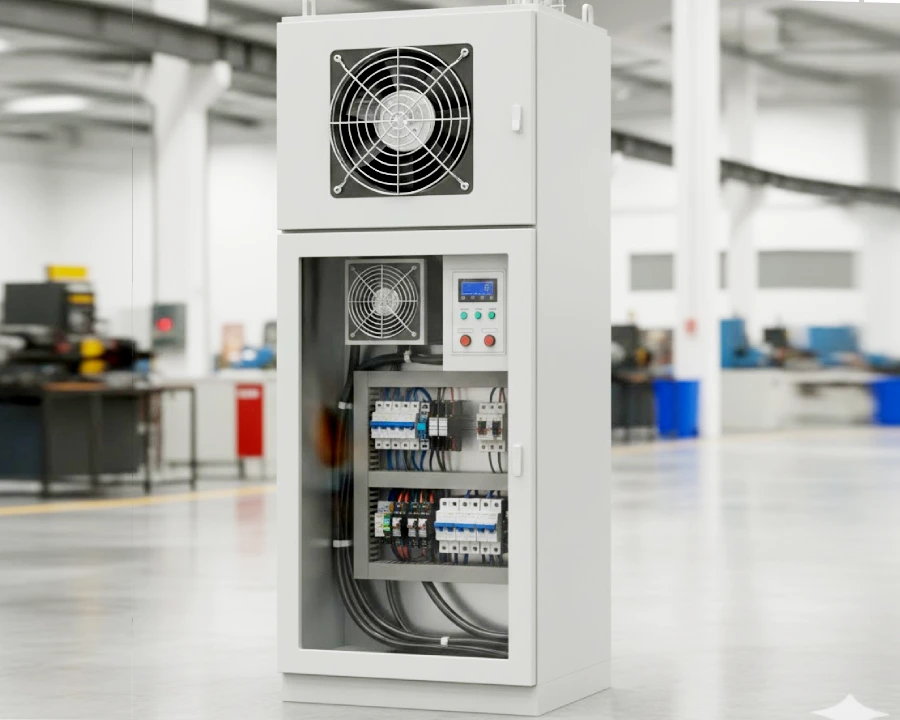
Key Situations for Cooling Fans
You might ask yourself, when to use cooling fans electrical enclosure solutions? The answer often depends on your environment and the type of equipment you use. If your electrical cabinets sit in hot factories, outdoor locations, or places with poor airflow, you need to think about cooling systems right away. High temperatures can build up fast, especially when machines run all day or the sun beats down on your enclosure.
Let’s look at some common scenarios where cooling fans become essential:
- High Ambient Temperatures: If your workspace or outdoor site regularly hits 40°C (104°F) or higher, your enclosure cooling systems will struggle to keep up.
- Sensitive Equipment: Devices like variable frequency drives (VFDs), telecom gear, and control panels can’t handle much heat. They often need cooling systems to stay below their safe limits.
- Continuous Operation: When your machines run non-stop, they generate more heat. This makes ventilation and cooling systems even more important.
- Seasonal Changes: Hot summers or sudden heat waves can push your enclosure’s temperature past safe levels.
- Dusty or Humid Environments: Dust and moisture can block ventilation and make cooling less effective. You need fans that keep air moving and filters that block debris.
Here’s a quick reference table showing industry standards for temperature thresholds in electrical enclosures:
| Component Type | Rated Operating Temperature | Cooling Requirement |
|---|---|---|
| General Devices | 60 °C (140 °F) | May require cooling if ambient exceeds limits |
| VFDs | 40 °C (104 °F) | Active cooling needed in high ambient conditions |
| Optimal Cooling Set Point | 35 °C (95 °F) | Target for cooling units to maintain efficiency |
If your enclosure temperature gets close to these numbers, it’s time to consider cooling fans. Linkwell’s enclosure cooling systems use forced ventilation to move heat out quickly. These fans fit easily into most cabinets and work better than passive vents, especially in tight spaces.
Tip: Don’t wait for equipment to fail. If you notice rising temperatures or your enclosure feels hot to the touch, install cooling fans before problems start.
Common Signs You Need Cooling
You don’t have to guess when to use cooling fans electrical enclosure solutions. Your equipment will give you clues. Watch for these warning signs:
| Sign of Insufficient Cooling | Description |
|---|---|
| Overheating | The inside of your enclosure feels hot, or you see temperature alarms. |
| Inadequate Cooling Capacity | You’ve added new devices, and the old cooling system can’t keep up. |
| Dirt Accumulation | Dust and debris block airflow, making ventilation less effective. |
| Condenser Filter Issues | Dirty filters slow down air movement and raise temperatures. |
| Unusual Noises from AC Unit | Strange sounds mean your cooling system might be failing. |
Other red flags include:
- Frequent Equipment Malfunctions: If your devices shut down or act strangely, heat could be the cause.
- Corrosion or Discoloration: Rust or faded spots around terminals show that moisture and heat are hurting your enclosure.
- Recurring Repairs: If you keep fixing the same problems, poor ventilation or weak cooling systems might be to blame.
High temperatures can damage sensitive electronics. Overheating causes more than half of all electronic failures. You might see warped circuit boards, dead batteries, or even fire risks if you ignore these signs. Telecom equipment is especially at risk. Too much heat can cut the life of your hardware in half, leading to expensive replacements.
Linkwell’s enclosure cooling fans help you avoid these headaches. They control temperature, block dirt, and keep out moisture. You get longer equipment life, fewer repairs, and peace of mind. Their fans use energy efficiently and fit into almost any enclosure, making them a smart choice for both new and old systems.
So, when to use cooling fans electrical enclosure? If you spot any of these signs or work in tough environments, don’t wait. Good ventilation and effective cooling systems protect your investment and keep your operations running smoothly.
Risks of Poor Electrical Enclosure Cooling
Overheating and Equipment Failure
You might think a little extra heat won’t hurt your equipment, but even small temperature spikes can cause big problems. When you don’t have proper enclosure cooling, the temperature inside your cabinet can rise above the maximum enclosure temperature. Sensitive electronics start to fail. You may see random shutdowns, flickering displays, or even total malfunction. If you want to prevent malfunction due to overheating, you need reliable cooling systems that remove excessive heat and keep everything running smoothly.
Industry standards show that electrical enclosure thermal management is not just about comfort—it’s about safety and performance. Without good temperature control, heat dissipation slows down. Components get stressed, and you risk permanent damage. Linkwell’s cooling systems help you remove excess heat and prevent overheating, so your equipment lasts longer and works better.
Condensation and Corrosion
You might not notice moisture right away, but condensation can sneak up on you, especially during cool nights or sudden temperature drops. When the inside of your enclosure cools to the dew point, water forms on surfaces. This cycle of condensation and evaporation leads to corrosion of sensitive electronics. Corroded parts can crack, develop holes, or lose their protective seals. That lets in more dust and moisture, making things worse.
Here’s what can happen if you ignore condensation:
- Water from condensation can cause tracking, which leads to short circuits or ground faults.
- The risk of fire goes up when moisture causes electrical faults.
- Corrosion means more repairs, higher costs, and even safety hazards.
Good electrical enclosure thermal management means you keep humidity low and use cooling systems that support temperature regulation. Linkwell’s fans and filters help you maintain steady temperature control and heat dissipation, so you prevent overheating and protect your investment.
Downtime and Reliability Issues
Downtime hits hard. Just 30 minutes without proper enclosure cooling can lead to lost production, idle workers, and missed deadlines. Some industries report costs as high as $260,000 per hour for unplanned downtime. You also risk losing customer trust and damaging your reputation.
When you don’t focus on electrical enclosure thermal management, you face unpredictable performance and frequent malfunction. Cooling systems that remove excess heat and support heat dissipation help you avoid these headaches. Linkwell’s solutions give you reliable temperature control, so you keep your operations running and your costs down.
Note: Investing in quality electrical enclosure thermal management and cooling systems now saves you from expensive repairs and lost business later.
How Enclosure Cooling Improves Reliability
Extending Equipment Lifespan
You want your electrical equipment to last as long as possible. Proper cooling systems make a huge difference. When you keep your enclosure at a safe temperature, you protect sensitive electronics from heat stress. Here’s what happens when you use the right cooling systems:
- Every 10°C rise in temperature can cut the life of your components in half.
- Heat stress is one of the main reasons equipment fails early.
- Most electrical gear works best below 40°-50°C. If you go above that, you risk big problems.
- Cooling systems help you avoid condensation and corrosion, which also helps extend component life.
By keeping things cool, you make sure your equipment runs longer and more reliably.
Reducing Maintenance and Costs
Nobody likes surprise repairs or high bills. Cooling systems help you avoid both. When you use fans in your enclosure, you lower the risk of overheating and dust buildup. This means fewer breakdowns and less time spent fixing things. Take a look at how cooling systems save you money:
| Benefit | Description |
|---|---|
| Lower repair costs | Fans protect equipment from overheating and dust, so you don’t need as many repairs. |
| Reduced maintenance costs | You can cut maintenance costs by about 60% compared to traditional systems. |
| Simple maintenance tasks | Cleaning the fan grille and blades only needs to happen every 6–12 months. |
| Durable components | Ball bearing motors last longer and need fewer repairs. |
| Avoidance of expensive AC units | Fans cost less to buy, run, and maintain than air conditioning systems. |
Cooling systems keep your equipment stable, so you spend less on repairs and maintenance.
Linkwell Electrical Enclosure Fan Benefits
When you choose Linkwell, you get more than just a fan. You get a solution that helps your business run smoothly. Here’s why Linkwell stands out:
| Benefit | Explanation |
|---|---|
| Regulates internal temperature | The fan keeps the air at the right level, so your components avoid thermal stress. |
| Prevents condensation and corrosion | Good air flow stops moisture from building up, which protects against shorts and failure. |
| Extends lifespan of equipment | Stable air flow inside the enclosure means your gear lasts longer and works better. |
Enclosure cooling improves reliability for your whole system. With Linkwell’s cooling systems, you get peace of mind, fewer headaches, and a longer life for your equipment.
Choosing the Right Electrical Enclosure Fan
Sizing and Airflow Needs
Picking the right fan starts with understanding your enclosure’s heat load. You need to know how much heat your equipment produces. First, add up the total heat output from all devices inside the cabinet. Next, look at the size of your enclosure and the environment. If you work in a climate-controlled room, passive ventilation might be enough. In dusty factories or outdoor sites, forced air cooling is the best choice.
Here’s a quick guide for matching airflow rates to enclosure types:
- Interior control panels often need little airflow. Passive vents work well.
- Industrial machine cabinets require forced air cooling to handle motors and drives.
- Outdoor equipment houses need sealed or filtered forced air cooling to block moisture and dust.
- Data cabinets with dense electronics benefit from smart forced air cooling systems.
To size your fan, follow these steps:
- Figure out the heat load of your enclosure.
- Choose a fan with enough CFM (cubic feet per minute) for forced air cooling.
- Make sure the fan fits your enclosure’s cutout and matches your voltage needs.
Tip: Forced air cooling works best when you keep the enclosure temperature at least 11°C (20°F) below your equipment’s maximum limit.
Installation and Integration
You want your cooling system to work efficiently. Forced air cooling depends on proper installation. Place fans and vents where they can move air across all components. Avoid blocking airflow with wires or large devices. Use filters to keep dust out and maintain airflow.
Best practices for installing forced air cooling fans include:
- Design your system to keep temperatures well below the equipment’s safe limit.
- Calculate the total heat load and pick forced air cooling fans that match.
- Decide if you need open or closed-loop forced air cooling.
- Set up monitoring and regular maintenance for your fans.
Sometimes, adding forced air cooling to an existing enclosure brings challenges. You must optimize airflow and choose the right fan size and number. Accessories like thermostats and hygrostats help automate forced air cooling and keep everything running smoothly.
Note: Forced air cooling only works if you maintain clear airflow paths and clean filters.
Linkwell Product Features
Linkwell offers fans designed for forced air cooling in tough environments. You get reliable performance and easy integration. Check out these features:
| Feature | Description |
|---|---|
| Effective Thermal Management | Keeps enclosure temperatures below 35°C (95°F) for safe operation. |
| Protection Against Contaminants | Sealed forced air cooling fans block dust and moisture. |
| Energy Efficiency | High-efficiency forced air cooling systems lower energy costs. |
| Long-Term Reliability | Fans run up to 70,000 hours with little maintenance. |
| Compact Cooling | Small forced air cooling fans fit tight spaces but deliver strong airflow. |
| Weatherproof Durability | IP68-rated forced air cooling fans work in any climate. |
| High-Performance Airflow | Forced air cooling handles heavy heat loads with powerful AC and DC fans. |
| Reliable Operation | Forced air cooling fans tested for outdoor, high-altitude, and dusty sites. |
Linkwell’s forced air cooling fans meet or exceed industry standards. You get ULPA filtration, low noise, and wide temperature ranges. Forced air cooling from Linkwell keeps your equipment safe, efficient, and ready for any challenge.
Conclusion
You’ve learned when cooling fans become essential for your electrical enclosures. If you spot rising temperatures, frequent equipment failures, or see dust building up inside your cabinet, don’t wait. These signs mean your system needs better cooling. Acting early helps you avoid costly repairs and keeps your operations running smoothly.
Let’s recap the main reasons you should use cooling fans:
- You work in hot environments or outdoors.
- Your equipment runs all day and generates lots of heat.
- You notice condensation, corrosion, or dirt inside your enclosure.
- You want to extend the life of your electronics and reduce downtime.
Tip: Regularly check your enclosure’s temperature and airflow. If things feel warm or you see warning signs, consider installing a cooling fan before problems start.
Choosing the right cooling solution makes a big difference. Linkwell offers high-quality electrical enclosure fans that fit many cabinet types. Their products help you control temperature, block dust, and protect sensitive electronics. You get reliable performance, energy savings, and peace of mind.
Here’s a quick checklist to help you decide your next steps:
| What to Do Next | Why It Matters |
|---|---|
| Assess your enclosure’s heat | Prevent overheating |
| Check for dust and moisture | Avoid corrosion and failures |
| Review your equipment’s needs | Match the right cooling system |
| Contact Linkwell for support | Get expert advice and solutions |
You don’t have to guess or take risks. Reach out to Linkwell for help with sizing, installation, and product selection. Their team supports you every step of the way. Protect your investment and keep your systems cool—your equipment will thank you!
You need cooling fans in your electrical enclosures for several key reasons:
- Control temperature and prevent overheating.
- Keep out dirt, debris, and corrosive vapors.
- Extend the life of your equipment.
- Avoid costly malfunctions and downtime.
Proactive cooling protects your electronics and keeps your operations running smoothly. Every degree matters for your equipment’s lifespan.
Here’s what you can do next:
- Assess your enclosure’s heat load and ambient conditions.
- Choose the right cooling technology and size.
- Plan for regular maintenance.
- Reach out to Linkwell for certified, reliable, and customized solutions.
| Why Partner with Linkwell? | What You Get |
|---|---|
| Reliable supply | Fast delivery and bulk support |
| Certified quality | CE, UL, ISO9001 assurance |
| Customization options | Solutions tailored to your needs |
| Improved customer trust | Fewer failures, happier clients |
FAQ
How do I know if my enclosure needs a cooling fan?
If your cabinet feels hot, equipment shuts down, or you see dust inside, you probably need a cooling fan. Check for temperature alarms or frequent malfunctions. These signs mean your enclosure needs better airflow.
Can I install a Linkwell cooling fan myself?
Yes, you can install most Linkwell fans with basic tools. The fans fit standard cutouts and come with clear instructions. If you need help, Linkwell’s support team is ready to guide you.
What maintenance does a cooling fan require?
You should clean the fan grille and replace filters every 6–12 months. Check for dust buildup and make sure the fan blades spin freely. Regular maintenance keeps your cooling system working well.
Will a cooling fan reduce my energy costs?
Yes, Linkwell fans use energy-efficient motors and smart blade designs. You get strong airflow with less power. Lower energy use means you save money over time.


