
If you run into transformer issues in your control panel or HVAC system, you know how quickly things can go downhill. You might notice energy losses or even a sudden drop in system performance. A faulty hvac transformer often means higher costs and less reliability. When troubleshooting, always put safety first—wear proper gear, de-energize equipment, and keep your workspace clear. Reliable brands like Linkwell help you avoid troubleshooting problems and make it easier to learn how to check 24v transformer performance. Whether you’re a pro or a DIYer, smart troubleshooting keeps your system running strong.
Key Takeaways
- Always prioritize safety when troubleshooting. Wear protective gear and turn off power before starting any work.
- Check the main power supply and breakers first. A tripped breaker or loose wire can often be the real issue, not the transformer.
- Use a multimeter to measure voltage on both the primary and secondary sides of the transformer. This helps identify faults quickly.
- Inspect the transformer and wiring for physical damage. Look for burn marks, loose connections, or signs of overheating.
- Regular maintenance and checks can prevent transformer failures. Keep loads within rated limits and ensure proper grounding.
Troubleshooting Power Supply Issues
Check Main Power and Breakers
When you start troubleshooting a transformer, always check if it’s getting power. You don’t want to waste time chasing a faulty hvac transformer when the real issue is a tripped breaker or a loose wire. Here’s a quick way to verify the power supply:
- Look at the main breaker. Make sure it’s switched on and not tripped.
- Inspect the wiring for any loose connections or signs of damage.
- Use a reliable multimeter to test the input voltage at the transformer terminals. Always test with AC, not DC.
- Confirm the power is on during testing. If you test with the wires disconnected, you might miss a load failure.
- If you spot a blown breaker, reset it and see if the transformer comes back online.
Tip: If you’re troubleshooting a power surge or sudden shutdown, always check the breaker first. Power interruptions can cause an hvac problem that looks like a transformer fault.
Inspect Fuses for Correct Rating
Fuses protect your transformer from overloads and shorts. If the fuse rating is wrong, you risk burning out the transformer or causing a bigger hvac problem. Here’s what you should do:
- Check the fuse for continuity using your multimeter. If it’s blown, replace it.
- Make sure the fuse matches the rating specified for your transformer. Using the correct size helps prevent failures.
- Linkwell transformers come with safety features that work best when paired with the right fuse. This keeps your system safe and reliable.
- Don’t assume the thermostat is the issue. Always inspect the fuse first, since a blown fuse can block output and mimic transformer failure.
If you follow these troubleshooting steps, you’ll quickly spot power supply issues before they turn into bigger problems. Regular checks help you avoid downtime and keep your system running smoothly.
How to Check 24V Transformer Voltage
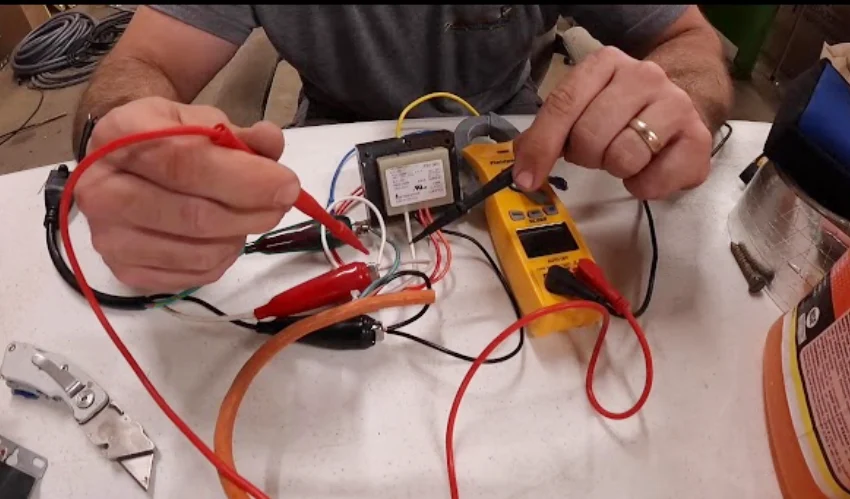
If you want to know how to check 24v transformer voltage, you need a simple process and the right tools. You can use a multimeter to get accurate readings and spot problems fast. Let’s walk through the steps together.
Use a Multimeter Safely
Safety comes first. Before you start, turn off the power at the breaker. Remove any panels to reach the transformer. Make sure you wear insulated gloves and stand on a dry surface. Set your multimeter to AC voltage. Double-check that your test leads are in the correct ports. Now you’re ready to begin troubleshooting.
Measure Primary and Secondary Sides
You need to check both sides of the transformer. Here’s how to check 24v transformer voltage step by step:
- Turn the power back on after you set up your multimeter.
- Place the multimeter probes on the primary side terminals. You should see a reading between 110 and 240 volts AC, depending on your system.
- Move the probes to the secondary side. For most control panels, you should see 24 to 28 volts AC.
- Test the transformer under load. Make sure the system is running and the load is connected.
- If you get a low or zero reading, you may have a faulty transformer or a wiring issue.
Tip: Linkwell Control Transformer and Industrial Control Transformer give you stable and accurate voltage, making troubleshooting easier.
Here’s a quick look at common voltage ranges:
| Primary Voltage (V) | Secondary Voltage (V) |
|---|---|
| 208 | 24 |
| 240 | 24 |
| 460 | 24 |
Interpret Voltage Readings
When you check the readings, you want to see 24 to 28 volts on the secondary side with no load. Under full load, the voltage should not drop below 22.5 volts. If you see numbers outside these ranges, you may need more troubleshooting. If the primary side shows no voltage, focus on troubleshooting the primary side. If the secondary side is low, start troubleshooting the secondary side.
Knowing how to check 24v transformer voltage helps you catch problems early. With Linkwell transformers, you get reliable results every time.
Inspect Linkwell Transformer and Wiring
When you start troubleshooting, don’t skip a close look at your transformer and all the wiring. A quick inspection can save you from bigger headaches later. Let’s break down what you should check.
Look for Physical Damage or Burn Marks
Start by scanning the transformer and all visible wiring. You want to spot anything that looks out of place. Here’s what to look for:
- Cracked or melted insulation on wires
- Burn marks or discoloration on the transformer case
- Loose or frayed connections
- Corrosion on terminals
If you see any of these, stop and address the issue before moving forward. Regular inspections like this help prevent fires and electrical hazards. They also catch problems like corrosion or insulation breakdown before they cause system downtime.
Tip: Even though Linkwell transformers are built for harsh conditions, you should still check them often. Regular cleaning and testing can catch small issues before they turn into big failures.
Check for Overheating or Odors
Next, use your senses. Feel the transformer (carefully) for unusual heat. Smell for any odd or burnt odors. These signs often point to trouble. Common causes of overheating include:
- Overloading the transformer
- Using the wrong load rating
- Poor airflow or blocked vents
- Damaged insulation
- Low-quality windings
- High temperatures or humidity in the room
Temperature and humidity can make a big difference. High heat can age your transformer faster and make it less efficient. Humidity can damage insulation and cause corrosion, leading to costly repairs.
Examine Thermostat and Relay Wiring
Don’t forget to check the wiring for thermostats and relays. Make sure all connections are tight and free from rust or buildup. Loose connections can cause voltage drops and system failures. If you spot any shorts or broken wires, fix them right away.
Here’s a quick look at how Linkwell transformers compare to the industry average:
| Feature | Linkwell Control Transformers | Industry Average |
|---|---|---|
| Defect Rate | 0.001 | 0.003 |
| Designed for Harsh Conditions | Yes | No |
Linkwell transformers meet UL, CE, and ISO 9001:2015 standards. You get peace of mind knowing your equipment is built to last, but regular troubleshooting and maintenance keep everything running smoothly.
Troubleshooting Connected Components
When you run into transformer problems, the issue might not be with the transformer itself. Sometimes, connected components like relays, contactors, or thermostats cause trouble. You need to check these parts before you replace a transformer. This step can save you time and money.
Test Relays, Contactors, and Thermostats
Start by looking at the relays, contactors, and thermostats. These devices control the flow of electricity in your hvac system. If one of them fails, you might think you have a faulty hvac transformer. Here’s how you can test them:
- Turn off the power before you touch anything.
- Inspect all connections for signs of loose connections or corrosion.
- Use a multimeter to check for continuity across the relay or contactor coil. If you get no reading, the coil is open.
- Try troubleshooting a contactor by pressing the manual override. If the contacts do not close, you may have a bad contactor.
- For thermostats, check if the device sends the right signal when you adjust the temperature.
Tip: If you’re troubleshooting an inoperable indoor fan or troubleshooting the outdoor condensing unit, always check these components first. A small fault here can stop your whole system.
Identify Short Circuits or Open Coils
Short circuits and open coils can cause transformer failures. You can use these steps to find the problem:
- Run a continuity test on each coil. If you find an open circuit, the coil is bad.
- Set your multimeter to the highest resistance range. Check for shorts between the primary and secondary windings. They should be isolated.
- Test for shorts between the windings and the transformer core. If you find a short, replace the transformer.
If you find a problem with any component, fix it before you install a new transformer. Linkwell step down transformer and Control Transformer give you reliable operation in complex systems. They help prevent repeat failures and keep your hvac running smoothly.
Regular troubleshooting of all connections and components keeps your system safe and efficient.
Check for Overloads and Grounding
Verify Load Against Nameplate Ratings
You want your transformer to last as long as possible. Start by checking the actual load against the nameplate ratings. If you overload the transformer, you risk more than just a quick shutdown. Here’s what can happen:
- Operational temperatures rise fast.
- Insulation ages, which shortens the transformer’s lifespan.
- Electrical equipment connected to the transformer may get damaged.
During summer, keep the load below 15% of the rated capacity. In winter, you can go up to 30%. These limits help you avoid overheating and protect your hvac system. Always compare the total load from relays, thermostats, and contactors to the transformer’s rating. If you notice loose connections or a bad contactor, fix them before they cause trouble. Overloads often start with small issues in connections, so regular checks matter.
Tip: If you see burn marks or smell something odd, check the load right away. Overloads can sneak up on you and damage your transformer before you know it.
Ensure Proper Grounding of Common
Grounding keeps your system safe. You need to make sure the common terminal is grounded correctly. Here are some best practices:
- Bond the neutral and ground at only one point, either at the panel or the transformer.
- Avoid parallel ground paths. These can cause fault current to circulate and create safety risks.
- Use a system bonding jumper sized for the largest ungrounded conductor, following NEC Table 250.102(C)(1).
- Make grounding connections at the transformer’s equipment grounding terminals.
Proper grounding helps you troubleshoot safely and prevents electrical hazards. Linkwell transformers support safe grounding and overload protection. You get peace of mind knowing your equipment meets strict safety standards.
| Safety Standard | Description |
|---|---|
| UL Certification | Meets electrical safety standards. |
| CE Certification | Follows European safety regulations. |
| IEC Requirements | Complies with international electrical safety standards. |
| ANSI Requirements | Validates American National Standards. |
| Grounding Support | Features for proper grounding. |
| Overload Protection | High-quality insulation and protection mechanisms. |
Regular checks for overloads and grounding keep your transformer and hvac system running smoothly. You avoid downtime and protect your investment.
Conclusion
You’ve just learned five quick ways to troubleshoot 24V transformer issues. These steps help you spot problems fast and keep your system running strong. Let’s recap what you should remember:
Tip: Always put safety first. Wear protective gear, turn off power, and double-check your work.
Here’s a quick look at the key actions for each troubleshooting step:
| Troubleshooting Step | Key Actions |
|---|---|
| Addressing Overheating | Keep loads within rated limits, improve airflow, and check cooling systems. |
| Resolving Voltage Fluctuations | Tighten connections, use thermal imaging, and add voltage regulators. |
| Fixing Oil Leakage | Inspect regularly and replace damaged gaskets. |
| Reducing Humming or Vibrations | Tighten core bolts to reduce noise. |
You can avoid most transformer failures by following a few simple maintenance habits:
- Make sure your transformer has good ventilation.
- Keep all connection terminals tight.
- Inspect insulation and coils for dust or moisture.
- Don’t run your transformer above 80% of its rated load for long periods.
- Schedule thermal scans to catch problems early.
Mistakes happen, but you can prevent the most common ones. Many people pick the wrong transformer rating or forget to check voltage compatibility. Others ignore wiring and grounding, or skip checking the load before replacing a transformer. Always use certified, industrial-grade transformers like those from Linkwell. They meet UL and CE standards, so you know you’re getting safe and reliable products.
| Mistake | How to Avoid It |
|---|---|
| Wrong transformer rating | Calculate load and check datasheets. |
| Ignoring voltage/frequency match | Verify both before installation. |
| Poor wiring and grounding | Use correct connections and proper grounding. |
| Overlooking ambient conditions | Match enclosure and ventilation to your environment. |
| Skipping load checks before replace | Measure current draw and check for shorts. |
Regular maintenance and smart troubleshooting keep your transformer—and your whole system—working longer. If you ever feel stuck, reach out to a qualified technician or Linkwell support for help. You’ll save time, money, and avoid headaches down the road.
You’ve got five quick steps to keep your 24V transformer in top shape. Always put safety first and choose certified products like Linkwell to lower your risk. If problems stick around, you might see these issues:
- Overloads from too much current
- Internal shorts
- Voltage drops during heavy loads
Here’s why Linkwell transformers make a difference:
| Feature | Benefit |
|---|---|
| Patented safety tech | Stops fire risks and explosions |
| Military-grade insulation | Shields against overloads and failures |
| Advanced thermal control | Cuts down on overheating |
| Strict quality control | Boosts reliability |
| UL, CE certifications | Meets top safety standards |
Don’t wait—check your transformer often. In normal spots, inspect every 12 months. In tough places, look every 6 months. For critical systems, use continuous monitoring. If you still have trouble, reach out to a pro or Linkwell support for help.
FAQ
How do you know if a 24V transformer is bad?
You can check for these signs:
- No voltage on the secondary side
- Burn marks or a burnt smell
- The transformer feels hot to the touch
If you see these, replace the transformer right away.
Can you test a transformer without removing it?
Yes, you can. Just turn off the power, set your multimeter to AC voltage, and test at the terminals. You don’t need to remove the transformer from the panel.
What causes a 24V transformer to fail?
Common causes include:
- Overloads from too many connected devices
- Short circuits in wiring or components
- Poor ventilation or high temperatures
Regular checks help you catch these problems early.
Why choose a Linkwell transformer?
| Feature | Benefit |
|---|---|
| UL/CE Certified | Meets safety standards |
| Durable Build | Lasts longer |
| Fast Support | Quick help available |
You get peace of mind and reliable performance with Linkwell.


