
You know how crowded electrical enclosures can get, especially when you pack them with terminal blocks. When space is tight, heat builds up fast and can threaten the reliability of your equipment. If you want to avoid costly downtime, you need effective thermal management. Linkwell’s expertise in cabinet components makes a real difference here. Their solutions help you keep things cool and running smoothly. For example:
- Linkwell specializes in thermal management solutions that ensure effective heat dissipation in high-density terminal block enclosures.
- Their filtered exhaust fans are essential for managing heat buildup, which is critical for the reliability of electrical components.
- Active thermal management helps prevent overheating, protecting your core electrical assets.
With the right approach, you can achieve Thermal Optimization for High-Density Terminal Blocks in Compact Enclosures and keep your systems safe.
Key Takeaways
- Organize your enclosure layout to improve airflow. Neat wiring and proper spacing help heat escape effectively.
- Use active cooling solutions like fans and ventilation systems to prevent overheating and manage hot spots.
- Install enclosure heaters to prevent condensation and protect sensitive electronics from moisture damage.
- Choose materials that enhance heat dissipation and meet safety standards for reliable thermal management.
- Regularly monitor your enclosure with smart sensors to catch potential issues early and maintain optimal performance.
Thermal Management Challenges in Compact Enclosures
High-Density Terminal Blocks and Heat Buildup
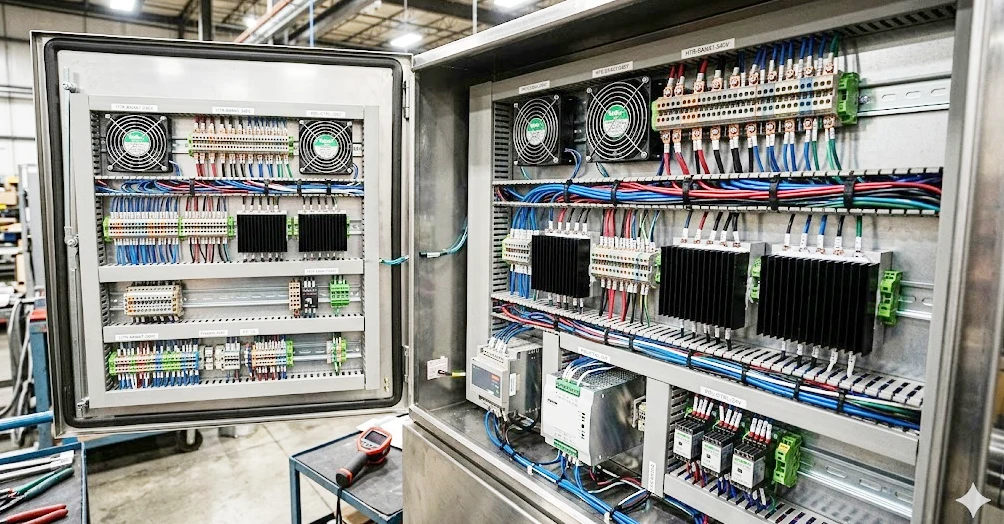
When you pack a lot of terminal blocks into a small enclosure, you face some real thermal challenges. Every wire and connection inside those blocks creates heat. This is called Joule heating. The more current you run, the more heat you get. Sometimes, you see hot spots where the temperature rises much higher than the rest of the enclosure. If you use high-density components like Linkwell’s Terminal Blocks and Terminal Block Connectors, you get reliable connections, but you also need to watch for heat buildup.
Here are some common sources of heat in crowded enclosures:
- Variable Frequency Drives (VFDs) and inverters can lose 3% to 5% of their power as heat.
- Power supplies and transformers give off heat from their magnetic and copper parts.
- PLCs and CPUs may not use much power, but they can still create hot spots.
- Relays and terminal blocks add to the heat through electrical resistance.
- Sealed enclosures can trap heat, making it hard for the system to cool down.
- Tight spaces reduce airflow, so heat has nowhere to go.
You might notice that temperatures inside these enclosures can reach over 130°F (about 54°C) during peak operation. That’s way above the safe limit of 35–40°C. When this happens, sensitive equipment can fail or even melt.
Impact of Component Crowding on Thermal Optimization
When you crowd too many parts together, you make thermal management even harder. Less space means less air movement. Heat gets trapped between components. This can cause uneven temperatures and create more hot spots. If you use undersized terminal blocks or connectors, you risk thermal runaway. That’s when heat keeps building up, resistance increases, and you could end up with melted parts or even a fire.
You need to think about how your enclosure design affects heat flow. Materials with poor conductivity hold onto heat. Sealed designs can cause thermal stratification, where hot air rises and stays trapped at the top. To keep your system safe, you need to plan for these issues from the start.
Tip: Always check the current ratings for your terminal blocks and connectors. Using high-quality products like those from Linkwell helps you avoid many common thermal problems.
Identifying Heat Sources and Stress Factors
Contact Resistance and Power Density
You might wonder why your enclosure heats up so quickly. The answer often comes down to contact resistance and power density. When you run high current through terminal blocks, every connection point creates a little resistance. Even a small amount of resistance can turn into heat, especially in high power density designs. If you use lower-quality materials or have loose connections, the resistance goes up, and so does the temperature.
Here’s what happens inside your enclosure:
- The total power loss from all components adds up, creating more heat.
- The thermal burden, measured in watts, affects how long your equipment lasts.
- The temperature difference between the inside and outside of the enclosure is key for good thermal management of electronic devices.
| Parameter | Description |
|---|---|
| Q | Joule heating from current in copper traces |
| I | Current flowing through copper traces (A) |
| R | Electrical resistance of copper traces (Ω) |
| L | Length of the copper trace (m) |
| A | Cross section of the trace (m²) |
If you want to keep things cool, you need terminal blocks with low contact resistance. Linkwell uses high-quality metals and strong clamping designs to help reduce resistance and heat. Their products meet strict certifications like IEC 61439 and UL 508A, so you know you’re getting safe and reliable connections.
Environmental Influences on Electronic Devices
The environment around your enclosure matters just as much as what’s inside. High ambient temperatures can push your system past its safe limits. If the temperature drops too low, condensation can form and cause corrosion or short circuits. Humidity swings can warp or crack materials, making thermal management of electronic devices even harder.
You need to pick the right materials for your enclosure. For example, polycarbonate handles a wide range of temperatures, while aluminum offers even more heat resistance. Linkwell’s enclosures come with high IP ratings (like IP65 or higher), which means they keep out dust and moisture. This helps maintain stable conditions and supports the thermal management of electronic devices.
Tip: Always check for certifications and protection ratings when choosing enclosure components. This ensures your system can handle tough environments and keeps your electronics safe.
Thermal Optimization Strategies for High-Density Terminal Blocks
Layout and Airflow Solutions
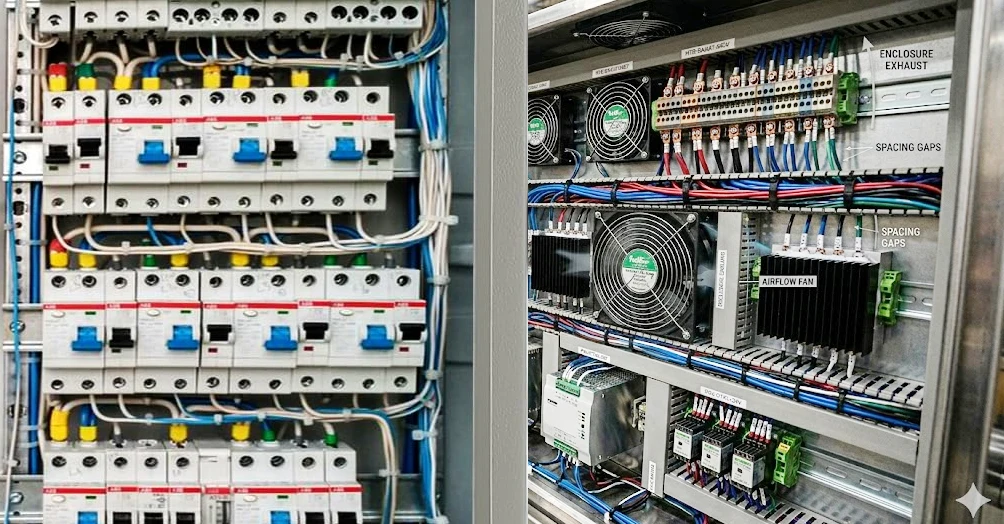
If you want to get the most out of your enclosure thermal management, you need to start with the basics: layout and airflow. When you organize your terminal blocks and wiring, you make a huge difference in how heat moves through the enclosure. Here are some practical tips you can use right away:
- Keep your cables neat and avoid blocking airflow. Good cable management stops hot spots from forming.
- Make sure you have clear front-to-back cooling pathways. This helps air move smoothly and keeps temperatures even.
- Use structured cabling systems, like patch panels and vertical cable managers. These reduce congestion and support better airflow.
- Choose racks with vented doors and leave space between equipment. This simple step boosts cooling efficiency.
Spacing matters, too. If you use a larger pitch for your terminal blocks, you give heat more room to escape. For example, a 10mm pitch offers excellent thermal performance in high power applications, while a 2.54mm pitch can limit heat dissipation. Check out this quick reference:
| Terminal Block Pitch | Current Rating Implications | Heat Dissipation Benefits |
|---|---|---|
| 2.54mm | Limited thermal performance | Minimal clearance |
| 5mm | Moderate thermal performance | Improved clearance |
| 10mm | Excellent thermal performance | Maximum clearance |
When you combine smart layout with proper spacing, you set the stage for effective thermal optimization for high-density terminal blocks in compact enclosures.
Active and Passive Cooling with Linkwell Products
You can’t always rely on passive airflow alone, especially in crowded panels. That’s where Linkwell’s Electrical Enclosure Fans and ventilation systems come in. These products help you move air exactly where you need it, keeping your components cool and safe. Here’s how they tackle common challenges:
| Key Challenges | Solutions |
|---|---|
| Prevent Overheating | Maintain enclosure temperatures below 35 °C (95 °F) to protect components. |
| Protect Against Dust | Cooling fans support sealed designs to prevent contaminants. |
| Reduce Energy Usage | High-efficiency fans optimize cooling while minimizing energy consumption. |
Linkwell’s fans work in all kinds of control panels and industrial settings. You can pick from different airflows, voltages, and sizes to match your needs. These fans boost forced air movement, which is key for thermal optimization for high-density terminal blocks in compact enclosures.
But don’t forget about condensation. When temperatures drop, moisture can form inside your enclosure and damage sensitive electronics. Linkwell Enclosure Heaters solve this problem. They use PTC technology to keep the temperature stable and the humidity low. The heaters only turn on when needed, thanks to built-in thermostats, so you save energy. By keeping the inside of your enclosure dry, you avoid corrosion and extend the life of your equipment.
Tip: Use both fans and heaters for year-round enclosure thermal management. Fans handle the heat, while heaters prevent condensation during cold or humid conditions.
Material Selection for Thermal Management
The materials you choose for your enclosure and terminal blocks play a big role in thermal optimization for high-density terminal blocks in compact enclosures. Metal enclosures, like aluminum or stainless steel, help pull heat away from your components. Aluminum stands out for its high thermal conductivity, making it a top pick for quick heat dissipation. Stainless steel gives you durability and still helps with heat management.
On the other hand, plastics like polycarbonate or ABS offer good insulation but don’t conduct heat well. You might use these when you want to keep heat inside or protect against electrical shock. For terminal blocks, manufacturers use thermoplastics, duroplastics, or even technical ceramics for insulation. The right choice depends on your industry and the environment where you install your equipment.
Certifications matter, too. Look for products that meet strict fire safety and flammability standards. Some industries, like railways, have extra rules about smoke and toxicity. When you pick certified materials, you know your enclosure thermal management will stand up to tough conditions.
If you want the best thermal optimization for high-density terminal blocks in compact enclosures, focus on smart layout, active and passive cooling, and the right materials. These steps help you achieve reliable thermal management and keep your systems running strong.
Monitoring and Maintenance for Reliable Thermal Management
Predictive Maintenance and Thermal Monitoring
You can’t just set up your enclosure and forget about it. If you want reliable thermal management of electronic devices, you need to keep an eye on things. Predictive maintenance helps you spot problems before they turn into failures. One of the best tools for this job is thermal imaging. With a thermal camera, you can see hot spots that your eyes can’t. You scan your enclosure while it’s running, and the camera shows you where temperatures are higher than normal. This lets you focus your maintenance on the right spots.
Here’s why thermal imaging works so well for enclosure thermal management:
- It reveals hidden issues, like loose connections or overloaded terminal blocks.
- You can scan large areas quickly and safely, even when the system is live.
- It gives you early warnings, so you can fix problems before they cause overheating.
Regular checks with thermal cameras, along with routine inspections, help you keep your system cool and safe. You also want to use fans, heaters, or even air conditioners to keep the temperature steady. Heaters stop moisture from building up, and fans move air to prevent hot spots. These steps all support the thermal management of electronic devices.
Smart Sensors and Linkwell Solutions
Smart sensors make monitoring even easier. You have lots of options, like fiber optic sensors that ignore electrical noise, infrared sensors for non-contact temperature checks, and wireless sensors for remote monitoring. Wired sensors, like RTDs or thermocouples, give you accurate readings but can pick up interference.
Linkwell offers integrated solutions that combine these sensor types for complete thermal management of electronic devices. Their enclosure heaters use ceramic PTC technology, which is energy efficient and needs no maintenance. These heaters prevent condensation and keep your electronics running smoothly. You can connect them to smart controllers for automatic temperature control, making enclosure thermal management simple and reliable.
Tip: Set up regular monitoring with smart sensors and Linkwell’s solutions to catch problems early and keep your equipment safe.
Conclusion
You’ve learned a lot about keeping your electrical enclosures cool and reliable. When you deal with crowded terminal blocks, you face real challenges. Heat builds up fast, and you need smart solutions to protect your equipment. If you want your system to last, you must focus on thermal management from the start.
Let’s recap the key strategies:
- Organize your layout for better airflow. Neat wiring and proper spacing help heat escape.
- Use active cooling, like fans and ventilation systems, to move air and prevent hot spots.
- Install enclosure heaters to stop condensation and keep electronics dry.
- Choose materials that support heat dissipation and meet safety standards.
- Monitor your enclosure thermal management with sensors and regular maintenance.
Remember: Good thermal management isn’t just about cooling. It’s about preventing failures, reducing downtime, and making your equipment last longer.
If you want reliable performance, you need to pick the right products. Linkwell offers certified terminal blocks, connectors, fans, heaters, and ventilation systems. Their solutions help you handle tough environments and keep your enclosures safe. You get quality, innovation, and support every step of the way.
Take a moment to review your enclosure designs. Ask yourself if your current setup meets your needs. If you see room for improvement, check out Linkwell’s products and resources. You’ll find tools and support to optimize your enclosure thermal management and protect your investment.
| Action Step | Benefit |
|---|---|
| Review enclosure layout | Improve airflow and cooling |
| Upgrade cooling systems | Prevent overheating |
| Add heaters | Stop condensation |
| Choose certified products | Ensure safety and reliability |
| Set up monitoring | Catch problems early |
You can build a safer, more efficient system. Linkwell stands ready to help you achieve the best results for your projects.
You can boost the reliability of your electrical enclosures by following a few smart strategies:
- Space out high-power components and use heat sinks to prevent hot spots.
- Test your layout with thermal simulations and real-world checks.
- Pick materials that match your environment and meet industry standards.
“A strong enclosure seal keeps your equipment safe and avoids costly repairs.”
Linkwell stands out for quality and innovation, supporting you with advanced solutions. Review your enclosure design and see how Linkwell’s products can help you manage heat and protect your investment.
| Benefit of Review | What You Gain |
|---|---|
| Better cooling | Longer equipment life |
| Predictive monitoring | Fewer breakdowns |
FAQ
How do you prevent overheating in crowded electrical enclosures?
You can use fans, heaters, and smart layout to keep temperatures low. Linkwell’s enclosure fans and ventilation systems help move air and stop hot spots. Regular checks with thermal cameras catch problems early.
What’s the best way to stop condensation inside my enclosure?
Install an enclosure heater with a thermostat. Linkwell’s heaters keep the temperature stable and prevent moisture buildup. This protects your electronics from corrosion and short circuits.
Can you add ventilation to an existing enclosure?
Yes, you can retrofit fan kits or vents. Make sure you check the enclosure’s IP rating before you start. Linkwell offers easy-to-install ventilation solutions for most cabinet types.
How often should you inspect cooling and heating components?
You should inspect fans, filters, and heaters every month. Replace filters every 3–6 months. Regular maintenance keeps your system reliable and extends equipment life.
What certifications should you look for in terminal blocks and enclosure accessories?
Look for UL, CE, and RoHS certifications. These show the products meet safety and quality standards. Linkwell’s terminal blocks and accessories carry these certifications for peace of mind.


