
You keep your equipment cool by placing cabinet fans near heat-generating components and ensuring a clear airflow path from intake to exhaust. Think of airflow as water moving through pipes; blockages or poor placement cause turbulence and leave hot spots. Up to 65% of IT equipment faults come from inadequate cooling, so proper fan placement for optimal air circulation: Industrial Cabinet Fan Placement is essential. When you position fans to move air evenly, you extend component life and prevent overheating. Consistent airflow eliminates stagnant pockets and supports stable performance.
- Optimal fan placement enhances equipment longevity by ensuring effective airflow.
- Stable temperatures are essential for the reliability and efficiency of electronic components.
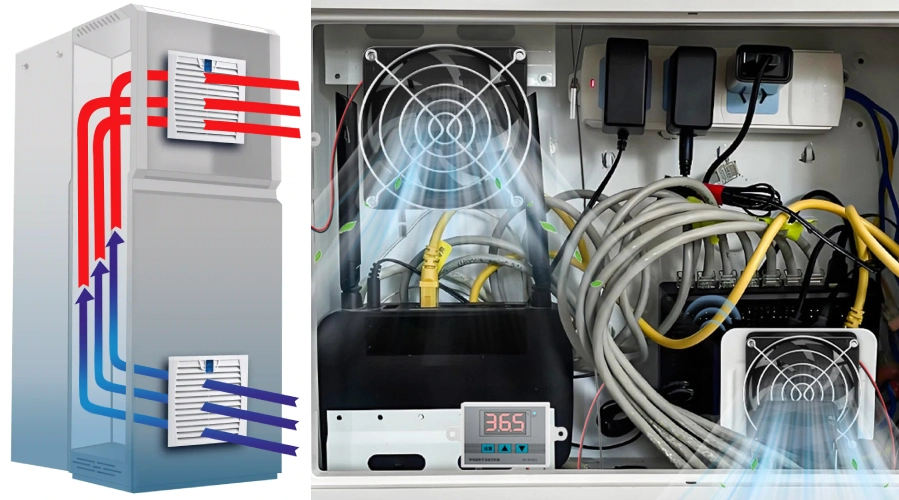
Design Considerations
- Place fans near heat sources to ensure effective airflow and prevent overheating.
- Use a clear intake and exhaust strategy: intake at the bottom and exhaust at the top for optimal cooling.
- Regularly check and replace filters to maintain airflow and protect sensitive electronics.
- Keep airflow paths clear of obstructions to avoid hot spots and ensure efficient cooling.
- Choose the right fan system—positive, negative, or hybrid—based on your cabinet’s needs.
Airflow Principles for Industrial Cabinet Fan Placement
Intake and Exhaust Strategies
You can think of air inside your cabinet like a river that needs a clear path to flow. When you set up intake and exhaust correctly, you create a steady stream of cool air entering and hot air leaving. Place the intake at the lower section of the cabinet and the exhaust at the upper section. This setup uses the natural rise of hot air to your advantage. If you position intake and exhaust on opposite sides, you boost air flow and help prevent hot spots from forming.
- Intake at the bottom brings in cooler air.
- Exhaust at the top removes hot air efficiently.
- Placing intake and exhaust at different heights increases cooling power.
- When hot spots block standard cutout positions, use top cutouts for exhaust fans.
Effective temperature control depends on removing heat and bringing in fresh air. Linkwell Cabinet Fans and fan filter units make this process simple. These fans work best when the internal temperature rises above the outside air. You can rely on Linkwell’s design to keep air moving smoothly, which is the heart of fan placement for optimal air circulation: industrial cabinet fan placement.
Airflow Direction and Pressure
Airflow direction shapes how well your cabinet stays cool. You want air to move in a straight line from intake to exhaust, avoiding obstacles that disrupt flow. If you use a positive pressure system, fans push filtered air into the cabinet. This method keeps dust out and maintains clean air inside. A negative pressure system pulls hot air out, but it can draw in unfiltered air through gaps. Hybrid systems combine both, giving you the benefits of dust control and strong cooling.
Tip: Use Linkwell fan filter units for positive pressure setups. They filter incoming air and protect sensitive electronics.
You should always check airflow direction and pressure when planning fan placement for optimal air circulation: industrial cabinet fan placement. Fans from Linkwell help you manage air flow, whether you need to push air in, pull air out, or balance both. By understanding these principles, you can prevent dust buildup, maintain even air flow, and keep your equipment safe.
- Ensure air flows from intake to exhaust without obstructions.
- Choose the right system—positive, negative, or hybrid—based on your cabinet’s needs.
- Use Linkwell’s solutions to optimize airflow direction and pressure for every application.
Step-by-Step Fan Placement Guide
Assessing Cabinet Layout and Heat Sources
Start by looking at where your cabinet sits. Place it in a clean, dry, and well-ventilated area. You want to avoid spots near doors, windows, or HVAC units because these can disrupt air movement. Make sure the cabinet stands on a flat, stable surface. Give it enough space on all sides so air can flow freely. Keep the area around the cabinet clear of dust and clutter.
Next, find out where the heat comes from inside your cabinet. Use thermal imaging cameras to spot hot spots. These cameras show you temperature differences, helping you catch problems like unbalanced loads or poor connections. Run your equipment under normal or peak loads during this check. If you see high temperatures on the outside, the inside is even hotter. Early detection with thermal imaging prevents costly breakdowns.
Tip: Always check for hot spots before you start fan installation steps. This helps you target the right areas for cooling.
Choosing Intake and Exhaust Locations
After you know where the heat builds up, decide where to put your intake vents and exhaust vents. Place intake vents in cool, well-ventilated spots. Make sure there is enough space around both the intake and exhaust vents for proper air movement. Keep these areas clean to prevent dust from entering the cabinet.
Position intake fans at the front and exhaust fans at the rear. This setup creates a straight path for air to move through the cabinet. When you balance the intake of cool air with the exhaust of hot air, you avoid pressure problems that can hurt cooling efficiency. Linkwell Cabinet Exhaust Fans work well for removing hot air, while Linkwell Electrical Enclosure Fans help bring in fresh air.
Determining Fan Quantity and Size
You need to figure out how many fans to use and what size works best. Follow these fan installation steps:
- Calculate the total heat load in watts. Add up the heat from all devices and any outside sources.
- Consider extra heat from sunlight or nearby machines.
- Find the target temperature difference between the inside and outside of the cabinet.
- Use the formula: CFM = (3.17 × Power in Watts) / Temperature Difference in °F. This tells you how much air you need to move.
- Adjust for static pressure and any resistance inside the cabinet.
Proper fan sizing is key. If you pick the right size, you remove heat efficiently and keep your components safe. Accurate airflow calculations help you avoid hot spots and reduce energy use. Linkwell offers a range of fan sizes, so you can match the airflow to your cabinet’s needs.
Positioning for Even Air Distribution
Spread the fans out to cover all areas inside the cabinet. Do not group them in one spot. Place fans near heat sources and make sure air reaches every corner. Uneven air distribution can cause some parts to overheat, which leads to higher energy bills and more wear on your equipment.
Use Linkwell Electrical Enclosure Fans to direct air where it is needed most. Check that air flows smoothly from intake to exhaust without hitting obstacles. If you notice uneven temperatures, adjust the fan positions or add more fans. Regular checks and adjustments keep your system running efficiently.
Note: Even air distribution means your equipment stays cool, lasts longer, and works better.
Industrial Cabinet Cooling Fans Configurations
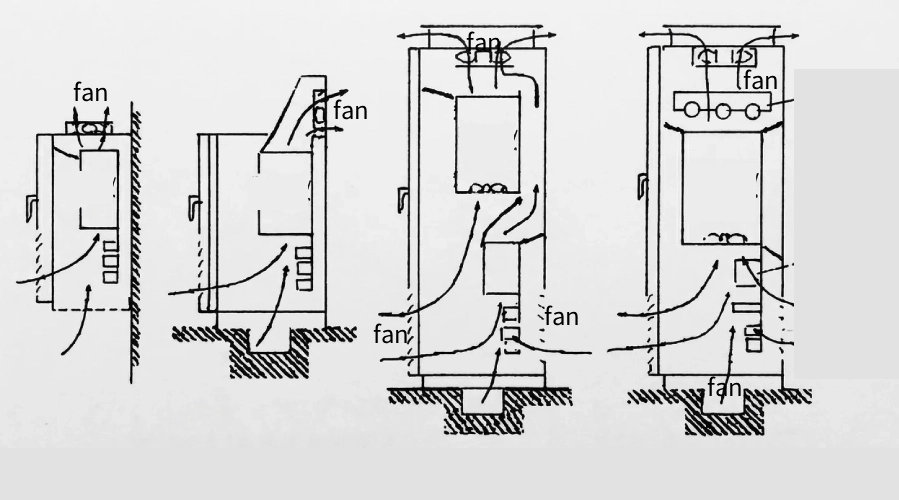
You can choose from several cabinet cooling fans configurations to match your equipment layout and cooling needs. Each setup manages air movement in a unique way, helping you control temperature and prevent hot spots.
| Configuration Type | Operation Description | Advantages/Disadvantages | Applicable Scenarios |
|---|---|---|---|
| Positive Pressure System | Fans blow filtered cool air into the cabinet | + Prevents unfiltered air from entering + Controls cleanliness + Reduces dust | Most electrical control cabinets, especially in dusty environments |
| Negative Pressure System | Fans extract hot air from the cabinet | – Draws unfiltered air – Can lead to dust accumulation | Special equipment layout constraints, temporary cooling |
| Hybrid System | Combines intake and exhaust systems | + Prevents dust while cooling efficiently | Recommended for various environments |
Front-to-Back Airflow
Many industrial cabinets use a front-to-back airflow pattern. You place cabinet cooling fans at the front to pull in cool air. Exhaust fans at the back push hot air out. This straight path lets air sweep across all components, removing heat quickly. Tube-axial fans work well here because they direct air in a focused stream. You often see this setup in server racks and automation panels. Linkwell cabinet cooling fans fit perfectly in these positions, giving you strong and steady air movement.
Tip: Keep cables tidy and away from the airflow path to avoid blocking air.
Bottom-to-Top Airflow
Bottom-to-top airflow uses the natural rise of hot air. You install intake fans at the bottom of the cabinet. Exhaust fans go at the top. As air enters from below, it cools the equipment and rises as it heats up. Vane-axial fans help straighten the air stream, making this setup more efficient. This configuration works best for tall cabinets or enclosures with stacked components. Linkwell’s cabinet cooling fans and fan filter units support this method, especially in control cabinets where dust control matters.
Side-to-Side Airflow
Side-to-side airflow moves air from one side of the cabinet to the other. You place intake fans on one side and exhaust fans on the opposite side. This method suits cabinets with wide layouts or when you need to cool equipment mounted along the sides. Air travels across the cabinet, reaching every corner. Linkwell cabinet cooling fans offer flexible mounting options for this setup. You can combine this with positive or hybrid pressure systems for better dust protection.
Note: Always check that air flows smoothly from intake to exhaust. Adjust fan positions if you notice uneven cooling.
Preventing Hot Spots and Improving Efficiency
Cable Management and Obstructions
Tangled cables inside your cabinet act like a wall, blocking airflow and trapping heat. When you organize cables neatly, you allow air to move freely and reach every component. Poor cable management can create air dams, which force your cooling system to work harder and increase energy costs. Unsealed cable openings also let conditioned air escape, reducing cooling efficiency. You should use cable ties, trays, and grommets to keep wires tidy and seal any unused openings. This simple step helps prevent hot spots and supports effective air convection throughout the enclosure.
- Cables that block cold air intakes can cause hardware to overheat.
- Messy wiring can stop hot air from leaving, making fans less effective.
Using Baffles and Filters
Baffles and filters play a key role in guiding airflow and keeping dust out. When you install baffles, you direct air to critical areas, avoiding dead zones where heat can build up. Filters, especially those in Linkwell fan filter units, trap dust and debris before they enter the cabinet. This not only protects sensitive electronics but also maintains optimal cooling. The table below shows how baffles and filters improve airflow:
| Role of Baffles and Filters | Description |
|---|---|
| Uniform Airflow Distribution | Air spreads evenly across the filter, maximizing cooling efficiency. |
| Prevention of Dead Zones | Proper placement avoids low airflow areas, reducing the risk of hot spots. |
| Minimization of Turbulence | Good alignment with ducts lowers pressure changes and boosts performance. |
| Enhanced Particle Impaction | Angled layouts help multi-stage filters catch more dust. |
| Reduced Mechanical Stress | Correct positioning protects baffles and filter media from damage. |
You get the best results when you combine Linkwell fan filter units with well-placed baffles. This setup ensures effective air convection and keeps your equipment running at safe temperatures.
Maintenance Practices
Regular maintenance keeps your cabinet cooling fans working at their best. You should clean or replace filters every month to prevent dust buildup. Inspect fans and motors each quarter for signs of wear or noise. Clean ventilation components with compressed air and a 70% isopropyl alcohol wipe monthly, always disconnecting power first. The table below outlines a simple maintenance schedule:
| Cabinet Component | Cleaning Agent | Frequency | Special Tips |
|---|---|---|---|
| Exterior surfaces | 70% Isopropyl Alcohol (IPA) | After each use | Avoid excess moisture near edges |
| Interior surfaces | Hydrogen peroxide-based cleaner | Weekly | Dry completely before closing cabinet |
| Hardware | Mild detergent solution | Weekly | Use soft cloth to avoid scratches |
| Gaskets and seals | Gasket cleaner | Monthly | Inspect for cracks or wear after cleaning |
| Ventilation components | Compressed air + IPA wipe | Monthly | Disconnect power before cleaning |
By following these steps, you maintain cooling efficiency and extend the life of your equipment. Linkwell recommends using their fan filter units for easy filter changes and reliable dust protection. Consistent care ensures optimal cooling and prevents unexpected downtime.
Mistakes to Avoid in Fan Placement
Blocking Airflow Paths
Picture air as a river flowing through your cabinet. If you place fans or vents too close to walls, you create a dam that slows the current. You might notice pressure drops, vibration, or even cavitation when air cannot move freely. Blocked intake forces fans to work harder, which increases energy use and wears out components faster. When cables, tools, or dust block the airflow, some areas become too hot while others stay cool. This uneven temperature can lead to equipment failure and higher energy bills. You should always keep intake and exhaust paths clear. Regularly clean ducts and check for obstructions to maintain consistent cooling. Linkwell’s technical guidance helps you design cabinets with open airflow paths, reducing strain and improving efficiency.
Tip: Use cable trays and seal unused openings to prevent air leaks and keep the cooling system balanced.
Improper Fan Orientation
You need to set fans in the right direction for effective cooling. Intake fans should pull cool air from the lower or front sections, while exhaust fans push warm air out from the upper or rear. If you reverse this setup, you risk creating a heat ceiling where hot air collects above sensitive electronics. This mistake ignores natural convection and can cause hot spots. Always check fan arrows and labels before installation. Linkwell provides clear instructions and support to help you avoid orientation errors. Their team can assist you in achieving the optimal cooling system configuration for your cabinet.
Note: Incorrect fan placement can disrupt airflow and reduce dust control, so follow manufacturer guidelines closely.
Over-Pressurization
Sometimes, you might add too many fans or block vents, thinking more airflow means better cooling. Over-pressurization can actually cause turbulence, noise, and uneven cooling. The system may pull in unfiltered air through gaps, which increases dust and maintenance needs. You should balance intake and exhaust to match your cabinet’s size and heat load. Linkwell’s experts can help you calculate the right number of fans and guide you through proper installation. Their support ensures you avoid common pitfalls and keep your equipment safe.
| Mistake | Effect on Cooling | Solution |
|---|---|---|
| Blocked airflow paths | Uneven temperatures, strain | Keep paths clear, regular checks |
| Wrong fan orientation | Hot spots, dust buildup | Follow placement instructions |
| Over-pressurization | Turbulence, noise | Balance intake and exhaust |
If you ever feel unsure about fan placement, reach out to Linkwell’s technical team. Their guidance helps you avoid mistakes and maintain a reliable cooling environment.
Conclusion
You can keep your industrial cabinet cool and your equipment safe by following a few essential steps. Start by choosing the right fan cutout positions to create a smooth path for air. Decide if you need a blowing (positive pressure), sucking (negative pressure), or hybrid system based on your cabinet’s environment and layout. Regularly check and replace filter cotton to keep airflow strong and dust out.
- Select fan cutout positions for effective air convection.
- Pick the right installation direction for your fans.
- Use a hybrid system when you need both dust prevention and cooling.
- Inspect and change filters as your environment demands.
When you prioritize even airflow and proactive maintenance, you protect your investment. Regular cleaning and filter changes prevent failures and extend the life of both your cooling unit and cabinet electronics. You avoid unplanned downtime, reduce repair costs, and keep your temperature stable—even during continuous operation. Skipping maintenance can lead to higher electricity bills, overheating, and even fire hazards.
- Longer service life for fans and electronics.
- Fewer breakdowns and lower maintenance costs.
- Reliable operation in tough industrial settings.
Linkwell’s cabinet cooling solutions stand out for their performance and reliability. The 2025 model moves more air, lasts longer, and uses less power than the average competitor. You also get quieter operation, which means less noise in your workspace.
| Metric | Linkwell 2025 Model | Competitor Average |
|---|---|---|
| Airflow (CFM) | 105 | 82 |
| MTBF (hours) | 68,000 | 45,000 |
| Power Consumption (W) | 9 | 15 |
| Noise Level (dB) | 22 | 35 |
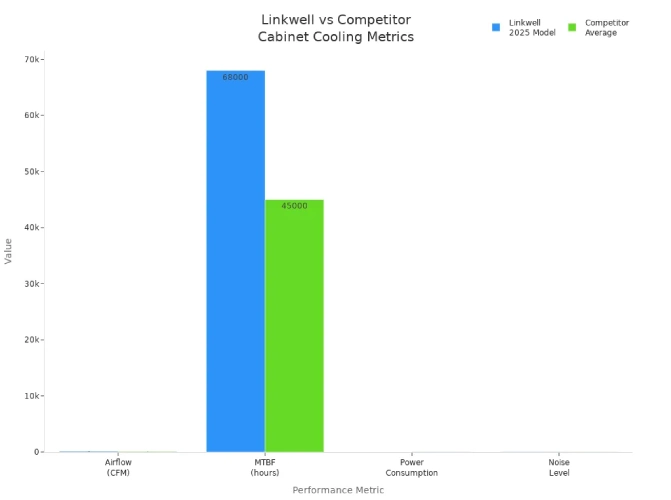
You see the difference in energy savings and replacement cycles, too. Linkwell fans cost less to run and last up to three times longer than generic options.
| Feature | Linkwell Fan | Generic Fan |
|---|---|---|
| Energy Consumption | $3.20/year | $6.00/year |
| Replacement Cycle | 5–6 years | 2 years |
| MTBF | 68,000 hours | 30,000 hours |
You can trust Linkwell for your industrial cabinet cooling needs. Their fans offer high-performance cooling, customizable solutions, and have earned the trust of industry leaders like ABB, Siemens, and Schneider Electric. When you choose Linkwell, you ensure efficient heat dissipation, prevent overheating, and extend the lifespan of your equipment.
For stable operation and peace of mind, review your fan placement regularly and keep up with maintenance. Linkwell’s support team stands ready to help you achieve the best results for your cabinet cooling system.
You achieve the best cooling by placing fans near heat sources and ensuring air flows smoothly from intake to exhaust. Adjust fan positions when you change cabinet layouts or add new equipment. Inspect filters every month and replace them if you see dust buildup. Clean fan blades and grills with a soft brush and check for loose wires or blocked vents. Even airflow keeps temperatures stable and prevents hot spots. For peace of mind, choose Linkwell cabinet cooling fans. Their support team helps you select the right model and offers guidance for every installation.
FAQ
How do you choose the right size cabinet fan?
Start by measuring your cabinet’s dimensions and calculating the total heat load. Use the airflow formula:CFM = (3.17 × Power in Watts) / Temperature Difference (°F).
Linkwell offers fans in multiple sizes to match your needs.
How often should you replace fan filters?
Check filters every month. In dusty environments, change them every 1–3 months. For clean areas, replace filters every 4–6 months. Linkwell fan filter units make filter changes quick and easy.
Can you use Linkwell cabinet fans outdoors?
Yes, you can. Linkwell cabinet fans come in IP65, IP67, and IP68 versions. These models resist dust, humidity, and water, making them ideal for outdoor or harsh industrial settings.
What is the difference between intake and exhaust fans?
Intake fans pull cool air into the cabinet. Exhaust fans push hot air out. You need both for balanced airflow. Linkwell provides both types, so you can design the best cooling system for your equipment.


