You want user-friendly interfaces that make your work easier and safer. An ergonomic hmi layout puts you, the user, first. It creates human-machine interface controls that fit how you move and think. ISO 9241 and ISO 11064 set guidelines for this. These standards use a human-centered approach so you get user-friendly interfaces that reduce mistakes and fatigue.
- They guide you to design ergonomic hmi layout systems that focus on operator needs and comfort.
- They help you create human-machine interface designs that boost safety and efficiency.
Linkwell leads the way in quality electrical control panel components. Their commitment to ergonomic hmi layout and global compliance means you get reliable solutions for every project.
Key Takeaways
- Ergonomic HMI design prioritizes user comfort. It places controls where you can easily reach them.
- ISO 9241 and ISO 11064 provide guidelines for creating safe and efficient control panels.
- Smart button placement helps you respond quickly and reduces the chance of errors.
- Good color choices and clear layouts make it easier to spot problems and stay focused.
- Using Linkwell products ensures your panels meet ergonomic standards and enhance usability.
Ergonomic HMI Layout Standards Explained
What Is Ergonomic HMI Layout?
You want an interface that feels natural and easy to use. That’s where ergonomic hmi layout comes in. It’s all about designing hmi screens and controls so you can work comfortably and efficiently. You get clear buttons, simple navigation, and feedback that makes sense. The goal is to match the interface to your needs and tasks.
Let’s break down the main components and criteria for hmi design:
| Key Components and Criteria | Description |
|---|---|
| HMI Screen Elements | Intuitive controls and dynamic graphics for real-time feedback. |
| Screen Background and Color | Light gray backgrounds reduce clutter and help you focus. |
| Consistent Navigation | Quick access to functions keeps your workflow smooth. |
| Space for Critical Items | Essential controls like start/stop buttons are easy to find. |
| Operator Engagement | Your input shapes the interface for better usability. |
| Feedback Mechanisms | Colors and animations confirm your actions. |
| Optimization of Access | Fewer clicks mean faster navigation. |
| Style Guides | Consistent design helps you feel familiar with the system. |
You see these standards in many industries. For example, medical systems use ergonomic touch screens to help doctors access patient data quickly. In manufacturing, hmi design lets you monitor and control machines with less effort. Transportation interfaces keep drivers focused and safe. Retail and education use interactive screens to improve service and learning.
Why Ergonomics Matter in HMI Design
You spend hours interacting with hmi systems. If the interface is poorly designed, you feel tired, make mistakes, or even develop health issues. Ergonomics and usability are key for your comfort and safety. When hmi design follows ergonomic standards, you get a workspace that supports you.
Here’s what happens when you use an ergonomic hmi layout:
- You feel more comfortable because screens and controls are positioned just right.
- You experience less fatigue during long shifts.
- You work faster and more efficiently.
- You avoid health problems caused by repetitive strain.
- Your environment feels brighter and easier to work in.
A task-oriented layout puts the most important controls where you need them. Proper lighting and glare reduction make the interface easier on your eyes. You get feedback that confirms your actions, so you know you’re doing things right. When you use a well-designed hmi, you stay focused and productive.
ISO Guidelines for HMI Design
Overview of ISO 9241 and ISO 11064
You want your hmi design to feel natural and safe. That’s where international standards like ISO 9241 and ISO 11064 come in. These standards set the rules for how you should build an interface that works for people, not just machines. ISO 9241 focuses on ergonomics in human-system interaction. It helps you create hmi layouts that match how you think and move. ISO 11064 gives you guidelines for designing control centers, making sure every interface supports your tasks and keeps you comfortable.
When you follow these international standards, you get more than just a checklist. You build hmi systems that reduce errors and boost efficiency. ISO 9241-11:1998 tells you to focus on usability in visual display terminals. ISO 9241-210:2010 makes sure your hmi design fits the needs of real users. You also see standards like MIL-STD-1472F, which help you create safe and effective interfaces for any industry.
Key Ergonomic Principles in HMI
You want your hmi to work with you, not against you. The best hmi design follows key ergonomic principles found in international standards. Here’s what you should look for:
- Suitable for the task
- Self-descriptive
- User controllable
- Conformable with user expectations
- Error tolerable
- Suitable for individualisation
- Suitable for learning
These principles make your interface easy to use and understand. You get clear feedback, so you always know what’s happening. The design team should test and improve the hmi with real operators. This process helps you avoid mistakes and keeps you safe.
Tip: Consistent design elements and clear feedback help you finish tasks faster and with fewer errors.
When you use hmi layouts that follow these standards, you improve situational awareness. You feel more in control and less stressed. Prototyping and testing with users make sure the interface meets your needs. That’s how international standards turn a basic hmi into a tool that supports you every day.
Applying Ergonomic HMI Layout in Control Panels
Physical Control Spacing and Reach
When you set up a control panel, you want every button and switch within easy reach. Good hmi design means you don’t have to stretch or twist to get to important controls. ISO standards give you clear rules for how far apart controls should be and how close they need to be to your hands. This keeps you comfortable and helps you work faster.
Let’s look at some common spacing and reach guidelines:
| Ergonomic Feature | How It Helps You Work Better |
|---|---|
| Adjustable consoles | You can move controls to fit your reach, so you don’t strain your arms. |
| Footrests and well-placed controls | You avoid stretching and twisting, which keeps you comfortable. |
| Clear sightlines to screens | You don’t have to turn your head all the time, so you stay focused. |
| Flexible furniture | You can adjust your workspace to fit your body and working style. |
ISO standards also recommend minimum distances for safety. For example, if you have a square opening of 5 mm, you need at least 5 mm between the opening and any hazard. If you use a slotted opening, you need 10 mm. These small details make a big difference in keeping you safe and comfortable.
Button and Indicator Placement per ISO 9241
You want to find the right button or indicator fast, especially in a busy work environment. ISO 9241 tells you to place the most important controls where your hand naturally rests. This means start and stop push buttons should be front and center. You should not have to search for them.
When you use Linkwell’s push button switches, you get clear, responsive controls that fit right into your hmi design. You can choose different colors and labels, so you always know what each button does. This reduces mistakes and helps you react quickly.
Here’s why proper button and indicator placement matters:
- You reach the right control without looking away from your main task.
- You make fewer errors because the layout matches your expectations.
- You respond faster in emergencies, which keeps you and your equipment safe.
ISO 9241 also shows that smaller target sizes can increase error rates. If you use larger, well-spaced buttons, you cut down on mistakes and improve your response time. Linkwell’s push button switches come in different sizes and styles, so you can match the right button to each task.
Linkwell Electrical Control Panel Integration
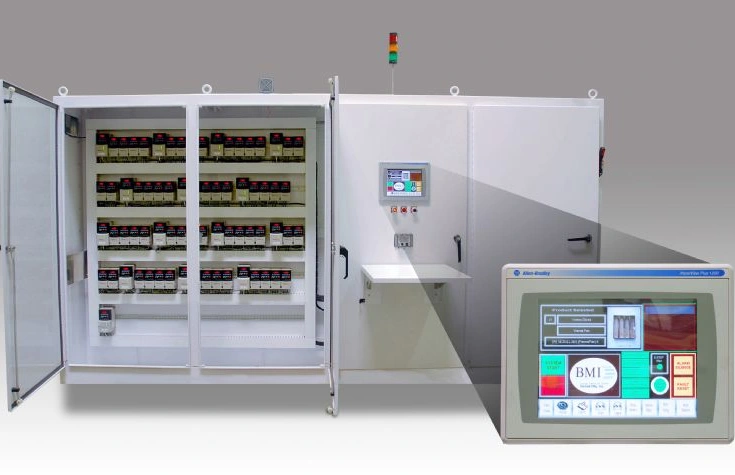
You want a control panel that follows all the right standards and makes your job easier. Linkwell’s electrical control panels are built with ergonomic hmi design in mind. You get panels that organize every component for easy access and clear labeling. This means you spend less time searching for the right switch and more time getting work done.
Here’s how you can apply ISO ergonomic standards with Linkwell’s solutions:
- Place start and stop push buttons at the center of your interface, using Linkwell’s customizable options.
- Use clear labels and color coding for each button and indicator.
- Make sure all controls are within your natural reach—no stretching or awkward movements.
- Choose panels with adjustable mounting and flexible layouts, so you can set up your workspace just how you like it.
- Select Linkwell’s panels with built-in safety features, like proper spacing and guard heights, to meet ISO requirements.
Tip: Test your panel layout with real users before finalizing. Small changes in button placement or spacing can make a big difference in comfort and safety.
When you use Linkwell’s electrical control panels and push button switches, you get more than just hardware. You get a complete hmi design solution that follows international standards and puts your needs first. This helps you work faster, stay safe, and reduce errors every day.
Best Practices for HMI Design Implementation
Layout and Navigation
You want your hmi design to feel natural and easy to use. Start with a layout that puts important controls where you expect them. Here’s a simple list to help you create intuitive dashboards:
- Space out buttons so you don’t hit the wrong one by accident.
- Use color to show which actions matter most.
- Make buttons big enough for easy touch, especially on screens.
- Show data in a way that matches how you think about your tasks.
- Highlight key information with bold text or borders.
- Keep navigation simple and clutter-free.
- Put important buttons in the same spot on every screen.
- Limit the number of clicks to reach what you need.
- Focus on layouts that put the most-used functions front and center.
- Organize information based on your workflow.
A good hmi layout helps you work faster and with fewer mistakes. Check out this table to see how smart navigation boosts your performance:
| Key Point | Explanation |
|---|---|
| Intuitive Layout | Lets you move around easily and learn the system quickly. |
| Information Organization | Helps you find controls fast, so you don’t get frustrated. |
| User Feedback | Makes the interface friendly and keeps you satisfied. |
Color, Contrast, and Visual Hierarchy
Color and contrast play a big role in hmi design. Use a light gray background to keep your eyes comfortable. Dark gray text stands out and is easy to read. Save red for emergencies and yellow for warnings. Don’t use bright colors everywhere—stick to a simple color scheme. This helps you spot problems fast and keeps the interface clear. Always use symbols or flashing borders with color changes, so everyone can understand alerts, even if they can’t see certain colors.
Accessibility and Error Prevention
Accessibility considerations matter in every hmi. You want everyone to use the system easily. Add options for bigger text, high contrast, and screen readers. Make sure users with motor challenges can use voice commands or switches. Keep language simple and navigation clear for those with cognitive needs. A well-designed hmi lets you control systems easily and spot problems before they grow. Organize information logically and give real-time feedback. Simple, clear controls help you avoid mistakes and stay safe.
Linkwell Structured Wiring Enclosure and DIN Rail
You need a control panel that supports ergonomic hmi design and meets all standards. Linkwell’s structured wiring enclosure keeps your wiring neat and protected. It offers flexible layouts and strong materials, so your hmi stays reliable in any environment. Pair it with Linkwell’s DIN rail for easy mounting and quick changes. DIN rails let you organize devices in a tidy row, making upgrades and repairs simple. These products help you build hmi systems that are safe, efficient, and ready for the future.
Tip: Test your hmi design with real users. Small changes in layout or color can make a big difference in comfort and safety.
Real-World HMI Examples and Industry Applications
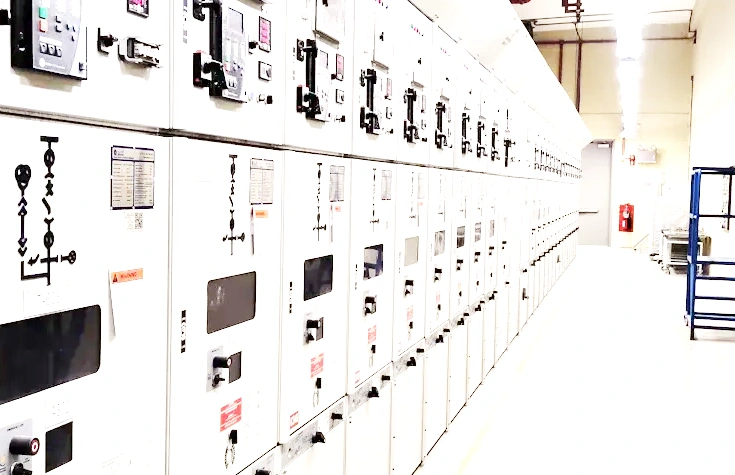
Industrial Control Panel Case Study (Linkwell)
Imagine you work in a busy factory. You need to control machines quickly and safely. Linkwell’s electrical control panels make this easy. These panels follow ISO ergonomic standards. You see clear labels and smart layouts. You find start and stop buttons right where you expect them. You do not waste time searching. You stay focused on your job. Linkwell’s panels help you avoid mistakes and keep your work area safe.
Note: Linkwell’s panels use certified parts from trusted brands. You get reliable performance every day.
Push Button Switch Placement
You want to react fast in an emergency. Linkwell’s push button switches help you do that. The buttons are big and easy to press. You see bright colors and clear labels. You know which button to use, even if you feel stressed. The layout follows ISO 9241 rules. Important buttons sit at the center of your reach. You do not stretch or twist. This setup reduces errors and keeps you safe.
Here’s a quick look at good button placement:
| Button Type | Location | Benefit |
|---|---|---|
| Start Button | Center, front | Fast access |
| Stop Button | Next to start | Quick emergency stop |
| Indicators | Above buttons | Easy status check |
Large Electrical Junction Box in Automation
You manage lots of wires in automation projects. Linkwell’s large electrical junction box gives you space to organize everything. The box protects your wiring from dust and water. You get flexible knockouts for easy cable entry. The design meets IP65 and ISO standards. You spend less time on repairs. Your system runs smoothly. You keep your team safe and your machines working.
Tip: Choose Linkwell’s junction boxes for tough jobs. They last longer and make maintenance simple.
You see how real-world hmi layouts, built with Linkwell’s products, improve your work. You get safer, faster, and more reliable control every day.
Conclusion
You’ve seen how an ergonomic HMI layout can change your workday. When you follow ISO standards, you make your control panels safer and easier to use. You cut down on mistakes. You help your team stay focused and comfortable. That’s a win for everyone.
Let’s recap the main takeaways:
- Ergonomic HMI design puts you first. You get controls that fit your reach and workflow.
- ISO 9241 and ISO 11064 give you clear rules. You know exactly how to set up your panels for safety and efficiency.
- Smart button placement means you react faster and avoid errors.
- Good color and layout choices help you spot problems before they grow.
- Linkwell’s products make it easy to build panels that meet these standards.
Tip: Test your HMI layout with real users. Small tweaks can make a big difference in comfort and safety.
If you design or upgrade control panels, start with the basics. List your most-used controls. Place them where your hand naturally rests. Use Linkwell’s push button switches for clear feedback. Organize your wiring with a structured enclosure and DIN rail. Choose a large junction box if you need more space.
Here’s a quick checklist for your next project:
| Step | Action Item |
|---|---|
| 1. Assess Needs | Identify key controls and user tasks |
| 2. Apply Standards | Follow ISO 9241 and ISO 11064 guidelines |
| 3. Choose Products | Use Linkwell’s certified components |
| 4. Test Layout | Get feedback from real users |
| 5. Improve Design | Make changes based on user experience |
You don’t have to do it alone. Linkwell stands by you with quality products, fast support, and expert advice. Visit Linkwell Electric’s website to see how you can build safer, smarter, and more ergonomic control panels today.
You see how ergonomic HMI layouts and ISO standards make your workspace safer and easier to use. If you want to improve your control panels, start by placing key controls where your hand lands naturally. Test your layout with real users. Keep making small changes for better comfort and safety. Linkwell gives you reliable products and expert support. You can trust Linkwell to help you build panels that meet global standards and keep your team working at their best.
Tip: Visit Linkwell Electric for solutions that fit your needs.
FAQ
How do you choose the right control panel for your project?
Start by listing your main tasks and power needs. Think about where you’ll install the panel. Linkwell offers custom options, so you can match your panel to your workspace and workflow.
What makes an HMI layout ergonomic?
An ergonomic layout puts controls where your hands naturally rest. You get clear labels, easy navigation, and feedback that helps you avoid mistakes. Linkwell’s panels follow ISO standards for comfort and safety.
Why should you use DIN rails in your control panel?
DIN rails keep your devices organized and secure. You can snap components on and off quickly. This saves time during upgrades or repairs. Linkwell’s DIN rails fit many brands and make your panel tidy.
How does color help in HMI design?
Color highlights important actions and alerts. Red means emergency, yellow warns you, and gray backgrounds reduce eye strain. You spot problems fast and stay focused. Linkwell’s push buttons use bright colors for quick identification.
Can you customize Linkwell’s products for special projects?
Yes! You can choose sizes, materials, and layouts. Linkwell supports bulk orders and custom branding. You get products that fit your exact needs and make your project easier.