
You might wonder what is low profile cooler. Simply put, it’s a compact cooling device designed for tight spaces where standard coolers won’t fit. These coolers play a big role in keeping your desktop PCs, gaming rigs, and workstations running smoothly, especially when space is limited. Linkwell offers reliable cooling solutions for offices, homes, and industrial setups. Check out some common uses:
| Application Area | Description |
|---|---|
| Desktop PCs | Widely used in homes, offices, and schools. |
| Gaming PCs | Essential for compact, high-performance gaming builds. |
| Workstations & Servers | Keeps enterprise equipment stable in small cases. |
| Others | Used in embedded systems and special devices across industries. |
Key Takeaways
- Low profile coolers fit in tight spaces where standard coolers can’t. They are perfect for mini PCs, slim desktops, and industrial cabinets.
- Choosing the right cooler involves checking your system’s size and airflow needs. Make sure it fits your hardware without blocking anything important.
- Linkwell offers customizable cooling solutions. You can get support for any project, ensuring you find the right cooler for your needs.
- Good cooling protects your investment. It keeps your system stable and extends the life of your components.
- Always measure your case height before buying a cooler. This helps avoid installation issues and ensures optimal performance.
What is Low Profile Cooler
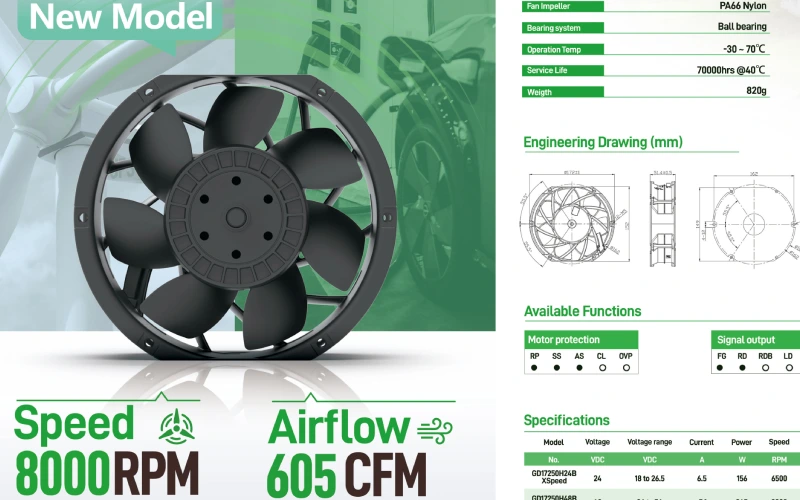
If you’ve ever tried to build a compact PC or set up equipment in a tight cabinet, you’ve probably asked yourself, what is low profile cooler? This cooler is a special type of cooling device with a slim, compact shape. It fits where standard coolers just can’t go. Most low profile coolers have a short height, usually under 70mm, and a flat, wide base. You’ll see them in small form factor PCs, mini-ITX builds, and industrial cabinets where every millimeter counts.
Linkwell knows how important it is to keep your systems cool, even when space is limited. The company designs cooling solutions that work perfectly in compact and industrial setups. You can trust Linkwell to deliver reliable performance, whether you’re building a tiny gaming PC or managing a row of electrical cabinets.
Key Features of Low Profile Cooler
You might wonder what makes a low profile cooler different from a standard one. Let’s break it down in a simple table:
| Feature | Low Profile Coolers | Standard Coolers |
|---|---|---|
| Size | Designed for small cases | Larger, suitable for standard cases |
| Cooling Performance | Generally less effective than tower coolers | More effective due to larger surface area |
| Airflow Direction | Blows air up and away from the CPU | Blows air through the cooler from the sides |
Low profile coolers focus on fitting into tight spots. They don’t have the tall heat pipes or big fans you see on tower coolers. Instead, they use a flat design to save space. You’ll find that a tower cooler can be about twice as effective at moving heat away from your CPU. But when you don’t have the room, a low profile cooler is your best friend.
Here’s what you get with a low profile cooler:
- Compact size for small cases and cabinets
- Direct airflow to move heat away from critical parts
- Easy installation, even in crowded spaces
You don’t need to worry about complicated mounting or clearance issues. These coolers keep things simple and efficient.
Space-Saving Design and Use Cases
The main reason you choose a low profile cooler is space. When you work with mini PCs, slim desktops, or industrial cabinets, every inch matters. These coolers fit where others can’t, making them perfect for:
| Application Type | Description |
|---|---|
| Medium to Large Capacity Cold Storage | Keeps equipment cool in cold storage facilities. |
| Low Temperature Cold Storage Warehouses | Handles extreme cold environments with ease. |
| Grocery Distribution Warehouses | Maintains airflow in busy distribution centers. |
| Fruit and/or Vegetable Processing or Storage | Supports processing lines where space is tight. |
| Controlled Atmosphere Fruit and Vegetable Storage | Helps manage temperature and air quality for produce. |
| Loading Docks | Fits into loading dock setups where space is limited. |
You’ll also see low profile coolers in home theater PCs, digital signage, and embedded systems. These coolers shine in places where you need reliable heat control but can’t use a bulky solution.
Linkwell’s expertise means you get a cooler that fits your needs, whether you’re building a sleek office PC or running industrial automation. The company’s products help you manage heat without sacrificing performance or space.
Tip: Always check the size of your case or cabinet before picking a cooler. A low profile cooler can save you time and headaches during installation.
If you want to know what is low profile cooler and why it matters, just remember: it’s all about fitting powerful cooling into the smallest possible space.
How CPU Cooler Works
When you power up your computer, the cpu gets to work fast. It handles millions of calculations every second, and that creates a lot of heat. If you don’t manage this heat, your system can slow down or even shut off to protect itself. That’s where a cpu cooler steps in. You have two main types: air cooling and liquid cooling. Both work to keep your cpu at a safe temperature, but they do it in different ways.
Cooling Mechanism Explained
Let’s break down how a cpu cooler actually moves heat away from your processor. The process uses three main mechanisms:
| Mechanism | Description |
|---|---|
| Thermal Conduction | Transfers heat from the cpu to the base of the cooler using solid materials like copper or aluminum. |
| Convective Heat Dissipation | Removes heat by moving air or liquid across the cooler’s surface, often with the help of fans. |
| Radiative Heat Dissipation | Releases heat as infrared radiation, but this plays a small role in cpu cooling. |
You’ll find that most coolers rely on thermal conduction and convection. The base of the cooler sits right on top of the cpu. It pulls heat away and spreads it through heat pipes or a metal plate. Then, either air cooling or liquid cooling takes over. Air cooling uses fans to blow air across fins, while liquid cooling pumps coolant through tubes to carry heat away. Both methods help keep your cpu running smoothly.
Tip: Always make sure your cooler sits flat on the cpu. Good contact means better heat transfer and lower temperatures.
Airflow and Heat Dissipation
Airflow is the secret sauce for any cooler. If you set up your fans the right way, you can boost cooling efficiency by up to 30%. That’s a big deal when you’re gaming or running heavy software. Air cooling works best when you have a clear path for air to move through your case. Liquid cooling also needs good airflow to help the radiator release heat.
Here’s what you need to know about airflow and heat dissipation:
- A tower cooler lines up with your case fans, pushing hot air straight out. This setup gives you the best cooling.
- A low profile cooler fits in tight spots, but it might not move air as efficiently as a tall tower cooler.
- When your cpu isn’t working hard, even a small fan can keep things cool. But as the workload increases, you need a cooler that can handle more heat.
- The overall airflow in your case matters. If air can’t move freely, heat builds up and your cpu gets hotter.
- Liquid cooling systems use pumps and radiators to move heat out of the case, but they still need fans to finish the job.
If you want your system to stay cool, always think about how air moves through your case. Don’t block the fans, and keep dust out for the best results.
Linkwell Cooling Products Overview
You have a lot of choices when it comes to cooling, but Linkwell makes it easy to find the right solution. The company offers a full lineup of coolers for every need, from home computers to industrial cabinets.
| Product Series | Key Features | Size Range | Voltage | Operating Temperature | Speed (RPM) | Service Life |
|---|---|---|---|---|---|---|
| FU Series | Quick installation with embedded nuts; optional air duct for airflow boost | 80mm to 140mm | 5V, 12V, 24V, 48V | -10°F to 120°F | 1000 to 30,000 | Up to 50,000 hrs |
| LK32 Series | Easy maintenance with buckle design; optional power light | 80mm to 140mm | 5V, 12V, 24V, 48V | -10°F to 120°F | 1000 to 30,000 | Up to 50,000 hrs |
| LK66 Series | Linear grill for better airflow | 80mm to 140mm | 5V, 12V, 24V, 48V | -10°F to 120°F | 1000 to 30,000 | Up to 50,000 hrs |
| FF Series | UV-stable PC alloy; optional filter mat | 80mm to 140mm | 5V, 12V, 24V, 48V | -10°F to 120°F | 1000 to 30,000 | Up to 50,000 hrs |
| FK55 Series | Slim cover for tight spaces; modern grill design | 80mm to 140mm | 5V, 12V, 24V, 48V | -10°F to 120°F | 1000 to 30,000 | Up to 50,000 hrs |
You can use these coolers in all kinds of places:
- Electrical control cabinets keep a steady temperature with Linkwell fans.
- Distribution boxes stay cool and safe, even in busy environments.
- Telecom enclosures get reliable airflow for sensitive equipment.
- Industrial control panels maintain precise heat control.
Linkwell’s coolers stand out for their double ball bearing structure, 360° air discharge, and large airflow. You get fast heat dissipation, low energy use, and a service life of up to 60,000 hours at 25°C. These coolers also meet strict international standards, so you know you’re getting quality.
Note: Choosing the right cooler is key for system stability. If your cpu gets too hot, you risk crashes or hardware damage. Always match your cooler to your system’s needs, whether you go with air cooling or liquid cooling.
If you want a cooler that works as hard as you do, Linkwell has you covered. From air cooling to liquid cooling, you’ll find a solution that fits your setup and keeps your cpu cool under pressure.
Low Profile Cooler vs Standard Cooler
Size and Compatibility
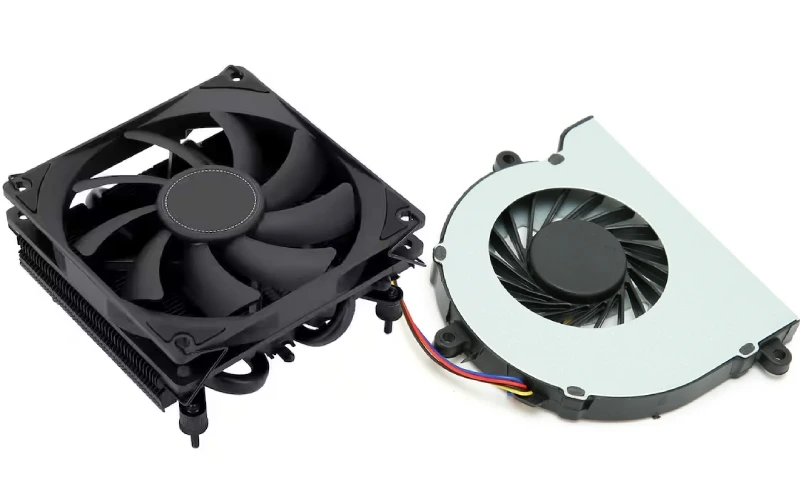
When you look at coolers for your cpu, size matters a lot. You want a cooler that fits your case and matches your system’s needs. Low profile coolers have a shorter height, making them perfect for tight spaces. Standard coolers stand taller and need more room inside your case. Here’s a quick table to show you the difference:
| Cooler Type | Height | Storage Capacity (12 oz. bottles) | Storage Capacity (wine bottles) |
|---|---|---|---|
| Standard Back Bar | 36″ | 50% more than low profile | Double the amount of low profile |
| Low Profile Cooler | 30″ | Less than standard | Less than standard |
Low profile coolers fit in mini-ITX builds, slim desktops, and industrial cabinets. Standard coolers work best in full-sized towers. Always check your case size before you pick a cooler.
Performance Comparison
You might wonder how these coolers stack up when it comes to cooling your cpu. Standard coolers usually offer better heat dissipation because they have bigger fans and more surface area. They handle heavy workloads and gaming sessions with ease. Low profile coolers focus on saving space, but they still keep your cpu safe from overheating. Air cooling works well for both types, but liquid cooling gives you even more heat control, especially in high-performance setups.
Here’s what you get with each cooler:
- Standard coolers: More airflow, better heat management, ideal for overclocking.
- Low profile coolers: Compact design, easy installation, reliable heat control in small spaces.
If you use liquid cooling, you can boost heat dissipation even further. Air cooling remains a solid choice for most builds.
Linkwell Solutions for Different Needs
Linkwell offers coolers for every situation. If you need strong airflow in a tight spot, you can choose miniature fans in 60mm or 70mm sizes. These coolers support 12V and 24V DC input, making them easy to integrate with low-voltage systems. You get maintenance-free operation and up to 70,000 hours of service life. For industrial cabinets, Linkwell provides cabinet air conditioners and thermoelectric coolers. These options keep your equipment cool and safe.
Linkwell also customizes coolers for your industry. You can pick the size, power, voltage, and mounting type. The team helps with layout optimization, installation guidance, and thermal simulation. You get fast delivery, competitive pricing, and technical support.
Tip: If you need a cooler for a special project, ask Linkwell about custom designs. You’ll get a solution that fits your exact needs.
Choosing the Right Cooler
System Requirements and Compatibility
Picking the right cpu cooler can feel tricky, but you can make it simple by checking a few key things. Start by looking at your case size and the height of your RAM. Some coolers sit close to the motherboard, so you want to make sure there’s enough space for both the cooler and your memory sticks. Here’s a quick checklist to help you out:
- Measure the height of your RAM and compare it to the clearance your cpu cooler provides.
- Think about how many RAM slots you’ll fill. Slots farther from the cpu usually have fewer clearance issues.
- Low profile air cooling and liquid cooling options often avoid RAM problems.
- If you need more space, you can sometimes adjust a side-mounted fan upward, but this might change the cooler’s height.
- For tight builds, consider low-profile RAM or even removing the heat spreader (only if you know what you’re doing).
You want a cooler that fits your hardware without blocking anything important. Always double-check your case specs before you buy.
Performance and Noise Considerations
You want your cpu to stay cool, but you probably don’t want a noisy system. Different coolers offer different levels of heat control and sound. Here’s a quick look at how some popular low profile models compare:
| Cooler Model | Temperature Difference (°C) | Fan Type Tested |
|---|---|---|
| AN600 | 1 – 2 | Original fan (120 mm) |
| Thermalright AXP120-x67 | 1 – 2 | Silverstone Air Slimmer |
| NH-L12S | Varies | 120 mm and 92 mm configurations |
| Scythe Kaze Flex 92 (ARGB) | N/A | Additional test |
If you want quiet operation, look for a cooler with a larger, slower-spinning fan. Air cooling works well for most builds, but liquid cooling can offer even better heat management, especially in high-performance or compact systems. Always balance your need for efficient cooling with your noise preferences.
Linkwell OEM and Support Services
When you need a cooling solution that fits your exact needs, Linkwell has you covered. You can choose from OEM, ODM, or OBM services, so you get a product that matches your project. Here’s what Linkwell offers:
- Project customization for unique industrial needs
- Technical support during every stage of your project
- After-sales service to keep your system running smoothly
- Requirement evaluation and product recommendations
- Design and engineering optimization for better performance
- Project management and implementation support
- 24/7 technical assistance and real-time updates
You get fast answers and expert help, which means less downtime and more reliable cpu cooling. If you’re ready to find the perfect cooler or need advice for your next build, reach out to Linkwell for a quote or technical support. You’ll get a quick response and a solution that works.
Tip: Don’t settle for a one-size-fits-all cooler. Ask about customization to get the best fit for your system.
Conclusion
You’ve learned a lot about low profile coolers and why they matter. These compact cooling solutions help you build powerful systems in tight spaces. You don’t have to sacrifice performance just because your case or cabinet is small. With the right cooler, you keep your CPU or sensitive equipment running smoothly and safely.
Let’s recap the key points:
- Low profile coolers fit where standard coolers can’t. They work best in mini PCs, slim desktops, and industrial cabinets.
- Choosing the right cooler means checking your system’s size, airflow, and noise needs. You want a cooler that matches your hardware and your environment.
- Linkwell gives you reliable, customizable cooling solutions. You get support for every project, big or small.
Remember: Good cooling protects your investment. It keeps your system stable and extends the life of your components.
If you’re planning your next build or upgrading your equipment, don’t overlook the importance of the right cooler. Linkwell stands ready to help you with expert advice, fast quotes, and flexible OEM services. You can reach out anytime for technical support or to discuss your unique requirements.
Ready to take the next step?
Contact Linkwell today for a quote, OEM service, or technical support. You’ll get a quick response and a solution that fits your needs—no matter the size of your order.
Stay cool, stay efficient, and let Linkwell help you build smarter!
Visit Linkwell’s official website or email linkwell@linkwellcn.com to get started.
Low profile coolers give you powerful cooling in tight spaces. You get quiet operation, easy installation, and reliable temperature control for small form factor systems. When you choose the right cooler, you boost efficiency and keep your equipment safe. Check out the main benefits:
| Benefit | Why It Matters |
|---|---|
| Cooling Efficiency | Keeps your CPU or system running smoothly |
| Reliability | Delivers consistent performance in tough conditions |
| Durability | Extends the life of your hardware |
The market for low profile coolers keeps growing as more users want compact, energy-saving solutions. If you need help or want a quote, reach out to Linkwell. You’ll get fast support for any order size.
FAQ
What is a low profile cooler?
A low profile cooler is a compact cooling device. You use it when space is tight, like in mini PCs or industrial cabinets. It keeps your system cool without taking up much room.
How do I know if a low profile cooler fits my case?
Check your case’s maximum cooler height. Measure the space above your CPU socket. Compare it to the cooler’s height. If the cooler is shorter, you’re good to go.
Can I use a low profile cooler for gaming?
Yes, you can! Low profile coolers work well for small gaming builds. Just make sure your CPU doesn’t generate too much heat. For high-end gaming, you might want a bigger cooler.
Does Linkwell offer custom cooling solutions?
Absolutely! You can ask Linkwell for custom sizes, voltages, or mounting options. The team helps you find the perfect fit for your project. You get quick support and expert advice.


