
Wondering what temperature you should set for your enclosure? Here’s a quick-reference list to help you choose the right adjustable thermostat setpoint range:
| Enclosure Type | Recommended Setpoint Range |
|---|---|
| Electrical Panels | 10–35°C |
| Server Cabinets | 18–27°C |
| Cleanrooms | 20–24°C |
| Animal Habitats | 22–28°C |
| Storage Spaces | 5–25°C |
Did you know that temperature issues cause over 55% of equipment failures in electrical devices? That’s why picking the right temperature matters. Linkwell offers reliable enclosure thermostats and temperature controllers to keep your equipment safe, cut energy costs, and maintain safety. Find your enclosure type and note the recommended range. Adjustable Thermostat Setpoint Range: What Temperature Should You Choose for Different Enclosures? This guide makes it simple.
Key Takeaways
- Choose the right temperature setpoint for your enclosure type to protect equipment and ensure longevity.
- Proper temperature and humidity control can save energy costs by up to 40%, making your operations more efficient.
- Regularly monitor and adjust your thermostat settings to adapt to changing conditions and maintain optimal performance.
- Use reliable products like Linkwell thermostats to achieve precise temperature control and prevent equipment failures.
- Perform routine maintenance checks to ensure your temperature control system operates smoothly and effectively.
Why Adjustable Thermostat Setpoint Range Matters
Equipment Protection and Safety
You want your enclosure to last, right? Choosing the right setpoint for temperature and humidity control is the first step. When you set the thermostat correctly, you protect your equipment from overheating and condensation. If you ignore temperature control, you risk damaging sensitive electronics. Humidity control is just as important. High relative humidity can cause corrosion, short circuits, and even mold. You need to keep the relative humidity low to avoid these problems.
Let’s look at how temperature and humidity control help your enclosure:
| Evidence Description | Impact on Equipment and Environment |
|---|---|
| Maintaining internal surfaces 5–15 K above the minimum expected ambient temperature | Prevents condensation by keeping surfaces above the dew point, thus protecting equipment longevity. |
| Daily temperature cycles cause air exchange with ambient air | Increases internal moisture content, which can lead to equipment failure if not managed properly. |
| Intelligent control of heaters reduces operating costs by 40–60% | Extends heater lifespan and prevents overheating, contributing to overall equipment reliability. |
You can see that temperature and humidity control work together. If you set the thermostat setpoint too low, condensation forms. If you set it too high, you waste energy and risk overheating. Linkwell’s expertise in temperature control helps you find the right setpoint for your enclosure. Their thermostats and hvac solutions make temperature and humidity control simple and reliable.
Energy Efficiency and Cost
You don’t want to pay more for hvac than you need. Setting the right setpoint for temperature and humidity control saves money. Studies show that adjusting the cooling setpoint in server cabinets and electrical panels can cut hvac energy use by up to 40%. Check out these findings:
| Study | Findings | Energy Savings |
|---|---|---|
| T. Hoyt et al. | Increased cooling setpoint from 22.2 °C to 25 °C | 29% cooling energy savings, 27% total hvac energy savings |
| A. Ghahramani et al. | Adaptive setpoint temperatures in air conditioning systems | Greater than 40% energy savings |
| C. Wang et al. | Occupancy-driven thermostat control | 11% to 34% energy savings without compromising comfort |
Incorrect thermostat setpoints can lead to auxiliary heating systems activating unnecessarily, which results in higher energy bills and inefficient heating performance. For instance, selecting Emergency Heat mode disables the compressor, causing heating costs to increase significantly, potentially two to three times more than using the compressor.
You can avoid these mistakes by using Linkwell’s temperature and humidity control products. Their hvac solutions help you set the right setpoint for both temperature and relative humidity. You get reliable control, lower energy bills, and longer equipment life.
Adjustable Thermostat Setpoint Range: What Temperature Should You Choose for Different Enclosures?
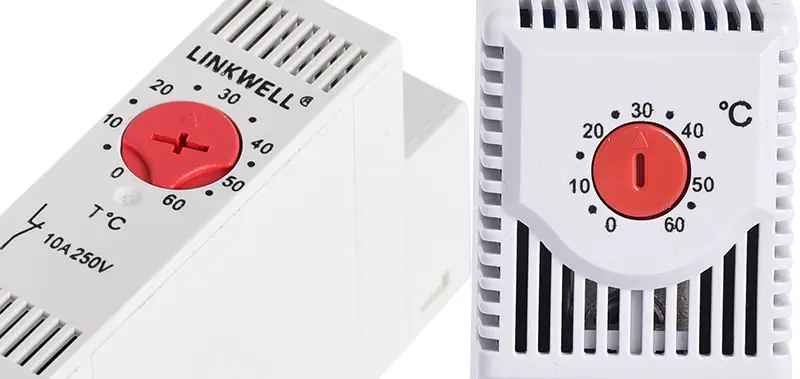
You want to keep your equipment safe and your energy bills low. The adjustable thermostat setpoint range: what temperature should you choose for different enclosures? Let’s break it down for each type.
Electrical Panels and Control Cabinets
Electrical panels need a stable temperature to protect sensitive components. The adjustable thermostat setpoint range: what temperature should you choose for different enclosures? For most panels, you should aim for 40°C to 50°C. This range helps you avoid excessive cooling and keeps your equipment running longer.
| Temperature Range | Description |
|---|---|
| 40ºC (105ºF) to 50ºC (122ºF) | Optimal range for electrical panels to ensure longevity of components. |
You might notice that the lifespan of electrical parts drops when internal temperatures rise. Overheating can cause malfunctions and even system failures. Adjustable thermostats help you control maximum temperature, reducing thermal shocks and extending the life of your panel. Cooling systems use ambient air to prevent overheating and minimize damage.
Quick tips:
- Set your thermostat to maintain the target temperature.
- Use Linkwell Enclosure Thermostats for precise control.
- Understand the hysteresis function to achieve your target temperature.
Linkwell’s products come with UL, CE, and RoHS certifications. You get reliable performance and safety every time.
Server Cabinets and Data Centers
Server cabinets demand tight temperature and humidity control. The adjustable thermostat setpoint range: what temperature should you choose for different enclosures? For Class A1 data centers, set your thermostat between 18°C and 27°C. Keep humidity between 40% and 60% rH.
- Recommended temperature range: 18°-27°C / 64°-80°F
- Recommended humidity range: 40% to 60% rH
High temperatures cause thermal stress on server components. You risk hardware failures and unexpected shutdowns. Cooling your server cabinets keeps your IT equipment healthy and efficient. Proper cooling minimizes system crashes and ensures optimal performance.
Quick tips:
- Use Linkwell Bimetal Thermostats for reliable temperature control.
- Monitor humidity to prevent condensation and electrostatic discharge.
- Linkwell Enclosure Heaters help maintain stable conditions in winter.
Linkwell’s thermostats and heaters integrate seamlessly with your cooling fans and air conditioners. You get consistent control and peace of mind.
Cleanroom and Humidity Control
Cleanrooms require strict control of both temperature and humidity. The adjustable thermostat setpoint range: what temperature should you choose for different enclosures? For cleanroom temperature and humidity, set your thermostat between 20°C and 21°C. Keep humidity between 40% and 50% relative humidity.
| Parameter | Ideal Range | Setpoint Range |
|---|---|---|
| Temperature | 19-23 degrees Celsius | 20-21 degrees Celsius |
| Humidity | 30-60% relative humidity | 40-50% relative humidity |
If you let humidity rise above 60%, you risk microbial contamination and corrosion. Low humidity below 30% can cause electrostatic discharge, damaging sensitive devices. High relative humidity creates a moisture layer on surfaces, which encourages microbial growth and contamination.
Quick tips:
- Use Linkwell thermostats for precise cleanroom control.
- Monitor humidity levels to avoid product defects.
- Linkwell’s certified products help you meet ISO standards.
You need to control both temperature and humidity to protect product quality and reduce contamination risks.
Animal Habitats and Storage Spaces
Animal habitats and storage spaces need careful temperature and humidity control. The adjustable thermostat setpoint range: what temperature should you choose for different enclosures? For dairy cattle, keep the temperature between 4°C and 24°C. For zebu cattle, aim for 15°C to 27°C. If the temperature rises above 32°C, milk production can drop by up to 50%.
| Temperature Range (°C) | Effect on Dairy Cattle | Effect on Zebu Cattle |
|---|---|---|
| 4 to 24 | Optimal production | Optimal production |
| 25 | Drop in milk production | Not specified |
| 32 or higher | Up to 50% drop | Not specified |
| 15 to 27 | Not specified | Comfort zone |
| Above 35 | Not specified | Milk production drop |
Quick tips:
- Set your thermostat to maintain the target temperature for animal comfort.
- Use Linkwell Enclosure Heaters to prevent condensation and cold stress.
- Monitor humidity to avoid mold and spoilage in storage spaces.
Linkwell’s products help you control temperature and humidity, keeping your animals healthy and your stored goods safe.
Custom and Industrial Applications
Custom and industrial enclosures need flexible solutions. The adjustable thermostat setpoint range: what temperature should you choose for different enclosures? You should ensure proper airflow and position your heater for natural convection. Panel mount options make maintenance easy.
Best practices:
- Ensure proper airflow for even temperature distribution.
- Use panel mount enclosure heaters for easy access.
- Inspect your heater regularly for wear and tear.
- Clean heater surfaces to maintain efficiency.
- Test your thermostat to make sure it cycles at the correct target temperature.
Linkwell offers customizable thermostats and heaters for every industrial need. Their products are certified for safety and reliability.
| Certification | Description |
|---|---|
| UL | Ensures compliance with safety standards in the U.S. |
| CE | Indicates compliance with European safety standards. |
| RoHS | Restricts hazardous substances in electrical and electronic equipment. |
Tip: Regularly review your adjustable thermostat setpoint range: what temperature should you choose for different enclosures? Conditions change, so adjust your settings to maintain the target temperature and humidity.
You can trust Linkwell to help you control temperature and humidity in any enclosure. Their certified products give you reliable performance and peace of mind.
Factors When Choosing a Temperature Controller
Insulation and Ambient Temperature
You want your enclosure to stay at the right temperature, so insulation matters. Insulation helps keep the internal temperature stable, even when the outside temperature changes. If you have poor insulation, your enclosure will lose heat quickly, and your temperature controller will work harder. High ambient temperature can cause overheating, while low temperature can lead to condensation and corrosion. You need to select the right thermostat setpoint to optimize insulation and protect your equipment. Research shows that adaptive thermostat strategies can help you adjust insulation thickness based on changing outdoor conditions. You get better energy efficiency when you consider both insulation and ambient temperature in your temperature controller setup.
Equipment Sensitivity and Load
Every enclosure has different equipment inside. Some devices are sensitive to temperature changes. Others have heavy electrical loads that generate heat. You need to think about these factors when choosing a temperature controller:
- You can shift temperature-sensitive demand to manage electricity use.
- Shifting temperature-sensitive load reduces demand variability.
- Regions with higher cooling or heating needs show more temperature-sensitive load.
If your equipment is sensitive, set your temperature controller to a tighter range. If you have a heavy load, you may need extra cooling or heating to keep the temperature stable.
Humidity and Airflow
Humidity is a big deal, especially in cleanroom environments. You want to keep humidity levels in check to prevent condensation, static buildup, and microbial growth. High humidity can cause condensation and mold, while low humidity can lead to static electricity damage. Cleanroom hvac design must focus on controlling both temperature and humidity. Cleanroom air conditioning systems help you maintain stable humidity levels and absolute humidity. Airflow is also important. Air–water heat transfer keeps cleanroom air supply stable. Studies show that cleanroom air conditioning can accurately control outlet temperature and humidity levels. You need to monitor absolute humidity and airflow to keep your cleanroom running smoothly.
Tip: For cleanroom hvac design, always check humidity levels and airflow to avoid contamination and equipment failure.
Linkwell offers customizable thermostats for every industrial need. Check out the advantages:
| Advantage | Description |
|---|---|
| Adaptability | You can tailor thermostats to your industry requirements. |
| Integration with IoT Technology | Wireless connectivity lets you control systems remotely. |
| Multifunctional Capabilities | Combine temperature control with humidity regulation and alarms. |
| Sustainability Considerations | Eco-friendly materials and energy-efficient components help you meet environmental goals. |
You get reliable temperature control systems that fit your enclosure, whether you need cleanroom air conditioning or basic temperature control.
How to Adjust and Monitor Temperature
Setting the Thermostat
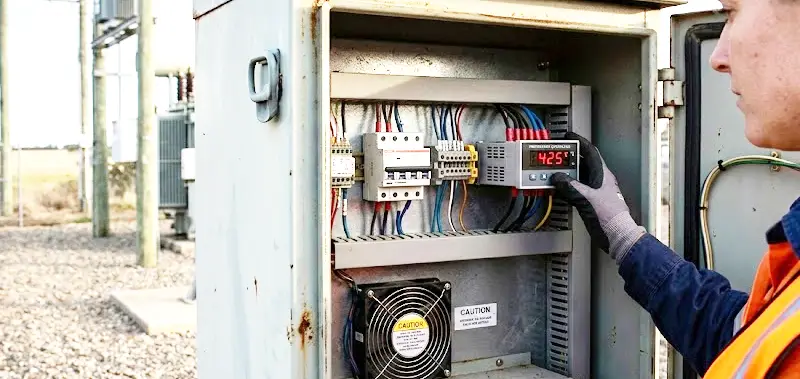
You want your enclosure to stay safe and efficient. Setting the thermostat is simple if you follow a few steps. First, identify the target temperature for your enclosure. For a cleanroom, you need tight control. Set the thermostat between 20°C and 21°C. In server cabinets, aim for 18°C to 27°C. Electrical panels work best at 40°C to 50°C. Animal habitats and storage spaces have their own ranges. Always check the recommended temperature for your specific enclosure.
Next, locate the thermostat inside your enclosure. Most Linkwell thermostats mount on a DIN rail. Turn the adjustment dial to your desired temperature. If you use a bimetal thermostat, you get reliable snap-action control. Make sure you set the thermostat to match your cooling or heating needs. For cleanroom applications, adjust both temperature and humidity controls. You can connect the thermostat to fans, heaters, or air conditioners for precise control.
Tip: Always double-check your settings after adjusting the thermostat. This helps you avoid accidental changes and keeps your enclosure stable.
Monitoring and Maintenance
You need ongoing monitoring to keep your enclosure running smoothly. Cleanroom environments demand constant control of temperature and humidity. Regular checks help you spot issues early. Use sensors to monitor temperature and humidity levels. Linkwell thermostats make monitoring easy with clear displays and reliable readings.
Here are some best practices for maintenance:
- Perform visual inspections every month. Look for dust, moisture, or signs of wear.
- Clean sensors and thermostat surfaces to prevent buildup.
- Test sensors and software every six months. Calibration keeps your control system accurate.
- Update software regularly. This protects your system and improves performance.
- Validate sensor readings against benchmarks. This ensures your monitoring stays reliable.
Note: Cleanroom maintenance requires strict protocols. Always follow your facility’s guidelines for temperature and humidity control.
If you keep up with monitoring and maintenance, you protect your equipment and maintain optimal conditions. You avoid costly downtime and keep your enclosure safe.
Common Mistakes with Temperature Controllers
Incorrect Setpoint Range
You might think setting the temperature controller is easy, but choosing the wrong setpoint can cause big problems. If you keep the setpoint too high or too low, you waste energy and risk operational inconsistencies. Sometimes, equipment runs nonstop without reaching the desired temperature, which strains your system and can lead to safety hazards. Teams that ignore equipment conditions may push operators to run closer to constraints, risking safety. Maintenance delays on degrading equipment can force operators to make adjustments that narrow safety margins. You need to match ratings for all enclosure accessories. If you use an enclosure rated for IP66 but a cable gland rated only for IP54, you compromise the protection level. This mismatch affects temperature control and reliability.
Tip: Always check your setpoint range and accessory ratings. Linkwell offers expert advice to help you install and set up your temperature controller correctly.
Ignoring Humidity and Environmental Changes
You can’t overlook humidity when you set up your enclosure. Poor humidity control leads to condensation, which can cause server crashes or data corruption. Dry air increases the risk of electrostatic discharge, damaging sensitive electronics. Exposure to damp environments can trigger respiratory issues like cough and asthma. Dry air dries out mucous membranes, making you more susceptible to infections. If you ignore humidity, you also waste energy and shorten equipment lifespan. Constant exposure to improper humidity levels means higher operational costs and more frequent replacements.
- A regional bank faced server crashes because of failing humidity control and condensation.
- An e-commerce company saw data corruption from ESD events during dry conditions.
- Poor humidity management leads to energy inefficiency and higher costs.
Note: Linkwell’s technical team can help you troubleshoot humidity issues and provide moisture control advice to prevent breakdowns.
Skipping Regular Checks
You need to perform regular checks to keep your temperature controller reliable. Calibration intervals depend on how critical your application is and the environmental conditions. Critical processes may need monthly or quarterly calibration. General HVAC applications might only require annual verification. High-temperature environments and corrosive atmospheres demand more frequent calibration. Establish a regular calibration schedule and document all results for compliance. Linkwell recommends maintenance checks every six months, including cleaning filters and sensors.
| Support Type | Description |
|---|---|
| Maintenance Tips | Regular checks every six months prevent issues, including cleaning filters and sensors. |
| Troubleshooting Help | Linkwell’s technical team assists with complex temperature and humidity control problems. |
Callout: Don’t skip regular checks. Consistent maintenance keeps your temperature and humidity control system running smoothly.
Conclusion
You made it to the end! Now you know how to pick the right thermostat setpoint range for any enclosure. You learned why temperature and control matter for equipment protection, energy savings, and safety. You saw how different enclosures need different temperature ranges. You also discovered how humidity and airflow affect your control strategy.
Let’s recap what you should remember:
- Always check the recommended temperature range for your enclosure.
- Use reliable thermostats and heaters for precise control.
- Monitor humidity and airflow to keep your environment stable.
- Adjust your settings as conditions change.
If you want to protect your equipment and save money, you need to focus on temperature and control. Don’t let overheating or condensation ruin your systems.
Linkwell gives you trusted solutions for temperature control. Their enclosure thermostats, heaters, and bimetal thermostats help you maintain the right temperature and humidity. You get certified products that work in tough environments. You can customize your control system to fit your needs.
You should review your control settings regularly. Conditions change, so your temperature and humidity targets might need updates. If you have questions or need expert advice, reach out to Linkwell. Their team supports you with product recommendations and technical help.
Take action today. Protect your equipment, improve your control, and keep your enclosure safe. Visit Linkwell’s website or contact their team for the best temperature control solutions.
You know that picking the right temperature setpoint keeps your equipment safe, saves energy, and ensures safety. Check out the benefits:
| Benefit | Description |
|---|---|
| Energy Savings | You can see an 8 to 20 percent reduction in HVAC energy use with proper thermostat settings. |
| Equipment Protection | Smart thermostats give maintenance alerts and prevent issues, boosting equipment longevity. |
| Safety | Good setpoint management lowers risks of overheating or freezing, keeping your operation safe. |
Linkwell’s enclosure thermostats and temperature controllers make temperature and humidity control easy. You get compact, durable devices that offer flexible adjustment and long lifespan:
| Feature | Description |
|---|---|
| Easy Deployment | DIN rail mounting lets you install quickly and securely. |
| Safety Protection | Flame-retardant material and wide temperature range keep your enclosure safe. |
| Long Lifespan | Over 100,000 cycles mean you can rely on your control system for years. |
If you don’t review and adjust your thermostat setpoints as conditions change, condensation can freeze and disrupt the refrigeration cycle. This leads to poor heat removal and risks damaging your electrical equipment.
Keep your temperature and control settings up to date. Reach out to Linkwell for expert advice and product recommendations. You’ll always have reliable temperature control for any enclosure.
FAQ
How do you set the right temperature for your enclosure?
You start by checking the recommended range for your enclosure type. Adjust the thermostat to match your needs. Use Linkwell products for easy temperature control and reliable performance.
Why is humidity management important in temperature control?
Humidity management protects your equipment from condensation and corrosion. You need to monitor both temperature and humidity. Linkwell thermostats help you achieve balanced control for safe operation.
Can you use one thermostat for both heating and cooling control?
Yes, you can. Linkwell thermostats let you switch between heating and cooling control. You get flexible options for different environments and easy integration with your enclosure systems.
What is environmental monitoring in enclosure control?
Environmental monitoring means tracking temperature, humidity, and airflow inside your enclosure. You use sensors and thermostats to maintain stable control. This keeps your equipment safe and efficient.
How often should you check your temperature control system?
You should check your temperature control system every six months. Regular inspections help you catch issues early. Clean sensors and update settings to keep your control accurate.


