
Choosing a cooled fan feels a lot like picking the right engine for your car—performance and fit matter most. I always check airflow, size, noise, and reliability before making a decision. When I match fan specs to my equipment’s cooling needs, I see real benefits. Take a look at this quick table:
| Benefit | Impact on Equipment |
|---|---|
| Stable temperature | Longer lifespan |
| Clean, filtered air | Less dust and humidity |
| Consistent airflow | Fewer malfunctions |
Simple steps like cleaning filters and monitoring temperature help me prevent big problems. Getting the right fan keeps everything running smoothly.
What Matters
- Assess your equipment’s heat load before selecting a fan. Calculate the total power consumption to determine the airflow needed for effective cooling.
- Consider the operating environment when choosing a fan. Dusty or humid locations require specific fan features like filters and higher IP ratings for protection.
- Select the right fan type based on your application. Different environments, such as data centers or industrial settings, have unique cooling requirements.
- Regular maintenance is crucial for fan performance. Clean or replace filters every few months to ensure optimal airflow and prevent overheating.
- Use a checklist during the fan selection process. This helps confirm you meet all requirements, from airflow calculations to energy efficiency.
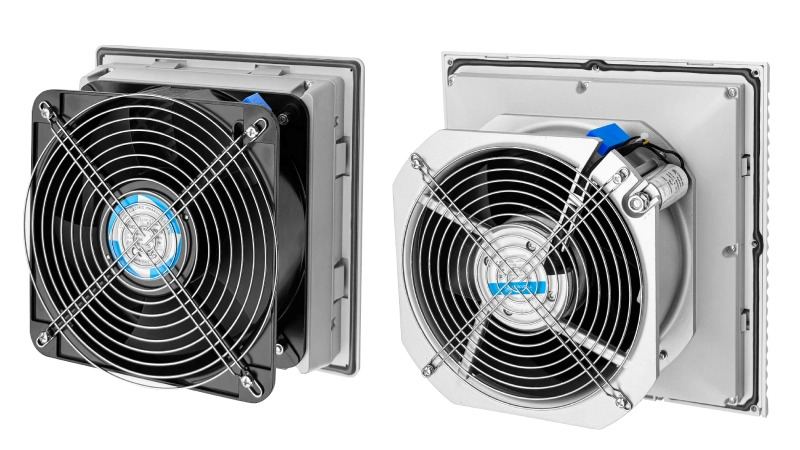
Assess Cooling Needs
Before I pick a cooled fan, I always start by figuring out exactly how much heat my equipment produces and what kind of environment it sits in. This step helps me avoid surprises later.
Power and Heat Load
I like to break down the process into a few simple steps:
- I check the power consumption for every part inside my enclosure. About 10–15% of that power turns into heat.
- I measure the temperature difference between the inside and outside of the cabinet.
- I add up the heat each device creates, usually in watts or BTU/h.
I pay close attention to things like power supplies, relays, PLCs, and any other parts that get warm during operation. These all add to the total heat load. Once I have the numbers, I use a quick formula to estimate the air flow I need:
Airflow (in m³/hr) = 2.6 × total power dissipated (in W) / allowable temperature rise (in °C).
This formula gives me a solid starting point. I always double-check my math because the right air flow keeps my equipment safe and steady. If I skip this step, I risk picking a fan that can’t handle the job.
Operating Environment
Next, I look at where my equipment lives. Is it in a dusty workshop, a humid warehouse, or a clean office? Each place changes what I need from my ventilation and cooling setup.
- High humidity can cause condensation, which may lead to short circuits or damage.
- Dust can build up and block air channels, making it harder for air flow to do its job.
- Moisture and dust together act like invisible killers, causing corrosion, overheating, or even electrical shorts.
I always choose fans with filters if I expect dust. For humid spots, I look for fans with higher IP ratings to keep moisture out. I also set a reminder to check and clean filters regularly, especially if I see dust building up or the air flow drops.
By understanding both the heat load and the environment, I make sure my air flow matches the real-world demands of my equipment. This approach keeps everything running smoothly and helps me avoid costly downtime.
Calculate Airflow for Cooled Fan
Safe Temperature Range
When I set up a new fan, I always check the safe temperature range for my equipment. If I let things get too hot, I risk damaging sensitive parts. I keep this table handy for quick reference:
| Equipment Type | Safe Operating Temperature | Notes |
|---|---|---|
| Custom Cooling Fans | Up to 60°C (140°F) | Needs careful thermal management. |
| Power Supplies | Typically 50°C | Higher temps shorten lifespan. |
| General Electronics | 104°F to 122°F | Reliability drops fast above this range. |
I try to keep my air flow steady so the inside temperature stays below these limits. If the room gets warmer, I know I need more ventilation and cooling to keep everything safe.
For every 10°C rise above the recommended range, the reliability of electronics can drop by half. I always aim for the lower end of the range to protect my gear.
Airflow Formulas
Calculating the right air flow feels like solving a puzzle. I follow these steps to make sure I get it right:
- I add up the total heat load from all the devices inside my enclosure (in watts).
- I decide how much temperature rise I can allow (in °C).
- I use this formula to find the airflow I need:
Required Airflow (CFM) = [3.16 × Heat Load (Watts)] / Allowable Temperature Rise (°C)
If I work with BTU/hr and Fahrenheit, I use:
```
Airflow (CFM) = BTU/hr / (1.08 × ΔT°F)
```
I never trust the perfect numbers—I add 20% to 25% headroom for dust and dirt.This keeps my air flow efficiency high, even if things get dirty over time.
| Formula | Description |
|---|---|
| Required Airflow (CFM) = [3.16 × Heat Load (Watts)] / Allowable Temperature Rise (°C) | For most electrical enclosures |
| Airflow (CFM) = BTU/hr / (1.08 × ΔT°F) | For calculations in Fahrenheit |
| Airflow (CFM) = BTU/hr / (1.95 × ΔT°C) | For calculations in Celsius |
Before I pick a fan, I look at its curve—speed vs airflow tells you everything. I match it to my system’s needs so I don’t end up with too little or too much air flow. This step helps me pick a fan that fits just right and keeps my equipment running cool.
Select the Right Fan Type
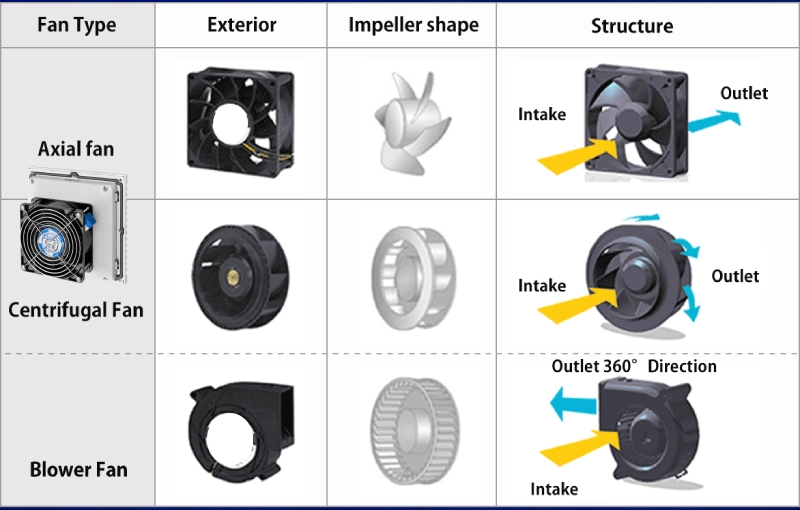
Choosing the right fan for my equipment feels a lot like picking the right shoes for a long hike. If I grab the wrong size or style, I end up with sore feet and a tough journey. The same goes for cooled fans—if I don’t match the fan type to my equipment and environment, I risk overheating, noise, or wasted energy.
Electronics Cooling Fan Options
When I’m spec’ing a fan, I first scope out what’s out there—axial, blower, whatever. Each one fits a different job, just like sneakers, boots, or sandals fit different adventures. Here’s a quick table I use to compare options:
| Industry / Application | Typical Fan Type | Key Requirements |
|---|---|---|
| Data Center & Server Cooling | High-CFM DC Fans, EC Fans | MTBF >150k hrs, redundant design, hot-swap support, low noise |
| Telecom & Networking Equipment | DC Fans, Blowers | -40°C to +70°C operation, high static pressure, dust resistance |
| Industrial Electronics & Control Panels | AC Fans, IP-Rated DC Fans | Vibration resistance, contaminant protection, stable 24/7 duty |
| Medical & Laboratory Equipment | Ultra-Quiet DC Fans, EC Fans | <20 dBA noise, smooth speed control, cleanroom compatibility |
When I select a cooled fan, I think about where it will work and what it needs to handle. For example, in a dusty factory, I pick a fan with a filter and a strong motor. In a quiet office, I look for a fan that runs almost silently.
I also pay attention to energy efficiency. EC fans can use up to 50% less energy than AC fans. They let me adjust speed to save power and keep things cool without wasting electricity. If I want to see how different fan types stack up, I check this table:
| Fan Type | Efficiency Level |
|---|---|
| AC Fans | Lower (15%-50%) |
| DC Fans | Medium (~30% improvement) |
| EC Fans | High (75%-90%) |
If I want the most efficient option, I go for EC fans. They use advanced technology to cut power use by 40–60% compared to AC fans. That means lower bills and less heat in my cabinet.
Linkwell Cabinet Fan Features
When I need a cooling fan for a control cabinet or electrical enclosure, I always check out Linkwell’s options first. They remind me of a Swiss Army knife—packed with features that solve real problems. Here’s how Linkwell Cabinet Fans compare to other brands:
| Feature | Linkwell Cabinet Fans | Other Brands |
|---|---|---|
| Moisture Resistance | IP54-rated design for moisture resistance | Non-IP rated models |
| Air Filtration | Integrated filter system for clean airflow | Basic or no filtration |
| Installation | Adjustable mounting brackets for easy install | Fixed or complex install |
| Performance | Robust airflow for consistent cooling | Intermittent operation |
| Certification | CE certified for safety | Uncertified alternatives |
I like that Linkwell Cabinet Fans come with adjustable brackets. I can install them quickly, even in tight spaces. The built-in filter keeps dust and debris out, which means less cleaning and fewer breakdowns. The IP54 rating gives me peace of mind in humid or dirty environments. I know my equipment stays safe and cool.
If I need something for a computer case, I look at the Computer Chassis Fan. It offers high airflow, low noise, and advanced speed control. For electrical enclosures, the Electrical Enclosure Fan gives me energy savings and long service life. I can even get custom options if my project needs something special.
Axial Fan and Filter Units
Axial fans and filter units work like the lungs of my equipment. They pull in fresh air and push out heat, keeping everything at the right temperature. In places with lots of dust or particles, I always use a fan filter unit. Here’s why:
| Feature | Description |
|---|---|
| Filtration | Advanced filters remove dust, particles, and pollutants from the airflow. |
| Airflow | Efficient design keeps air moving and prevents hot spots. |
| Energy Efficiency | Runs continuously without using too much power—great for critical gear. |
When I select fan size and type, I follow a few simple steps:
- I figure out the temperature my equipment needs to stay under.
- I add up the heat it produces.
- I calculate the airflow needed to keep things cool.
- I pick a cooled fan that matches those numbers.
If I’m working in a harsh environment, I choose an axial fan with a high IP rating and a filter unit. Linkwell’s Axial Fans and Fan Filter Units give me options for different voltages, sizes, and protection levels. I can even get custom branding if I want my logo on the cover.
I always check the filter every few months. If I see dust building up, I swap it out right away. This keeps airflow strong and my equipment safe.
Selecting the right fan is all about matching the fan’s features to my equipment’s needs and the environment. I look at room size, fan diameter, speed, and airflow direction. If I get these details right, my equipment runs cooler, lasts longer, and needs less emergency repair.
I never guess when I select fan types. I use real numbers, check the specs, and pick the right fan for the job. That’s how I keep my systems running smoothly, no matter where they are.
Installation Factors for Cooling Fan
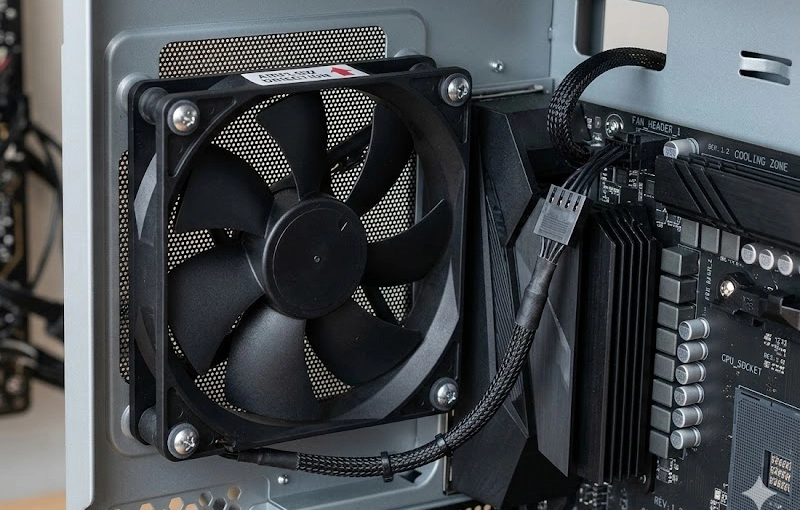
Mounting and Connections
When I install a cooling fan, I always start by planning the best spots for intake and exhaust. I place intake fans at the front or bottom of my cabinet to pull in the coolest air. I put exhaust fans at the back or top so hot air escapes fast. This setup keeps air flow moving in the right direction and helps my equipment stay cool.
I aim intake fans at the hottest parts, like CPUs or power supplies. I try to keep a 1:1 ratio of intake to exhaust fans. This balance prevents pressure problems and keeps air flow steady. Sometimes, I experiment with different setups to see what works best for my cabinet.
The mounting options and electrical connections really matter. If I use a proper shroud or bracket, the fan draws air through the whole filter or radiator. This boosts air flow and makes my ventilation and cooling system more efficient. If I mount a fan the wrong way, I notice airflow drops and hot spots form.
Linkwell fans make installation easy. Most models come with adjustable brackets, clear wiring diagrams, and universal mounting holes. I can connect them to thermostats or hygrostats for automatic control. I always double-check the wiring to avoid mistakes.
Protection and Maintenance
I never skip protection features when I set up a fan. I look for IP ratings that match my environment. For dusty or wet places, I pick fans with IP54 or higher. Fan guards also matter. They keep fingers and tools safe and block debris.
Here’s how they stack up:
| Type of Fan Guard | Advantages | Limitations | Best For |
|---|---|---|---|
| Metal Fan Guards | Strong, heat resistant, long life | Heavy, may corrode, higher cost | Industrial, outdoor |
| Plastic Fan Guards | Light, no rust, safe for moisture | Less tough, lower heat tolerance | Electronics, damp areas |
| Wire Mesh Fan Guards | Great air flow, blocks dust | Not as strong, less protection from big debris | Data centers, dusty spots |
| Ring and Screw Guards | Secure, limits blade exposure | Harder to install, less access for cleaning | Safety-critical, commercial use |
For maintenance, I follow a checklist:
- I balance the fan to stop vibration.
- I check blades for cracks or rust.
- I align drive parts if the fan uses gears or belts.
- I grease the bearings with the right lubricant.
- I stick to the maintenance schedule from the manufacturer.
I clean or replace filters often, especially if I see dust building up. This keeps air flow strong and prevents overheating. With Linkwell fans, filter changes are quick, and the design makes routine checks simple. I find that regular care keeps my fans running longer and my equipment safer.
Linkwell Cooling Fan Solutions
When I look for a cooling solution that actually works, I always check what sets a brand apart. Linkwell stands out for me because their cooled fan options cover everything from computer chassis to rugged industrial cabinets. I want fans that keep my equipment safe, run quietly, and don’t waste energy. Here’s a quick table that shows why I trust Linkwell over other brands:
| Feature | Advantage |
|---|---|
| High-Efficiency Cooling | Delivers powerful axial airflow for effective heat dissipation in electronics and industrial equipment. |
| Impedance Protection | Ensures stable operation under fluctuating electrical conditions, maintaining reliability. |
| Corrosion-Resistant Materials | Durable construction with a metal frame and lightweight plastic blades for easy installation. |
| Energy Efficiency | Reduces operational costs by up to 25% compared to conventional fans. |
| Versatile Mounting | Pre-drilled holes for easy integration into various systems. |
| Safety Certification | CE certified for safety and quality standards, backed by a 1-year warranty. |
Product Selection Checklist
I always use a checklist before I finish my fan selection. This helps me avoid mistakes and makes sure I get the right cooled fan for my setup:
- Check the total heat load and required airflow (CFM or m³/hr).
- Confirm the safe temperature range for my equipment.
- Match the fan size and voltage to my enclosure.
- Choose the right IP rating for dust or moisture.
- Pick a fan with a filter if I expect dust.
- Look for energy-saving features to cut costs.
- Make sure the fan has safety certifications.
- Review mounting options for easy installation.
- Plan for filter changes and routine maintenance.
I always double-check my numbers and compare the fan’s airflow curve to my needs. This step keeps my equipment cool and running longer.
Real-World Examples
I’ve seen Linkwell fans make a real difference in tough environments. Here’s what happened after I upgraded to their cooled fan models:
| Metric | Before Upgrade | After Upgrade |
|---|---|---|
| Downtime incidents/month | 3.4 | 0.5 |
| Component failure rate | 12% annually | <3% annually |
| MTBF | 9 months | 27 months |
| ROI (after 1 year) | N/A | 180% |
Some stories stand out for me:
- Wastewater-Plant Control Panel Overhaul: I saw a 78% drop in component faults and over 18 months of smooth operation.
- Coastal Desalination Plant: The rugged design doubled the time between failures, even in salty air.
When I use Linkwell for my cooling solution, I get peace of mind and fewer headaches. That’s why I keep coming back.
Conclusion
Choosing the right cooled fan for your equipment doesn’t have to feel overwhelming. I like to break the process into simple steps that anyone can follow. Here’s how I wrap up my selection:
- Start with the numbers. I always calculate the heat load and figure out the airflow my equipment needs. I use the formulas I shared earlier and double-check my math.
- Match the fan to the environment. I look at where my equipment sits. If I see dust, I pick a fan with a filter. For humid or wet spots, I go for a model with a high IP rating.
- Pick the right size and voltage. I measure the space inside my cabinet and check the voltage requirements. I never guess—if I’m not sure, I ask for a spec sheet.
- Check for energy-saving features. I look for fans that use less power but still move enough air. This helps me cut costs and keeps my gear cool.
- Plan for maintenance. I set reminders to clean or swap out filters every few months. I check the blades for dust and make sure the fan spins freely. If I see anything off, I fix it right away.
Keep a checklist handy. It helps me stay organized and makes sure I don’t miss a step.
If you want a fan that’s easy to install, quiet, and built to last, I recommend checking out Linkwell’s lineup. Their fans cover everything from computer chassis to rugged industrial cabinets. You can find models with adjustable brackets, built-in filters, and energy-saving motors. I’ve seen the difference these fans make in real-world projects.
Before you buy, review your calculations and compare the fan’s specs to your needs. A little extra time up front saves a lot of trouble later. If you need help, reach out to Linkwell’s support team—they’re quick to answer questions and help you find the right fit.
With the right cooled fan, your equipment runs cooler, lasts longer, and gives you fewer headaches. That’s a win in my book.
When I pick a cooled fan, I follow these steps to get it right:
- I check the voltage and fan type.
- I match the fan to my equipment’s airflow and pressure needs.
- I look at size, noise, and mounting details.
- I confirm the brand and technical specs.
- I review protection level and installation.
I always double-check my math and compare specs before I buy. Linkwell’s support team helps me with questions, and their warranty gives me peace of mind. A good checklist keeps my equipment cool and my projects on track.
FAQ
How do I figure out the right fan size for my cabinet?
I measure the cabinet’s dimensions and check the heat load. I use airflow formulas to calculate the needed CFM. If I’m unsure, I ask Linkwell’s support team for help.
What’s the best way to keep my fan running smoothly?
I clean the filter every few months. I check for dust buildup and swap out filters if airflow drops. I follow Linkwell’s maintenance schedule for each model.
Can I use a Linkwell fan outdoors?
Yes, I pick a model with a high IP rating, like IP65 or IP67. These fans handle moisture and dust. I check the specs before installing.
How often should I replace the filter in my fan filter unit?
I change filters every 3–4 months in dusty areas. In clean rooms, I wait up to 6 months. I set reminders so I don’t forget.
What should I do if my fan gets noisy?
I check for loose screws or debris. I clean the blades and inspect the bearings. If the noise continues, I contact Linkwell for advice.


