
You rely on industrial equipment enclosures to protect sensitive electronics and electrical gear from dust, moisture, and harsh conditions. These enclosures keep your systems safe, but they face real challenges inside—like heat buildup, tangled wiring, and tight spaces. When you overlook thermal management or power organization, you risk serious problems, including:
- Overheating that shortens equipment life
- Melting, smoke, or even fires
- Electrical arcing and safety hazards
- Expensive repairs and unexpected downtime
To keep everything safe and reliable, you need to follow strict standards. Here are some key ones:
| Standard | Description |
|---|---|
| NEMA 4/4X | For outdoor or corrosive environments, offering strong ingress protection |
| NEMA 7/9 | For hazardous locations, keeping you safe in classified areas |
| ATEX/IECEx | For explosive atmospheres, matching specific safety zones |
| Temperature Class (T4/T6) | Keeps surface temps below dangerous ignition levels |
| NEMA 250 | Adds corrosion resistance and gasket aging to basic ingress protection |
Getting the right Industrial Equipment Enclosures: Cooling and power distribution in place means safer, longer-lasting operations.
Key Takeaways
- Choose the right cooling system to prevent overheating and extend equipment life. Options include air cooling, evaporative cooling, and refrigeration cooling.
- Follow strict standards like NEMA ratings to ensure safety and reliability in harsh environments. This protects your equipment from dust, moisture, and corrosion.
- Organize power distribution effectively to avoid overloads and electrical faults. Use busbars or modular systems for flexibility and easy upgrades.
- Regular maintenance is crucial. Inspect filters and fans monthly to prevent dust buildup and ensure optimal airflow.
- Implement monitoring technologies like temperature sensors and power meters. These tools help catch issues early and maintain system efficiency.
Industrial Equipment Enclosures: Cooling Solutions
Cooling System Types
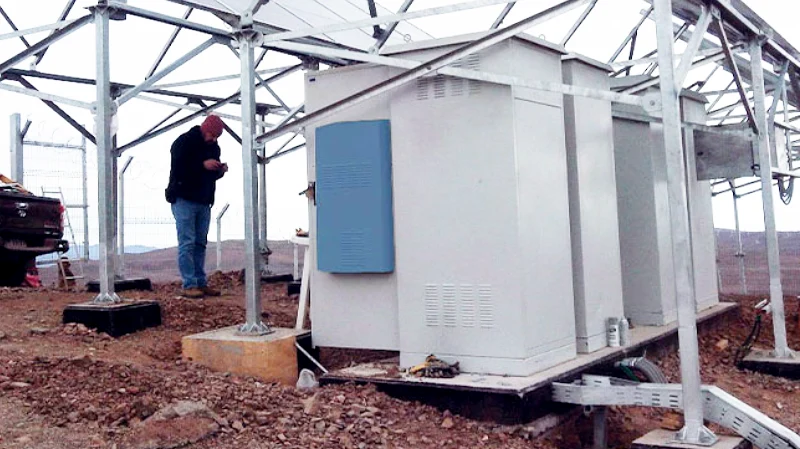
You face a lot of heat inside industrial equipment enclosures. Power electronics, drives, and transformers generate heat that can build up fast. If you don’t manage this heat, your equipment can overheat, fail, or even catch fire. That’s why you need the right cooling system.
Let’s look at the main cooling system types you can use:
| Type of Cooling System | Mechanism Description | Cooling Capacity Comparison |
|---|---|---|
| Heat Sink Coolers (Air Cooling) | Uses air circulation to move heat away from the enclosure. | N/A |
| Heat Pipe Coolers (Evaporative Cooling) | Moves heat with a working fluid throughout the structure. | N/A |
| Vapor Compression Coolers (Refrigeration Cooling) | Runs in a closed-loop with refrigeration components. | N/A |
| Thermoelectric Coolers (Solid State Cooling) | Uses solid-state tech—no compressors or refrigerants. | N/A |
You also have cooling fans (AC and DC) that help with ventilation and airflow. Fans push hot air out and pull cool air in, keeping temperatures stable. Cabinet air conditioners work well for high-heat environments. Closed-loop cooling systems keep dust and moisture out while maintaining precise temperature control.
Industry leaders like ISC Sales, nVent HOFFMAN, and ETA Enclosures offer reliable cooling solutions. They design systems that meet strict standards and keep your equipment safe.
Choosing the Right Cooling Method
Picking the best cooling method for your enclosure isn’t always easy. You need to think about several factors:
- Control internal temperature for reliable operation.
- Consider the heat load from your equipment.
- Check the environment where your enclosure sits.
- Look at heat transfer methods: radiation, conduction, and convection.
- Make sure your enclosure rating (like NEMA 4, 4X, or 12) matches your cooling method.
- Decide between natural convection, forced convection, or air conditioning.
- Choose materials that help with thermal management.
Natural convection works for mild heat and good airflow. Forced convection (fans and blowers) is better for higher heat or tight spaces. Closed-loop cooling is perfect for sealed enclosures.
Here’s a quick comparison of popular cooling methods:
| Cooling Method | Advantages | Disadvantages |
|---|---|---|
| Compressor-Based Air Conditioners | High cooling capacity | Higher maintenance, limited orientation, stationary, mostly AC powered |
| Vortex Coolers | Low maintenance, small footprint, inexpensive | Needs compressed air, stationary, noisy, filter changes required |
| Air-to-Air Heat Exchangers | Low maintenance, inexpensive | Can’t cool below ambient |
NEMA 4 air conditioners are sealed against dust and water. They work well in tough industrial and outdoor settings. NEMA 4X units add corrosion resistance, so you can use them in places with salt spray or chemicals. NEMA 12 enclosures protect against dust and dripping liquids, making them great for indoor use.
Installation and Maintenance
You want your cooling system to work smoothly and last a long time. Good installation and regular maintenance help you get there.
| Cooling Method | Description |
|---|---|
| Natural Convection | Works for mild heat; needs open airflow and vents. |
| Forced Convection | Uses fans or blowers; check noise and airflow under backpressure. |
| Air Conditioning | Best for critical jobs; gives maximum heat transfer in sealed cabinets. |
When you install cooling fans, place them where they can move air efficiently. Make sure vents aren’t blocked. For cabinet air conditioners, seal the enclosure to keep dust and moisture out.
Maintenance matters, too. Here’s what you should do:
| Maintenance Task | Frequency |
|---|---|
| Inspect filters on fans and ACs | Monthly |
| Replace filters | Every 3 to 6 months |
| Clean dirt buildup | As needed, based on environment |
Tip: Use temperature sensors to monitor heat buildup. Adjust your cooling strategy if you see rising temperatures.
Common Cooling Mistakes
You can avoid a lot of headaches by steering clear of these common mistakes:
- Don’t let dirty air enter your enclosure. It brings dust and particulates.
- Always check the ambient air temperature. If it’s too high, your cooling won’t work.
- Watch out for corrosive environments. Protect your electronics from airborne contaminants.
- Make sure there’s enough space inside for air to circulate.
- Pick a fan with the right cubic feet per minute (CFM) rating.
- Know your NEMA rating. It helps you choose the right protection against environmental hazards.
If you follow these steps, you’ll keep your industrial equipment enclosures: cooling system running smoothly. You’ll protect your gear, avoid downtime, and meet all the important standards.
Power Distribution in Enclosures
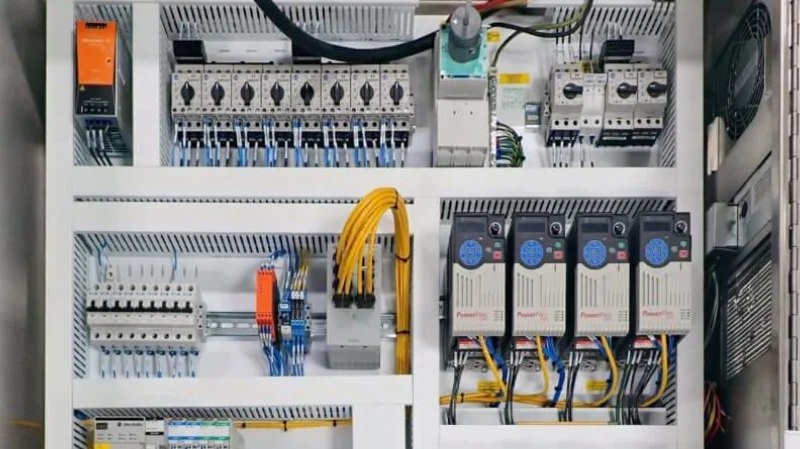
Power distribution inside industrial enclosures is just as important as cooling. If you don’t organize your power system, you risk overloads, electrical faults, and even equipment failure. A well-designed setup keeps your energy flowing safely and reliably, protects your electronics, and makes maintenance much easier.
Distribution Options
You have several ways to distribute power inside your enclosure. Each option offers different benefits for efficiency, scalability, and safety. Here’s a quick look at some of the most common systems:
| Feature | System pro E power Rear Busbar System |
|---|---|
| Design | Modular and scalable, compact-high performance for premium applications |
| External Height | 2200 mm |
| External Depth | 600, 800, and 1000 mm |
| Rated Short-Time Withstand Current | Up to 150 kA |
| Maximum Rated Current | Up to 6300A |
| Installation Techniques | Fixed, plug-in, removable, and withdrawable |
| Delivery Options | Fully assembled, pre-assembled, or flatpack |
| Compliance | IEC 61439-1 and -2 |
| Space Saving | Optimized for ABB Emax2 and Tmax T/XT |
| Additional Features | CombiLine N modules for small currents |
You’ll often see three main types of power distribution systems:
| Feature | Busbars | Modular Systems | Panel Boards |
|---|---|---|---|
| Modularity | High, easy expansion | Pre-engineered segments | Limited modularity |
| Installation Speed | Fast, modular components | Quick assembly, minimal rewiring | Slower, more complex wiring |
| Reliability | Fewer connection points | Stable, fewer components | More points, higher risk |
| Scalability | Seamless expansion | Supports upgrades | Limited scalability |
- Busbars give you a compact design and high power density. You can install them quickly and expand them easily as your needs grow. Fewer connection points mean fewer chances for things to go wrong.
- Modular systems let you add or remove segments as needed. They’re great for future upgrades and quick changes.
- Panel boards work well for smaller setups but don’t offer as much flexibility or speed for big changes.
You’ll also find control transformers inside many enclosures. These devices convert voltage to the right level for your sensitive electronics, protecting them from surges and spikes. Terminal blocks help you organize wiring, make safe connections, and simplify maintenance and troubleshooting.
Tip: Don’t choose your enclosure or power system based only on price. A reliable manufacturer with the right certifications will save you headaches and money in the long run.
Selection Criteria
Picking the right power distribution method depends on several factors. You want a system that fits your environment, keeps your equipment safe, and allows for future changes.
| Criteria | Description |
|---|---|
| Material and Construction | Choose metal for durability or plastic for corrosion resistance, depending on your environment. |
| Enclosure Integrity | Make sure your enclosure meets NEMA ratings to protect components and prevent accidental contact. |
| Material Flammability | Use flame-retardant materials for safety. |
| Clear Labeling | Look for boxes with clear manufacturer and electrical rating labels. |
| Safety Features | Secure doors, covers, and proper grounding prevent accidental contact. |
Think about your current equipment load and any future expansion. Busbar systems, for example, let you add or move loads easily with tap-off points. You can add circuits as your needs grow, and you won’t need to shut down your whole system for upgrades. This flexibility helps you keep up with changing demands without major downtime.
| Feature | Description |
|---|---|
| Flexibility | Busbars allow easy addition or relocation of loads. |
| Scalability | Add circuits as load increases. |
| Future-Proofing | Adaptable systems meet evolving needs with little downtime. |
| Modification Process | Adding machines is simple and less disruptive than with cables. |
Safety and Compliance
Safety should always come first in power distribution. You need to follow strict standards to protect your people and equipment. Here are some of the most important certifications and ratings to look for:
| Certifications / Standards | Description |
|---|---|
| NEMA Type 4, 4X, 12 | Protects against dust, water, and corrosion |
| cUL Listed, UL 508A, UL 746 | Ensures electrical safety and quality |
| ATEX, IECEx, UL HazLoc | Certified for hazardous and explosive environments |
| IP66, IEC 62208 | High ingress protection and enclosure integrity |
| NEC-certified explosion-proof housings | For hazardous areas, made from tough materials like copper-free aluminum or stainless steel |
NEMA ratings go beyond just keeping out dust and water. They also cover corrosion resistance, gasket aging, and even ice formation. Always check that your enclosure and power system meet the right standards for your application.
Best practices in power management can reduce electrical hazards. Here are a few you should follow:
| Best Practice | Explanation |
|---|---|
| Find and Fix Approach | Encourage workers to spot and report hazards right away. |
| Critical Equipment Safety Checks | Use protection devices to prevent faults and hazards. |
| Use of PPE | Make sure everyone wears the right gear when working with electricity. |
| Identify and Label Hazards | Clearly label all equipment and hazards for quick recognition. |
Troubleshooting Issues
Even with the best setup, problems can pop up. Some of the most common issues in power distribution systems include:
- Transients (sudden voltage spikes)
- Electrical harmonics (distorted waveforms)
- Poor power factor
- Voltage instability
- Imbalance
You can catch these problems early by using the right diagnostic tools and regular inspections. Here’s what you should do:
- Inspect for dust, overheating, and loose connections.
- Use monitoring tools to track voltage stability and load behavior.
- Make sure your power supplies are sized and matched to your load.
- Keep your enclosure environment controlled to avoid extreme conditions.
- Plan for backup power with uninterruptible power supplies or generators.
- Replace components before they fail, based on their lifespan and history.
The ALVIN system helps you spot faults and power quality issues in low voltage networks. It records voltage and current waveforms, so you can find and fix problems fast.
Organized power management inside your enclosure does more than just keep things tidy. It ensures reliable energy distribution, prevents overloads, and protects against electrical faults. Control transformers and terminal blocks play a big role in this. They help you convert voltage, protect sensitive electronics, and keep wiring safe and easy to manage. When you follow these best practices, you make maintenance and troubleshooting safer and faster, and you keep your whole operation running smoothly.
Mounting and Space Optimization
Mounting Techniques
You want your enclosure layout to be neat, safe, and easy to work with. DIN rails make this possible. They give you a standard way to mount terminal blocks, relays, and power devices. You can snap components on or off the rail, which makes installation and replacement quick. Racks and sub-panels help you organize larger equipment and keep everything stable. Custom enclosures let you mix and match brands, so you can use the best parts for your needs.
Here are some smart mounting techniques you can use:
- Add internal mounting rails or sub-panels for flexible layouts.
- Plan cable entry points at the bottom, top, or sides to reduce clutter.
- Leave extra space for future upgrades or new devices.
Tip: A well-organized enclosure makes troubleshooting and maintenance much easier.
Space and Accessibility
You can get more out of your enclosure by using space wisely. Think about how you arrange your components. Place the most-used items where you can reach them fast. Use overhead space for wiring or extra modules. Label everything clearly, so you find what you need without searching.
Try these strategies to boost accessibility and space:
- Maximize overhead space for better organization.
- Use a labeling system for faster retrieval.
- Select the right rack depth for easy access.
- Minimize clutter to improve safety and airflow.
When you keep things tidy, you also improve cooling and reduce wiring mess. This helps your equipment last longer and makes your job easier.
Vibration and Environmental Protection
Industrial environments can be tough on your enclosures. Vibration, heat, and moisture all affect how you design and mount your equipment. You need to pick solutions that protect your gear and keep it running.
| Environmental Factor | Impact on Enclosure Design | Key Findings |
|---|---|---|
| Temperature | Affects thermal acceptability | Higher thermal acceptability in controlled environments. |
| Lighting | Influences user performance | Good lighting improves visibility and safety. |
You can use industrial instrument enclosures in places like gas turbine halls or nuclear plants. These protect sensitive gear from extreme temperatures and moisture. Outdoor cabinets stand up to salt spray, rain, and even vandalism. Manufacturers test these enclosures to make sure they resist corrosion and harsh weather.
Note: Always choose enclosures rated for your environment to avoid costly failures.
Integration and Monitoring
System Integration
You want your enclosure to work as one smooth system. That means your cooling and power setups need to fit together. Start by planning your airflow. Calculate how much air you need to move based on the highest temperature and how much heat your equipment makes. Place fans near the power supply. This keeps the hottest spots cool and protects your gear. Always clean or swap out dust filters. Clean filters help air move freely and keep your system running strong.
Here are some key steps for smart integration:
- Match your cooling method to your power load.
- Use modular layouts for easy upgrades.
- Keep wiring neat and away from airflow paths.
- Choose cooling equipment that fits your enclosure’s NEMA rating.
Tip: Good integration means less downtime and fewer headaches when you add new devices.
Monitoring Technologies
You can’t fix what you can’t see. That’s why monitoring matters. Use temperature sensors to track heat inside your enclosure. Many systems let you set alarms for high temperatures. Some even send alerts to your phone or computer. Power meters help you watch for overloads or voltage drops. Smart controllers can adjust fan speed or turn on extra cooling when things heat up.
Here’s a quick look at useful monitoring tools:
| Tool | What It Does |
|---|---|
| Temperature Sensors | Track and report heat levels |
| Power Meters | Monitor voltage and current |
| Smart Controllers | Automate cooling and power settings |
Note: Real-time monitoring helps you catch problems early and avoid costly failures.
Maintenance Practices
You want your equipment to last. Regular maintenance is the secret. Check filters and fans every month. Replace filters when they get dirty. Watch for dust, loose wires, or hot spots. Remember, every 10°C rise in temperature can cut your equipment’s life in half. Good airflow and steady temperatures keep your gear healthy.
If you skip maintenance, your equipment ages faster. You might face sudden breakdowns and higher repair bills. In server cabinets, poor cooling leads to hardware failures. Make airflow control and temperature checks part of your routine. This keeps your system reliable and your costs down.
Stay proactive. A little maintenance now saves you big trouble later.
You can boost safety and performance in your industrial enclosures by following these steps:
- Use VFDs to control motors and save energy.
- Run a 30-day load study to spot efficiency gains.
- Check for air leaks with a sonic imager.
- Install waste heat recovery systems.
- Optimize when you use energy.
- Add lighting controls like sensors.
- Schedule work during off-peak hours.
- Complete a lighting and energy audit.
Regular maintenance and compliance with standards keep your team safe and your equipment reliable. High-quality cooling fans, transformers, terminal blocks, and DIN rails help your enclosure run smoothly for years. Stick with these best practices for long-term success.
FAQ
What is the main purpose of an industrial equipment enclosure?
You use an enclosure to protect electrical and electronic parts from dust, moisture, and damage. It keeps your equipment safe, helps prevent accidents, and makes sure everything meets industry standards.
How do I know which cooling method is right for my enclosure?
Check your equipment’s heat output and the environment. For light heat, fans work well. For high heat or harsh settings, use air conditioners or closed-loop systems. Always match your cooling choice to your enclosure’s NEMA rating.
Why should I use DIN rails inside my enclosure?
DIN rails let you mount and swap components quickly. You keep your layout neat and organized. This makes maintenance easier and helps with future upgrades.
What are the signs of poor power distribution?
Watch for tripped breakers, hot spots, flickering lights, or equipment shutting down. These signs mean you need to check your wiring, connections, and load balance.
How often should I inspect and maintain my enclosure?
Check filters, fans, and wiring every month. Clean out dust and replace filters as needed. Regular checks help you catch problems early and keep your system running smoothly.


