
You rely on your equipment every day, but electrical enclosure cooling often gets overlooked until problems pop up. When heat builds up inside an enclosure, you might see early component failure, shortened equipment life, or even equipment damage. Electrical enclosure cooling keeps sensitive devices, like microprocessor-controlled Electrical Cabinet Component systems, safe from issues such as performance throttling or set point drift. Without proper electrical enclosure cooling, you face increased risk of fire, condensation, and corrosion.
Good thermal management through electrical enclosure cooling gives you peace of mind and helps you avoid costly downtime. Whether you want a simple fix or the latest tech, electrical enclosure cooling protects your investment.
Quick Content Search
- Proper electrical enclosure cooling prevents overheating, which can lead to equipment failure and costly repairs.
- Choose between passive and active cooling methods based on your enclosure’s heat generation and environment.
- Regular maintenance, including cleaning fans and filters, is essential for effective thermal management.
- Monitor temperature and humidity to avoid condensation and protect sensitive electronics.
- Smart fan placement and airflow management can significantly enhance cooling efficiency and prevent hot spots.
Importance of Electrical Enclosure Cooling
Overheating Risks and Failure Rates
You might not notice heat building up inside electrical enclosures right away, but the risks are real. Overheating can sneak up on you and cause serious problems for your electronics. When you look at the numbers, you see how common these failures are. Check out this table showing the main causes of overheating in enclosures:
| Cause of Overheating | Percentage |
|---|---|
| Loose Connections/Parts | 30.3% |
| Moisture | 17.4% |
| Line Disturbance (excluding lightning) | 10.4% |
| Defective/Inadequate Insulation | 9.9% |
| Lightning | 8.1% |
| Foreign Objects/Short-circuiting | 7.3% |
| Collision | 3.9% |
| Overloading/Inadequate Capacity | 2.4% |
| Accumulation of Dust, Dirt, & Oil | 2.2% |
| Other Causes | 8.1% |
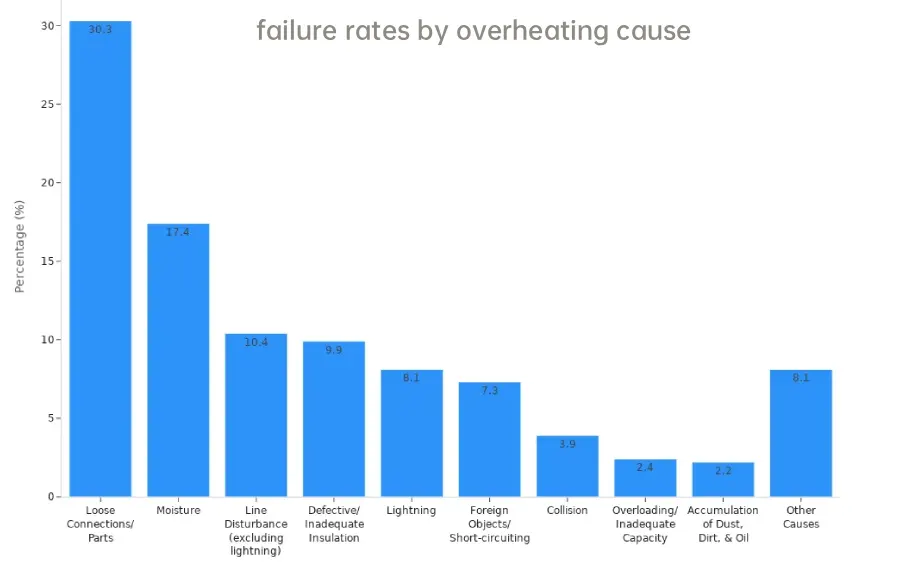
Loose connections and moisture top the list. These issues can lead to unexpected shutdowns and expensive repairs. If you ignore cooling, you risk losing valuable time and money.
Impact on Performance and Safety
Thermal management in electronics is not just about keeping things cool. It’s about protecting your equipment and keeping your workplace safe. Here’s what can happen if you don’t manage the temperature inside your electrical enclosures:
| Evidence Type | Description |
|---|---|
| Overheating Risks | Overheating and condensation can lead to significant equipment failures, increasing maintenance costs and safety hazards. |
| Cost of Climate Control | Implementing a climate control system is often cheaper than replacing damaged equipment due to heat. |
| Component Lifespan | A 10°C rise over the rated temperature limit can halve the life expectancy of electrical components. |
- You avoid unexpected shutdowns when you use proper cooling.
- You keep your operations running smoothly.
- You reduce the risk of fire or electrical accidents.
Understanding Heat and Thermal Management
Internal and External Heat Sources
You might wonder where all the heat inside your electrical enclosure comes from. It’s not just the outside weather. Many components inside your enclosure create their own heat as they work. Here are some of the main sources you should watch out for:
- Variable Frequency Drives (VFDs) lose about 3% to 5% of their rated power as heat.
- Power supplies and transformers give off heat because of losses in their magnetic and copper parts.
- Programmable Logic Controllers (PLCs) and CPUs can create hot spots in certain areas.
- Relays, contactors, and terminals add to the heat through electrical resistance.
Don’t forget about what’s happening outside your enclosure. These external factors can make things even hotter:
- Solar radiation heats up outdoor enclosures, especially in direct sunlight.
- High ambient temperatures push the internal temperature even higher.
- Radiant heat from nearby machines, like welders or furnaces, can sneak in.
If you keep an eye on both internal and external sources, you’ll have a better shot at keeping your equipment cool.
Factors Affecting Heat Dissipation
You need to think about more than just where the heat comes from. How well your enclosure gets rid of heat matters just as much. Several factors play a big role in heat dissipation:
- Thermal load calculations help you know how much heat your system produces.
- Airflow requirements show you how much air you need to move to keep things cool.
- Material choices can make a big difference. Metal enclosures, like aluminum and steel, get rid of heat faster than plastic ones.
- Environmental considerations, such as humidity and dust, can change how well your cooling works.
For every 10 degrees Celsius increase in temperature, the life of electrical equipment is cut in half—a sobering reminder that enclosure thermal management directly relates to a company’s survival.
If you pay attention to these factors, you’ll protect your equipment and avoid costly surprises.
Cooling Methods for Enclosures
When you want to keep your electrical enclosures running smoothly, you need to pick the right cooling method. You have two main options: passive cooling and active cooling. Each method has its own strengths, costs, and best-use cases. Let’s break them down so you can make the best choice for your setup.
Passive Cooling (Natural Convection)
Passive cooling uses the natural movement of air to remove heat from your enclosure. You don’t need any electricity or moving parts. Instead, you rely on simple science—hot air rises, and cool air takes its place. This method works best when your enclosure doesn’t generate much heat or when the outside temperature is much cooler than the inside.
Here’s what you get with passive cooling:
- No electrical power needed—your system stays silent and energy bills stay low.
- No fans or compressors, so you don’t have to worry about electrical noise or extra maintenance.
- Simple design—just vents or louvers in the right spots.
But passive cooling has limits. It can only handle small amounts of heat. If your enclosure gets very hot or sits in a warm place, natural convection might not keep up.
Check out this table to see how natural convection compares to forced air cooling:
| Cooling Modality | ΔT Capability | Heat Removal Capacity | CAPEX | Maintenance Needs |
|---|---|---|---|---|
| Natural Convection | Needs ΔT > 20°C | Very Low (< 200W) | Zero | Low |
| Forced Air (Fans) | Needs ΔT > 5°C | High (Up to 2000W+) | Low | Medium (Filter cleaning) |
Active Cooling (Fans, Air Conditioners, Heat Exchangers)
Sometimes, passive cooling just isn’t enough. That’s when you turn to active cooling. This method uses energy to move heat out of your enclosure. You can pick from several tools, like fans, air conditioners, and heat exchangers.
Let’s look at each option:
- Fans: These create forced air movement. They push cool air in and pull hot air out. Fans work well when you have a moderate amount of heat and the outside air is clean and cooler than the inside. You’ll find fans are cost-effective and can handle a lot of heat, but they need power and regular filter cleaning.
- Air Conditioners: If you need to keep your enclosure cooler than the outside air, air conditioners are your best bet. They use compressors and refrigerants to drop the temperature below ambient. You’ll get strong cooling, but you’ll pay more upfront and in energy bills. Maintenance is more involved, too.
- Heat Exchangers: These work great when you want to keep dirty outside air out of your enclosure. Heat exchangers transfer heat without mixing inside and outside air. They’re perfect for outdoor or dusty environments, but they need a big temperature difference to work well.
Here’s a quick comparison to help you decide:
| Cooling Method | Typical Application | Advantages | Limitations |
|---|---|---|---|
| Fans (Filtered Fan Systems) | Forced air cooling when ΔT > 5°C | Cost-effective, high heat displacement | Needs power, clean outside air |
| Air Conditioners | When internal temp must be lower than ambient | Strongest cooling, lowers temp below ambient | High cost, complex maintenance |
| Heat Exchangers | Outdoor/contaminated environments | Closed-loop, keeps out contaminants | Needs large ΔT, moderate heat removal |
Note: If your enclosure sits in a hot place, fans alone won’t help. You’ll just move hot air around. In that case, go for a closed-loop air conditioner or a heat exchanger.
Cost Comparison of Cooling Solutions
You want to keep costs under control, so let’s see how these cooling methods stack up:
- Passive cooling costs almost nothing to set up or run. You just need vents and good design.
- Fans are about one-tenth the cost of air conditioning. They give you a lot of cooling for your money, but you’ll need to clean filters and keep them powered.
- Air conditioners cost the most. You pay more upfront and for energy. Maintenance is also higher because of compressors and refrigerants.
- Heat exchangers sit in the middle. They cost more than fans but less than air conditioners. They protect your enclosure from dust and dirt, which can save you money on repairs.
How Enclosure Design and Material Affect Cooling
Don’t forget—your enclosure’s design and material matter just as much as your cooling method. Aluminum enclosures spread heat quickly, helping you avoid hot spots. Steel enclosures hold onto heat longer, so you’ll need good airflow to keep things cool. The thickness of your enclosure walls also changes how fast heat moves. Thicker walls spread heat out, but they can slow down cooling. Thinner walls respond faster but need careful airflow planning.
You should also think about vent placement. Good airflow needs clear paths for air to move in, across hot parts, and out. If you put vents in the wrong spot, warm air can get trapped and your cooling won’t work as well.
Remember: Smart design and the right material can make your cooling system work better and last longer.
Enclosure Cooling Fans Explained
What Are Enclosure Cooling Fans?
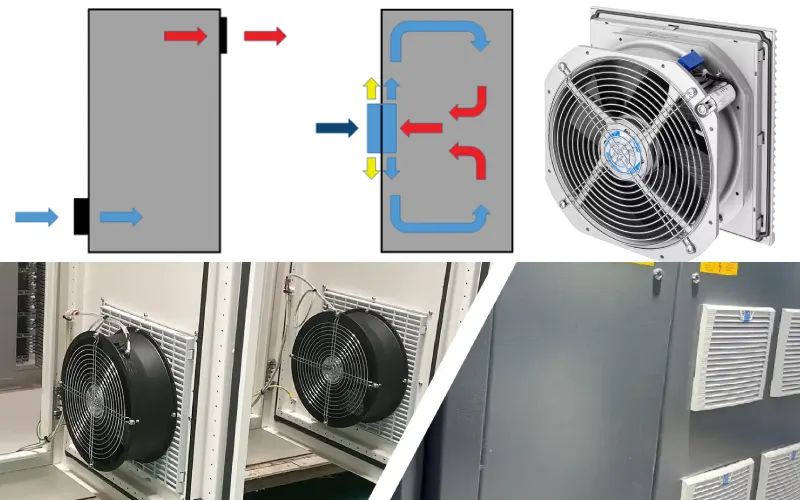
You use enclosure cooling fans to move air through electrical enclosures and keep your equipment safe from heat. These fans come in different shapes and sizes, each with a special job. Some fans push hot air out, while others pull cool air in. You can find tube-axial fans, vane-axial fans, blowers, and fan trays. Each type helps you manage airflow and target hot spots inside your enclosure.
Here’s a quick look at the main types of enclosure cooling fans and what they do:
| Fan Type | Characteristics | Functions |
|---|---|---|
| Tube-Axial Fan | Propeller style with a venturi tube | Exhausts hot air, targets hot spots |
| Vane-Axial Fan | Straightens airflow with vanes | Improves airflow efficiency |
| Blowers | Creates high internal pressure | Pushes cool air in when resistance is high |
| Fan Trays | Multiple small tube-axial fans in a chassis | Directs airflow to hot spots in crowded cabinets |
| Air Conditioners | Uses refrigerants and heat exchangers | Cools below ambient, prevents condensation |
You can boost cooling by placing fans near cold air inlets or using exhaust fans at the top of your cabinet. Fan trays work well for crowded enclosures with lots of hot spots.
Key Fan Terms (CFM, RPM, Airflow)
When you pick enclosure cooling fans, you see terms like CFM, RPM, and airflow. These numbers help you choose the right fan for your needs.
- CFM (Cubic Feet per Minute) tells you how much air a fan can move. Higher CFM means more cooling power.
- RPM (Revolutions Per Minute) shows how fast the fan spins. Faster fans move more air but can be noisier.
- Airflow is the path air takes through your enclosure. Good airflow removes heat from your electronics and keeps everything running smoothly.
If you understand these terms, you can match the right fan to your enclosure and avoid overheating.
Filtered Fans and Airflow Patterns
Filtered fans play a big role in keeping your enclosure clean and cool. These fans use filters to block dust and dirt from getting inside. Clean filters make it easier to keep fans working well, so you don’t have to clean your components as often.
Check out this table to see how filtered fans and airflow patterns help your enclosure:
| Feature | Explanation |
|---|---|
| Sealed enclosures with fans | Move heat out or stir trapped air for better cooling |
| Filters | Stop dust from building up on PCBs and heat sinks |
| Positive pressure systems | Push filtered air in, keep dust out |
| Continuous airflow from intake to exhaust | Removes heat and keeps temperatures steady |
You get the best results when you set up a steady airflow from intake to exhaust. This keeps hot air moving out and cool air coming in. With filtered fans, you protect your electronics from dust and keep your cooling system working longer.
Importance of Enclosure Cooling Fans
Role in Thermal Management
You might wonder why enclosure cooling fans matter so much in your setup. These fans play a huge part in keeping your electrical enclosures safe and reliable. When you use enclosure cooling fans, you help regulate temperatures by moving air through the enclosure. The fans draw in cooler air and push out hot air, which stops heat from building up around your sensitive electronics. This simple action keeps your equipment running at the right temperature and helps prevent sudden shutdowns or damage.
Here’s what enclosure cooling fans do for your thermal management:
- Move cooler air into the enclosure and force hot air out.
- Prevent thermal buildup that can shorten the life of your components.
- Keep your electronics working at their best, even when things heat up.
Equipment to last longer and avoid costly repairs, you need to pay attention to the importance of enclosure cooling fans.
When to Use Fans
You don’t always need the most expensive cooling system. Sometimes, a fan is the perfect solution. You should use enclosure cooling fans when your enclosure generates moderate heat and the outside air is cooler than the inside. Fans work well in many places, including renewable energy systems, data centers, telecommunications, industrial automation, and medical devices. These are just a few applications of enclosure cooling fans.
Here are some signs that fans are the right choice:
- The enclosure sits in a spot with good ventilation.
- You need a cost-effective way to manage heat.
- The temperature difference between inside and outside is at least a few degrees.
To get the most out of your fan, make sure you install it in the right spot and keep it clean. Regular maintenance, like cleaning filters and checking airflow, helps your fan work better and last longer.
Forced air convection with enclosure cooling fans gives you a simple, affordable way to boost heat transfer and protect your equipment.
Climate Control in Electrical Enclosures
Temperature and Humidity Control
You might think cooling is all you need, but climate control means more than just lowering the temperature. You need to manage both temperature and humidity inside your electrical enclosure. If you ignore these, you risk condensation, corrosion, and even electrical shorts.
Here are some important points to remember about temperature and humidity control:
- The best temperature set point for most enclosure cooling units is around 95 °F (35 °C).
- Many electrical devices can handle up to 140 °F (60 °C), but some, like variable frequency drives (VFDs), need cooler conditions—usually no more than 104 °F (40 °C).
- Keeping humidity low helps prevent condensation, which can damage sensitive electronics.
If you want your equipment to last, you should check the ratings for each device and set your cooling system to match. Good temperature regulation keeps your electronics safe and reliable.
When Heating Is Needed
You might not expect to need heat inside an electrical enclosure, but sometimes it’s essential. Cold weather can cause just as many problems as heat. When temperatures drop, condensation can form, and that moisture can ruin your electronics.
You should consider adding heating in these situations:
- You want to protect your equipment from insulation damage and component failure.
- You need to keep workers safe by avoiding thermal discomfort or health risks.
- You want to reduce the chance of arcing or fires caused by extreme cold or rapid temperature swings.
A small enclosure heater can keep the inside temperature above the dew point, stopping condensation before it starts. Heaters also help your equipment start up smoothly in cold environments.
Note: Climate control isn’t just about cooling. Sometimes, a little heat is the best way to keep your system running strong.
Fan Placement and Air Circulation
Getting the most out of your enclosure cooling fans starts with smart placement. If you put fans in the right spots, you boost airflow and keep your electronics safe from heat. Let’s look at how you can set up intake and exhaust fans for the best results.
Intake vs. Exhaust
You want to move cool air in and push hot air out. The way you place your fans makes a big difference. Here’s a quick guide to the most effective strategies:
| Strategy | Description |
|---|---|
| Bottom Intake | Draws in cooler air from the bottom of the enclosure. |
| Top Exhaust | Removes hot air that rises to the top. |
| Different Heights | Placing intakes and exhausts at different heights maximizes airflow and prevents hotspots. |
| Positive Pressure System | Pushes filtered air into the enclosure to prevent dust entry. |
| Negative Pressure System | Exhausts hot air but may draw in unfiltered air. |
| Mixed Flow System | Combines both systems for effective cooling and cleanliness. |
You get the best airflow when you use a bottom intake and a top exhaust. Cool air comes in low, hot air escapes high. If you want to keep dust out, try a positive pressure system. This setup pushes filtered air in, so dirt stays out. For tough environments, a mixed flow system gives you both strong cooling and clean air.
Avoiding Hot Spots
Hot spots can sneak up on you and cause trouble for your equipment. You need to spot them early and keep them from forming. Here’s how you can do that:
- Use thermal imaging to find temperature differences inside your enclosure.
- Set up monitoring systems to track heat and alert you if things get too hot.
- Arrange your components so air can move freely around them.
- Inspect your enclosure when it’s running under load—hot spots show up best when equipment works hardest.
- Wait for peak loads or at least 40% load before checking with thermal imaging.
- Watch out for loose connections, since they often create extra heat.
If you keep an eye on these things, you’ll catch problems before they turn into failures. Good airflow and smart fan placement help you avoid hot spots and keep your system running strong.
Controlling Fan Performance
Speed Controllers and Thermostats
You want your enclosure cooling system to work smarter, not harder. Speed controllers and thermostats help you do just that. These devices let you adjust how your fan runs, so you only use as much cooling as you need. This approach saves energy and helps your fans last longer.
Here’s a quick look at the main types you’ll find in electrical enclosure thermal control:
| Type | Description |
|---|---|
| Speed Controls | Let your cooling system operate only when needed, cutting energy use and reducing fan wear. |
| Thermostats | Keep temperatures steady for sensitive electrical and electronic parts. |
| Accessories | Include filters, guards, and mounting brackets for better airflow management. |
You might see products like Fantech fan speed controls, thermostats, humidistats, and pressure switches. Each one plays a role in thermal control. For example, EC controllers and Variacs keep things quiet at low speeds. Triac dimmers can start your fan at full speed, then slow it down. If you mount your fan properly and size your ducts right, you’ll also cut down on noise.
Tip: Using the right speed controller or thermostat means your thermal control system responds quickly to temperature changes, keeping your equipment safe.
Automated Fan Control
You can take thermal control to the next level with automated fan control. This technology uses advanced strategies like Pulse-Width Modulation (PWM) and closed-loop systems. These methods let your fan change speed based on how much heat your enclosure produces.
Automated fan control enhances energy efficiency and equipment protection in enclosure cooling systems by utilizing advanced control strategies such as Pulse-Width Modulation (PWM) and closed-loop control systems. These methods allow for variable fan speeds that match the thermal load, reducing energy consumption and minimizing wear on the fans.
Some systems even have embedded tachometers. These give you feedback on how your fan is running. If something goes wrong, you’ll know right away and can fix it before your equipment overheats.
Additionally, features like embedded tachometers provide feedback on fan performance, enabling quick detection of issues that could lead to overheating and component failure.
With automated fan control, you get reliable thermal control, lower energy bills, and peace of mind.
Common Cooling Problems
Noise, Vibration, and Blockage
You might notice your enclosure fans making strange noises or shaking. These issues can signal bigger problems if you ignore them. Noise often comes from dirty or loose fan blades, while vibration usually means something is out of place. Blockages, like dust or debris, can slow down airflow and make your fans work harder.
Here’s a quick table to help you spot and fix these common issues:
| Checkpoint | Possible Problem | Recommended Solution |
|---|---|---|
| Fan Blades | Noise or imbalance | Clean, tighten, or replace blades |
| Bearings | Grinding noise | Lubricate bearings, remove dust |
| Installation | Vibration or movement | Tighten mounts, realign fan |
Troubleshooting Tips
When your enclosure gets too hot or starts acting up, you need to find the cause fast. Look for signs like burn marks, a burning smell, or even delamination on your components. These can all point to overheating.
Try these steps to solve common problems:
- Add ventilation fans or louvers if you see equipment failures or short component life.
- Increase the size of your enclosure to help heat escape.
- Install heat exchangers for extreme conditions.
- Move heat-generating parts away from each other.
- Check gaskets and drain holes if you spot condensation or corrosion.
- Upgrade to stainless steel or use protective coatings to fight rust.
- Use hygrostat-controlled heaters when humidity goes above 65%.
- For outdoor boxes, pick light colors and solar shields to block extra heat.
If you want to avoid future trouble, follow the “Diagonal Flow” rule: put your intake at the bottom corner and your exhaust at the opposite top corner. This setup gives you the best airflow.
You can keep your cooling system reliable by staying alert and fixing small problems before they grow.
Implementation Checklist
Planning and Selection Steps
You want your cooling system to work right from the start. Planning helps you avoid mistakes and keeps your equipment safe. Here’s a step-by-step checklist to guide you:
- Calculate the heat load using manufacturers’ catalogs. Find out how much energy your devices use.
- Gather climate data for your location. Know the ambient temperature where your enclosures sit.
- Use temperature measuring tools after installation. Check if your enclosure stays within safe limits.
- Refer to the NEMA Enclosure Guide. Pick the right protection level for your environment.
- Try the Enclosure Temperature Management Calculator. Figure out how much cooling you need.
- Look through cooling equipment catalogs. Choose the best cooling solution for your setup.
- Collect any extra information you need. Make sure your cooling plan covers all bases.
Tip: Double-check your calculations and measurements. Small errors can lead to big problems later.
Key Considerations (Ratings, Material, Form Factor)
When you select cooling equipment for enclosures, you need to focus on a few important details. These choices affect how well your system works and how long it lasts.
- Choose the right NEMA rating for your application. Indoor enclosures need different protection than outdoor ones. Think about exposure to water, dust, or chemicals.
- Pick materials that resist hazards. Stainless steel, polycarbonate, fiberglass-reinforced polyester, aluminum, and powder-coated carbon steel all offer unique benefits.
- Make sure your enclosure is UL listed or certified by groups like CSA or Intertek. This keeps your system safe and compliant.
- For food, beverage, or pharmaceutical setups, consider NEMA 4X enclosures. These handle high-pressure washdowns and harsh cleaning chemicals.
- If you work in hazardous locations with combustible gases or dust, use enclosures rated NEMA 7, 8, 9, or 10. Check that your choices match NEC requirements.
Note: The right ratings and materials protect your equipment and keep your cooling system running smoothly.
Maintenance and Best Practices
Inspection and Cleaning
Enclosure cooling system to work smoothly, so regular inspection and cleaning are key. Dust and debris can block airflow and make your thermal management less effective. If you let filters clog, your cooling fans have to work harder, which can lead to overheating and damage to your electronics.
Here’s a simple checklist for keeping your thermal system in top shape:
- Inspect cooling fans every month. Look for signs of wear, noise, or vibration.
- Clean or replace filters at least twice a year. If your environment is dusty or dirty, change filters more often.
- Make sure filters stay clear to prevent clogging and keep thermal airflow strong.
- Check for blockages around vents and fans. Remove any dirt or debris right away.
- Keep fan blades clean to avoid imbalance and extra noise.
Regular inspection and cleaning help you avoid sudden failures and keep your electronics safe. You protect your investment and extend the life of your thermal equipment.
Monitoring and Upgrades
You can boost your thermal management by using smart monitoring tools and planning upgrades. Real-time sensors and predictive maintenance make it easier to spot problems before they cause downtime. If you track temperature, humidity, and airflow, you prevent overheating and keep your electronics running longer.
Take a look at how ongoing monitoring and upgrades improve your thermal system:
| Evidence Type | Description | Impact |
|---|---|---|
| Predictive Maintenance | AI analytics spot failures early | Fewer disruptions |
| Real-time Monitoring | Sensors track thermal conditions | 30% better operational efficiency |
| Continuous Tracking | Watch temperature, humidity, airflow | Longer equipment life |
| Cooling Monitoring | Reduce air conditioner power use | Over 50% lower costs |
| Proactive Monitoring | Prevent telecom outages | 80% fewer outages |
| Emergency Repairs Reduction | Fewer site visits | Up to 25% lower maintenance expenses |
You can upgrade your thermal system with smarter fans, better sensors, and improved controls. These steps help you manage thermal loads, save energy, and keep your electronics safe. If you stay proactive, you avoid costly repairs and keep your enclosure cooling system reliable.
Smart monitoring and timely upgrades make your thermal management stronger and more efficient. You get peace of mind and protect your electronics from unexpected thermal issues.
You play a key role in keeping your electrical enclosures safe and reliable. Good thermal management helps you avoid shutdowns and keeps your equipment running longer. Remember these takeaways:
- Prevent unexpected failures with smart cooling choices.
- Pick the right system—passive or active—for your needs.
- Stay up to date with UL and cUL safety standards.
- Explore more on climate control and industry guidelines to keep your setup compliant and efficient.
FAQ
How to size a fan for my enclosure?
Calculate your enclosure’s total heat load in watts or BTU, consider airflow requirements (CFM), ΔT between inside and ambient, and choose a fan that meets these specs while allowing margin for efficiency and airflow resistance.
Can I mix fans and heat exchangers?
Yes. Fans move air through the enclosure, while heat exchangers transfer heat without mixing air. Combining both improves cooling in dusty or hot environments, maintaining safe temperatures and extending component life.
What maintenance schedule ensures maximum efficiency?
Inspect fans monthly for wear, clean or replace filters twice a year (more in dusty environments), check airflow paths, and lubricate bearings if needed. Regular maintenance ensures reliable cooling and prevents overheating or equipment damage.
How often should you clean enclosure cooling fans and filters?
You should check and clean fans and filters every month. If your environment is dusty, clean them more often. Clean parts help your cooling system work better and last longer.
Can you use regular household fans for electrical enclosures?
No, you should not use household fans. Enclosure cooling fans are built for industrial use. They handle heat, dust, and moisture much better than regular fans.
What is the best way to prevent condensation inside enclosures?
Install a small heater or use climate control units. Keep humidity low and monitor temperature. This stops condensation and protects your electronics from moisture damage.
Do enclosure cooling fans make a lot of noise?
Most enclosure fans run quietly. If you hear loud noises, check for dirt, loose blades, or worn bearings. Clean and maintain your fans to keep noise levels low.


