
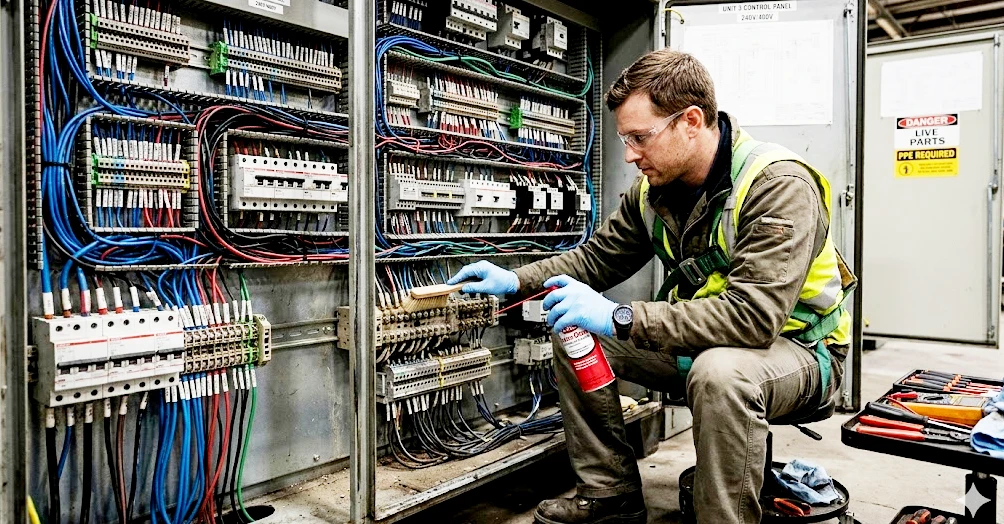
Cleaning electrical terminals in control panels and cabinets keeps your equipment safe and reliable. Dust, oxidation, and corrosion hide in terminals, increasing resistance, causing overheating, and leading to failures.
- About 12% of electrical panel defects come from corrosion-related issues.
- Dirty terminals threaten critical systems like wind power, solar inverters, and automated lines.
| Benefit | How It Helps |
|---|---|
| Prevents corrosion | Stops unexpected failures in electrical systems |
| Maintains conductivity | Avoids voltage drops for smooth performance |
| Boosts reliability | Matches maintenance to your environment |
If you stay on top of cleaning electrical terminals, you protect your panels and keep your operations running smoothly.
Key Takeaways
- Regularly clean electrical terminals to prevent corrosion and ensure reliable performance.
- Always power down and follow safety procedures before cleaning to avoid electric shock.
- Use appropriate cleaning tools and agents, like isopropyl alcohol, to safely remove dirt and oxidation.
- Inspect terminals frequently for signs of corrosion or loose connections to maintain system safety.
- Implement climate control solutions to reduce humidity and dust, extending the life of your electrical equipment.
Why Cleaning Electrical Terminals Matters
Performance and Safety
You want your control panels and cabinets to run smoothly, right? Clean terminals make that happen. When dust, oil, and dirt build up, they cause short circuits and equipment failures. These contaminants can even spark fire hazards. If you let dirt block ventilation, your panel heats up fast. That leads to frequent tripping of circuit breakers and erratic relay operation. Corrosion is a big threat. It corrupts electrical current, overheats wires, and sometimes starts fires. Water intrusion and aluminum oxide make things worse, acting as insulators and destroying internal functions. You need corrosion-resistant terminals to keep your system safe.
Linkwell terminals use high-grade copper and advanced plating. That means you get efficient power transfer and less energy loss. Tin plating resists oxidation and corrosion, so your panels stay reliable even in harsh environments. With Linkwell, you prevent corrosion and rust, protect electrical functions, and reduce maintenance costs. You keep your equipment safe for everyone.
Tip: Clean terminals regularly to avoid costly downtime and keep your panels running at peak performance.
Risks of Dirty Terminals
Dirty terminals bring real hazards. Check out this table for the main safety risks:
| Safety Risk | Description |
|---|---|
| Electric Shock | Direct contact with energized parts can cause painful jolts or even death. |
| Arc Flash | Explosive energy release from faults can burn skin and damage hearing. |
| Loose Connections | High resistance creates heat, melts insulation, and can trigger arc flash incidents. |
| Contamination | Dust and moisture compromise insulation, leading to faults, corrosion, and tracking. |
If you ignore corrosion, you risk overheating, fire hazards, and expensive repairs. Poorly maintained systems can fail and cost you big. Old panels rust and lose surge protection, making fires more likely. Corrosion-resistant terminals from Linkwell prevent these issues. They keep your panels safe, reliable, and efficient for years.
- Dust causes arcing and overheating.
- Oil traps more dust and moisture.
- Dirt blocks ventilation, raising temperatures.
- Corrosion leads to frequent failures and safety hazards.
You can trust Linkwell to help you fight corrosion and keep your electrical systems strong.
Signs of Electrical Connector Corrosion
Visual Inspection Tips
You can spot corrosion early if you know what to look for. Start with a simple visual check. Look for these signs:
- Discoloration on terminals or wires
- Dust accumulation inside the cabinet
- Moisture or water droplets near connectors
- Rust or white powdery buildup on metal parts
- Green or blue stains on copper wires
If you see any of these, your panel needs attention. Sometimes, you notice a musty smell or sticky residue. That means moisture has entered and corrosion is starting. Check for loose screws or cracked insulation. These issues make corrosion worse.
Tip: Always inspect after storms, high humidity, or recent maintenance. Temperature swings can cause condensation and speed up corrosion.
Performance Issues
Corrosion does more than change how things look. It affects how your panel works. Watch for these performance problems:
- Voltage drops across terminals
- Intermittent signals or random device resets
- Circuit breakers tripping without clear cause
- Overheated wires or burning smells
- Devices failing to start or respond
When corrosion attacks, it corrupts electrical current. Wires overheat and sometimes catch fire. Aluminum oxide acts as an insulator, blocking current and raising fire risks. Moisture destroys internal functions, and rust signals trouble inside.
If you notice these issues, act fast. Clean the terminals and check for deeper corrosion. Reliable terminals help prevent these headaches.
Linkwell Screw Terminals: Durability and Corrosion Resistance
You want terminals that fight corrosion and last longer. Linkwell Screw Terminals use corrosion-resistant aluminum and tin-plated materials. They outperform standard connectors by 40%. Check out this comparison:
| Feature | Linkwell Screw Terminals | Industry Standard | Improvement |
|---|---|---|---|
| Corrosion Resistance Rating | 40% better than uncoated | Standard materials | +40% |
| Material Used | Corrosion-resistant aluminum and tin-plated | Varies | N/A |
Linkwell Screw Terminals keep your panels safe and reliable. You spend less time worrying about electrical connector corrosion and more time focusing on your operations.
Safety Precautions for Cleaning Electrical Contacts
Power Isolation Steps
Before you start cleaning electrical contacts, you need to make sure the panel is safe. You don’t want to risk shock or damage. Here’s what you should do:
- Follow your facility’s lockout/tagout (LOTO) procedures. This step keeps the equipment from turning on while you work.
- Check for multiple energy sources. Some panels have more than one power supply. Make sure you isolate all of them.
- Use a voltage detector to confirm a zero energy state. Don’t trust the switch alone. Always double-check.
- Apply safety grounds to all phases. This step protects you from unexpected surges.
- Allow time for capacitors to discharge. Even after you turn off the power, capacitors can hold a charge. Wait a few minutes before touching anything.
You protect yourself and your equipment when you follow these steps. Cleaning electrical contacts without proper isolation can lead to injury or equipment failure. Linkwell products are designed for safe maintenance, but you still need to follow these precautions every time.
Tip: Never skip lockout/tagout. It’s the most important step for safe cleaning electrical contacts.
PPE and Safe Practices
You need the right gear when cleaning electrical contacts. Safety comes first. Here’s what you should wear:
- Insulated gloves. These protect your hands from electric shock.
- Safety glasses or goggles. You don’t want dust or debris in your eyes.
- Flame-retardant clothing. This reduces risk if a spark occurs.
- Closed-toe shoes. Protect your feet from dropped tools or parts.
Always de-energize the equipment before cleaning electrical contacts. If you see signs of corrosion, take extra care. Corrosion can weaken metal and make contacts brittle. Don’t force anything. Use gentle tools and avoid harsh chemicals.
Linkwell terminals and accessories support safe cleaning electrical contacts. Their corrosion-resistant materials help you avoid unexpected hazards. You keep your panels reliable and your team safe when you follow these practices.
Note: Cleaning electrical contacts is safer and easier when you use PPE and follow all safety steps. Corrosion is less likely to cause trouble if you maintain your equipment regularly.
Tools and Contact Cleaner for Terminals
Essential Cleaning Tools
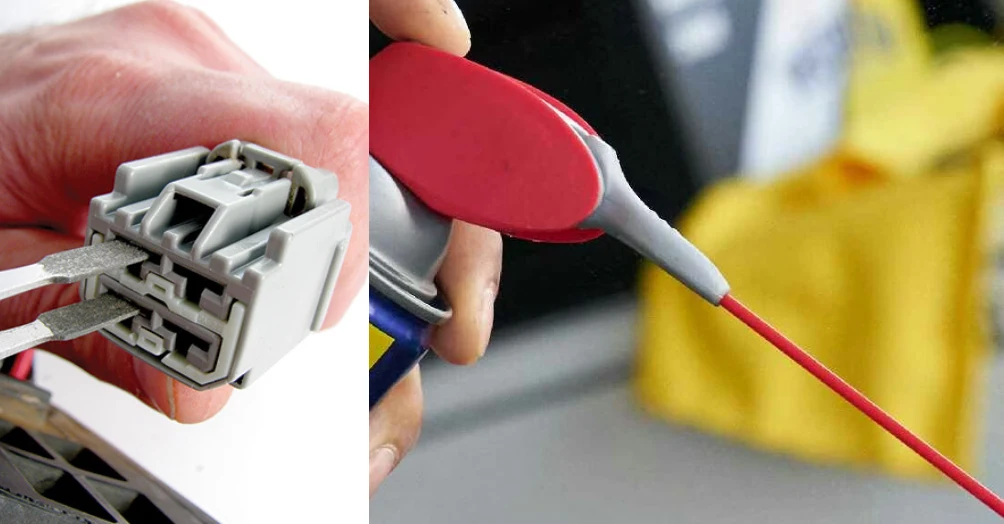
You need the right tools to clean electrical terminals in control panels and cabinets. Start with a soft brush. This tool removes dust and loose debris without scratching the metal. Use compressed air to blow away particles from tight spaces. A lint-free cloth works well for wiping surfaces. For cabinets, some users recommend a pressure washer or water hose, but only if you can guarantee the area is fully de-energized and protected. Aerosol contact cleaner makes the job easier. It sprays into crevices and dissolves grime quickly. You can also use a small screwdriver to gently loosen stubborn buildup.
Tip: Linkwell Screw Terminals handle standard cleaning tools and methods. You can use brushes, compressed air, and contact cleaner without damaging the terminal.
Recommended Contact Cleaners
Choosing the right contact cleaner is important. Look for products made for electrical work. Isopropyl alcohol is a safe option. It evaporates fast and leaves no residue. WD-40 Specialist Electrical Contact Cleaner is another good choice. It removes oil, dirt, and oxidation from terminals. Aerosol contact cleaner comes in cans for easy application. You spray it directly onto the terminal, and it works fast. Electrical contact cleaner is designed to reach deep into connectors and dissolve contaminants. You can use it for routine maintenance or heavy cleaning. Always follow the instructions on the label.
| Cleaner Type | Safe for Terminals | Application Method |
|---|---|---|
| Isopropyl Alcohol | Yes | Spray or wipe |
| WD-40 Specialist Electrical Contact Cleaner | Yes | Aerosol spray |
| Aerosol Contact Cleaner | Yes | Direct spray |
What to Avoid
You want to protect your terminals, so avoid harsh methods. Never use abrasive tools like sandpaper, wire brushes, or metal wool. These scratch the surface and damage the terminal. Stay away from corrosive cleaning agents. They can eat away at the metal and ruin the wires. Don’t use improper cleaners like brake fluid. This can dissolve plastic parts and cause more problems. Stick to contact cleaner made for electrical work. You keep your panels safe and extend their life.
Note: Linkwell Screw Terminals resist corrosion, but you still need to avoid harsh chemicals and abrasive tools.
How to Remove Corrosion and Clean Terminals
Preparation and Access
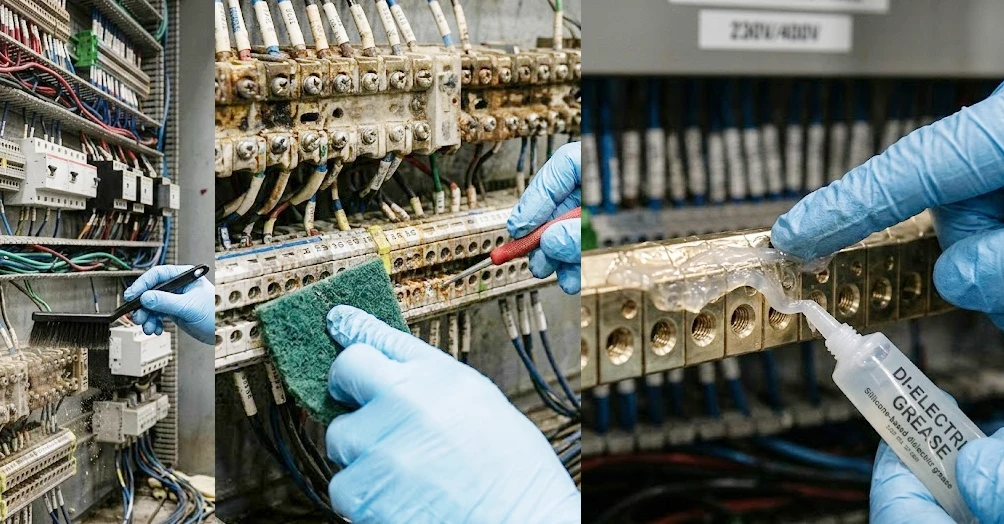
You want to start cleaning electrical terminals the right way. First, make sure the panel is powered down and locked out. Safety comes first. Open the cabinet and check for dust, moisture, or visible corrosion. Use an anti-static brush to sweep away loose dirt. This keeps particles from getting into the contacts. If you see heavy buildup, grab a soft brush or compressed air to clear the area. You can reach tight spots with a fiberglass pen or a small tool. Always clean the contacts gently to avoid damaging the metal.
Tip: Wear insulated gloves and safety glasses. You protect yourself and keep the workspace safe.
Cleaning Electrical Terminals
Now you’re ready to clean the terminals. Pick a cleaning agent made for electrical work. Isopropyl alcohol works well. Contact cleaners are another good choice. Avoid water and harsh abrasives. Spray the cleaner onto a lint-free cloth. Wipe the terminals and connectors. If you see oxidation or corrosion, use a brass wire brush or Scotch Brite pad. These tools scrub away corrosion without harming the terminal. For sensitive contacts, try a nylon brush. Sometimes, corrosion gets deep into the wire end. You may need to cut off the bad connector and re-terminate it.
Here’s a step-by-step guide:
- Brush away loose dust and debris with an anti-static brush.
- Spray isopropyl alcohol or contact cleaner onto a cloth.
- Wipe the terminals and connectors thoroughly.
- Scrub corrosion spots with a brass wire brush or Scotch Brite pad.
- Use a fiberglass pen for small or hard-to-reach areas.
- If corrosion is severe, cut off the damaged connector and re-terminate.
- Apply dielectric grease to the terminals to prevent corrosion.
Mechanical methods like brushing and scrubbing remove corrosion. Chemical methods dissolve stubborn buildup. You can use mild acids like vinegar or baking soda for battery terminals, but always rinse and dry afterward. Special circuit board cleaning sprays help with circuit boards. You keep the terminals clean and ready for use.
Note: Linkwell Screw Terminals handle standard cleaning methods. You can clean electrical terminals without worrying about damaging the connector.
Drying and Reassembly
After cleaning electrical terminals, you need to dry everything completely. Use compressed air to blow away any leftover liquid. Let the connector air dry. Moisture causes corrosion and short circuits, so don’t rush this step. Once dry, apply a thin layer of insulating silicone grease or dielectric grease to the metal contacts. This protects against moisture and contaminants.
Reconnect the terminals. Make sure the locking clips engage firmly. Inspect your work. Check for any signs of corrosion or loose connections. You want everything tight and secure.
Callout: Never reassemble wet connectors. Drying prevents corrosion and keeps your panel safe.
Preventing Future Corrosion
You can prevent corrosion by controlling the environment inside your cabinet. Linkwell fan filter units, cabinet air conditioners, and enclosure fans help keep humidity low. Cooling systems stop condensation, which causes corrosion. When you manage temperature and airflow, you extend the life of your electrical terminals. Linkwell ventilation products keep your panels dry and reliable.
| Solution | How It Helps Prevent Corrosion |
|---|---|
| Fan Filter Units | Remove dust and moisture, keep airflow stable |
| Cabinet Air Conditioners | Control temperature, stop condensation |
| Enclosure Fans | Reduce humidity, prevent corrosion |
You protect your investment and keep your operations running smoothly.
Post-Cleaning Checks and Maintenance
Verifying Connections
You finished cleaning the terminals. Now, you need to make sure everything works as it should. Here’s a simple checklist to help you verify connections:
- Appearance Inspection: Look at each terminal. Check if the connections are tight and secure. Make sure you don’t see any damage or loose wires.
- Connection Performance Check: Use a multimeter to measure resistance between terminals. You want a reading less than 1 ohm. This shows the connection is solid.
- Internal Condition Inspection: Peek inside the terminal. Make sure there’s no leftover dirt or debris that could mess with performance.
Turn the power back on. Watch for any unusual sounds or smells. Test the system by running a few cycles. If everything works smoothly, you did a great job.
Tip: If you spot a loose connection, tighten it right away. Loose terminals can cause overheating and failures.
Preventive Maintenance Tips
Keeping your terminals clean isn’t a one-time job. You need a routine to keep your control panels safe and reliable. Here are some easy tips:
- Wipe down the panel exterior often. Dust and debris can sneak inside and cause trouble.
- Inspect terminals regularly. Look for signs of corrosion or loose connections.
- Test breakers to make sure they trip and reset as expected.
- Keep electrical equipment accessible. This helps prevent overheating and damage.
- Check outdoor panels for moisture. Water can lead to corrosion and short circuits.
- Test grounding and bonding. Good grounding keeps your system safe.
| Tip | Description |
|---|---|
| Make Complete Contact | Use quality terminals and heat shrink tubing to seal connections and block corrosion. |
| Clean and Tight Make it Right | Cut back damaged wires, clean terminals, and apply anti-corrosive grease. Tighten all screws. |
| Heat Shrink Tubing Barrier | Add heat shrink tubing around repairs for extra protection against moisture and dust. |
| Replace Cables and Connections | Swap out old cables for sealed, non-corrosive products if needed. |
| Use Over-Molded Solutions | Over-molded connections seal out moisture and debris, making corrosion less likely. |
Humidity and dust are your biggest enemies. High humidity causes corrosion. Dust speeds up the problem and can even cause arcing. Linkwell’s fan filter units, cabinet air conditioners, and enclosure fans help control temperature and moisture. These products keep your terminals dry and clean. You get longer-lasting equipment and fewer headaches.
Note: Climate control isn’t just about comfort. It protects your electrical terminals and keeps your panels running strong.
Conclusion
You now know how to keep your electrical terminals clean and your control panels running strong. Cleaning terminals is not just a one-time job. It is a routine that protects your equipment, saves you money, and keeps your team safe.
Let’s recap the key steps:
- Power Down and Isolate
Always turn off the power and lock out the panel before you start. This step keeps you safe from shocks. - Inspect and Prepare
Look for dust, corrosion, or loose wires. Use the right tools to clear away debris. - Clean the Terminals
Use a soft brush, contact cleaner, or isopropyl alcohol. Avoid harsh chemicals and abrasive tools. - Dry and Reassemble
Make sure everything is dry before you put it back together. Tighten all connections. - Check and Test
Inspect your work. Turn the power back on and test the system. - Prevent Future Problems
Use Linkwell fan filter units, cabinet air conditioners, and enclosure fans to control dust and moisture. Regular checks stop corrosion before it starts.
Tip: Set a reminder to inspect your panels every few months. A little effort now prevents big problems later.
| Step | Why It Matters |
|---|---|
| Power Down | Keeps you safe |
| Clean Terminals | Stops failures and overheating |
| Preventive Checks | Extends equipment life |
When you use Linkwell solutions, you get reliable, corrosion-resistant terminals and smart climate control for your cabinets. You protect your investment and keep your operations running smoothly. Clean terminals mean safe, efficient, and worry-free panels—every time.
You keep your control panels safe and reliable when you follow these steps:
- Clean the inside of your cabinet to remove dust and metal particles.
- Inspect wiring for loose or damaged connections.
- Record your cleaning and inspection work.
Regular cleaning and preventive maintenance boost reliability, extend equipment life, and improve safety. Linkwell enclosures and terminals make your job easier with corrosion-resistant materials, modular layouts, and global safety certifications.
| Standard/Guideline | Description |
|---|---|
| EPM Program | Routine checks prevent failures and keep your system running strong. |
Stay proactive and trust Linkwell for top performance.
FAQ
How often should you clean electrical terminals?
You should clean terminals every three to six months. If your environment is dusty or humid, check them more often. Regular cleaning keeps your panels safe and reliable.
What’s the safest way to clean terminals?
Always turn off the power and lock out the panel. Wear insulated gloves and safety glasses. Use a soft brush and contact cleaner. Never rush this step.
Can you use water to clean electrical terminals?
No, you should not use water. Water can cause corrosion and short circuits. Stick with isopropyl alcohol or electrical contact cleaner for safe results.
Which Linkwell products help prevent terminal corrosion?
Linkwell fan filter units, cabinet air conditioners, and enclosure fans control dust and moisture. These products keep your terminals dry and extend their lifespan.
What tools work best for cleaning terminals?
You can use a soft brush, compressed air, and lint-free cloths. Contact cleaners are safe for most terminals. Avoid abrasive tools and harsh chemicals.


